
PingDisplay
See exact player ping in the Tab list with customizable colors, thresholds and display modes.
介绍
PingDisplay
See every player’s exact ping directly in the Tab list — no more guessing from signal bars.
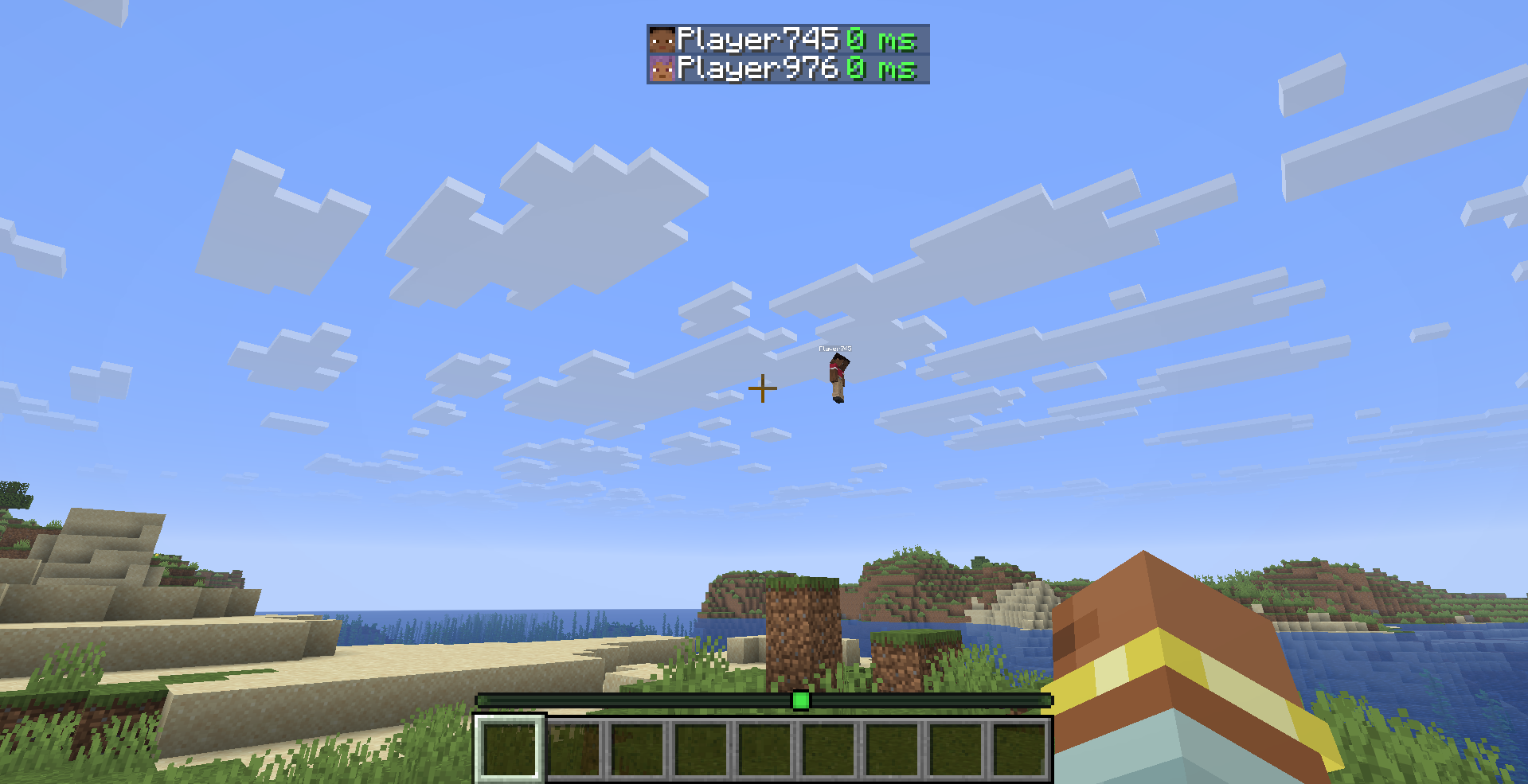
What it does
PingDisplay makes Minecraft’s Tab player list much more useful by showing each player’s real latency as a numerical value.
Choose exactly how you want ping to appear:
- 🔢 Number Only — replaces the vanilla signal bars with values like
42 ms - 📶 Bars + Number — keeps the vanilla connection bars and adds the exact ping
- 🎮 Vanilla Mode — restores the normal Minecraft ping display instantly
Features
- ⚡ Exact numerical ping — see the real latency of every player
- 🎨 5 color-coded ping levels — Excellent, Good, Medium, Bad and Terrible
- 🛠️ Custom thresholds — decide exactly when each ping quality level applies
- 🌈 Custom colors — every ping level can have its own color
- 🔁 3 display modes — Number Only, Bars + Number and Vanilla
- 👁️ Toggle the
mssuffix - ⏻ Enable or disable PingDisplay instantly
- ⚙️ Built-in configuration screen
- 🇬🇧 English localization
- 🇹🇷 Turkish localization
- 🔄 Automatic migration from PingDisplay 1.0.0 configs
- 🪶 Lightweight and client-side only
- 🖥️ No server installation required
Default Ping Levels
| Quality | Ping |
|——–|——:|
| 🟢 Excellent | Below 50 ms |
| 🟩 Good | Below 100 ms |
| 🟡 Medium | Below 150 ms |
| 🟠 Bad | Below 250 ms |
| 🔴 Terrible | 250 ms and above |
All thresholds and colors can be changed from the in-game configuration screen.
Configuration
PingDisplay stores its settings in:
.minecraft/config/pingdisplay.json
When Mod Menu is installed, simply open:
Mods → PingDisplay → Configure
Mod Menu is optional. PingDisplay works perfectly without it.
Supported Versions
- Minecraft 26.1.2 — Fabric
- Minecraft 26.2 — Fabric
Requirements
Optional
- Mod Menu — quick access to the PingDisplay configuration screen
Cloth Config is no longer required.
Client-Side Only
PingDisplay only needs to be installed on your client.
You can use it on multiplayer servers without requiring the server or other players to install the mod.
Upgrading from 1.0.0
Already using PingDisplay 1.0.0?
Your existing configuration is automatically migrated to the new 1.1.0 system. You don’t need to delete your old config.
License
MIT — see LICENSE
常见问题
PingDisplay 支持哪些 Minecraft 版本?
PingDisplay 支持 Minecraft Java 版 26.1–26.2,共 4 个版本,可用的加载器:Fabric / Forge / NeoForge。下载时注意选择和你游戏版本一致的文件。
PingDisplay 怎么安装?
先用 PCL2 或 HMCL 启动器安装对应版本的 Fabric / Forge / NeoForge,再把下载的 .jar 文件放进游戏目录的 mods 文件夹,重新启动游戏即可。开启了版本隔离的,mods 文件夹在 versions/版本名 下面。运行环境:仅客户端。
Cukkoo 的其他作品
查看全部 →
Sound Culling
Dynamically limits and dampens overlapping sounds to reduce audio clutter and improve performance in sound-heavy areas.

Free Camera
A powerful client-side cinematic camera mod with Free, Orbit, Tripod, Follow, recording, paths, roll, zoom, and collision.

Auto Replant Tree
Automatically replants saplings when a player breaks a log block. Supports all vanilla tree types across Fabric, Forge, and NeoForge.

Inventory Trash Can
Adds a simple and clean trash can slot to your inventory to easily delete items.
评论
登录后评论和评分