
Simple Durability HUD
A lightweight Forge 1.20.1 HUD that displays durability for your armor and main hand item. Fully draggable and resizable.
截图
介绍
Here is a professional, high-quality English description for your Modrinth page. It’s designed to look clean, highlight your new features (RGB and Auto-save), and answer all user questions upfront.
🛠️ Simple Durability HUD
Never break your favorite gear by accident again! Simple Durability HUD adds a clear, easy-to-read durability counter to your screen. No more squinting at tiny bars or opening your inventory in the middle of a fight.
✨ Key Features:
🧩 Smart Dynamic Labels: The mod understands what’s in your hand!
“Blocks left” — for Pickaxes, Axes, and Shovels.
“Hits left” — for Swords and Weapons.
“Durability” — for Armor, Bows, and everything else.
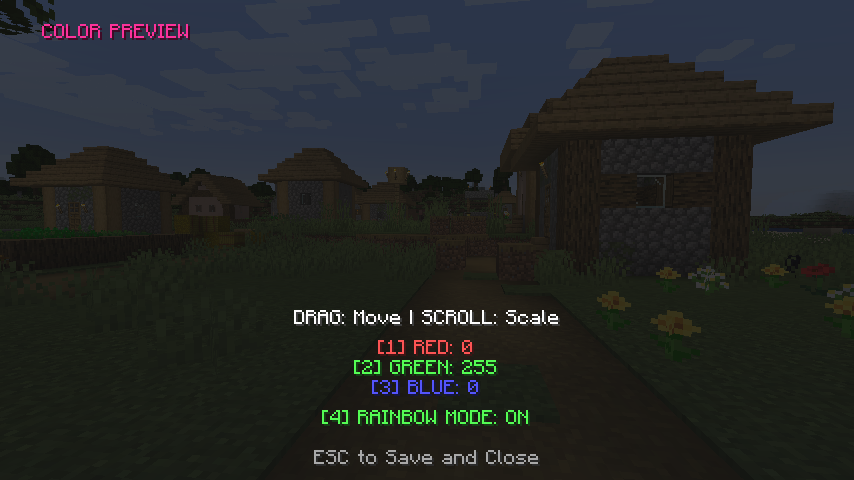
🌈 Chroma & RGB Support: Customize your HUD with any color! Use the RGB keys to find your perfect look or enable the Rainbow Mode for a dynamic, shifting glow.
💾 Persistent Memory: Your settings are no longer temporary. The mod automatically creates a config file to save your position, scale, and colors forever. Set it once, keep it forever!
⚠️ Critical Warning: When an item drops below 10% durability, the text flashes white to make sure you notice before it’s too late!
⚙️ In-Game Customization (No Files Needed!):
Take full control of your interface without ever leaving the game:
Press [ O ] (default key) while in-world to open the editor.
Drag & Drop: Move the text with your mouse to any position on your screen.
Mouse Wheel: Scroll to change the Scale (size) of the HUD.
Keys [ 1, 2, 3 ]: Fine-tune your Red, Green, and Blue levels.
Key [ 4 ]: Toggle the legendary Rainbow Mode.
Press ESC: Your settings (your “Soul”) will be saved automatically!
📦 Technical Requirements:
Version: Minecraft 1.20.1
Loader: Forge
Config File: config/durabilitymod-common.toml
常见问题
Simple Durability HUD 支持哪些 Minecraft 版本?
Simple Durability HUD 支持 Minecraft Java 版 1.20.1–1.20.6,共 6 个版本,可用的加载器:Forge。下载时注意选择和你游戏版本一致的文件。
Simple Durability HUD 怎么安装?
先用 PCL2 或 HMCL 启动器安装对应版本的 Forge,再把下载的 .jar 文件放进游戏目录的 mods 文件夹,重新启动游戏即可。开启了版本隔离的,mods 文件夹在 versions/版本名 下面。运行环境:仅客户端。
StutelYT 的其他作品
查看全部 →
PixelSight
PixelSight is a professional in-game editor for Minecraft 1.20.1 that allows you to draw your own 16x16 pixel crosshair with full RGB color support. By pressing the "Period" key, you can instantly replace the vanilla aiming reticle with your unique cus

RealWorld Sync
brings total realism to your Minecraft experience by connecting the in-game day/night cycle and weather directly to real life
评论
登录后评论和评分