
SimpleChat fork++
A small mod for a customizable chat, with the most simple settings. Integration with LuckPerms and Vanish.
截图
介绍
SimpleChat (fork++) 2.3.0


This fork was created because the main project is no longer maintained.
Log: “This is a fork of the SimpleChat mod by rantuhin and its fork by stanlystark for 1.21″
_A simple chat mod for your server._
Doesn’t work in single player.
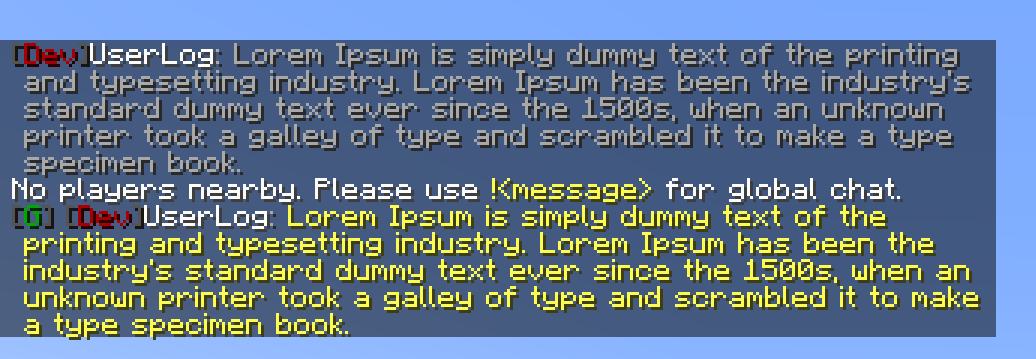
Just use !<message> for global chat or #<message> for world chat!

Features
- LuckPerms integration _(tested 5.4)_
- Vanish integration _(tested 1.5.7)_
- Global, world and local chat (you can turn it off)
- Color chat (you can turn it off)
- Reloading the configuration with the command
- Command to clear chat history
- Command or text that suggests when you click on the player’s name.
Configuration
The configuration is located in <game or server directory>/config/simplechat.json.
| Name | Description | Type |
|-|-|-|
| enable_chat_mod | Enables (true) or disables (false) chat handling by the mod. | boolean |
| enable_global_chat | Enables (true) or disables (false) the global chat. | boolean |
| enable_world_chat | Enables (true) or disables (false) the world chat. | boolean |
| enable_chat_colors | Enables (true) or disables (false) the use of color codes in the chat. | boolean |
| local_chat_format | Defines the appearance of the local chat. | String |
| global_chat_format | Defines the appearance of the global chat. | String |
| no_players_nearby_text | Defines a message for local chat when there are no players nearby. | String |
| no_players_nearby_action_bar | Enables (true) or disables (false) action bar message. | boolean |
| chat_range | Specifies the distance after which local chat messages will not be visible (if global chat is enabled). | int |
| suggests_when_you_click_on_the_player_name | Command or text that suggests when you click on the player’s name. (Support Placeholder API and %player%) | String |
{
  "enable_chat_mod": true,
  "enable_global_chat": true,
  "enable_world_chat": false,
  "enable_chat_colors": false,
  "local_chat_format": "&7%lp_prefix%&r%player%&7:&r &7%message%",
  "global_chat_format": "&8[&2G&8] &7%lp_prefix%&r%player%&7:&r &e%message%",
  "world_chat_format": "&8[&9W&8] &7%lp_prefix%&r%player%&7:&r &e%message%",
  "no_players_nearby_text": "&fNo players nearby. Please use &e!<message> &ffor global chat.",
  "no_players_nearby_action_bar": false,
  "suggests_when_you_click_on_the_player_name": "/msg %player% ",
  "chat_range": 100
}
You can use the placeholder %player% to specify the player’s nickname and the placeholder %message% to specify their message in the chat.
%lp_group%LuckPerms – display player group.%lp_prefix%LuckPerms – display player prefix.%lp_suffix%LuckPerms – display player suffix.
You can reload the configuration without restarting the server or the game using the /simplechat command (requires permission level 1 or more).
Command
/simplechat– reload configuration/simplechat clear– clear history chat (all players)
NO API
I am removing me.vetustus.server.simplechat.api.event.PlayerChatCallback as I didn’t see the need for it, and instead of porting it to 1.21, I am using the standard event net.fabricmc.fabric.api.message.v1.ServerMessageEvents ALLOW_CHAT_MESSAGE.
License
The MIT license is used.
常见问题
SimpleChat fork++ 支持哪些 Minecraft 版本?
SimpleChat fork++ 支持 Minecraft Java 版 1.20–1.21.11,共 19 个版本,可用的加载器:Fabric。下载时注意选择和你游戏版本一致的文件。
SimpleChat fork++ 怎么安装?
先用 PCL2 或 HMCL 启动器安装对应版本的 Fabric,再把下载的 .jar 文件放进游戏目录的 mods 文件夹,重新启动游戏即可。开启了版本隔离的,mods 文件夹在 versions/版本名 下面。运行环境:仅服务端。
UserLog 的其他作品
查看全部 →
BackInv
Creates backup copies of players' inventories before death, which can be loaded using a command.

Create: Red Button
Adds a wireless Redstone button that can be used in the world and linked to Redstone Links.

SScript
Fabric mod that adds a Python/Lua-like scripting language to your Minecraft server. Write game logic with events, built-in functions, HTTP requests and file I/O — no Java required.

FancySprites
Client-side mod for custom animated sprites in GUI and HUD.
评论
登录后评论和评分