SettingsManagerLib
A simple, easy-to-set-up config library using YACL and Mod Menu to create simple or complex config menus
介绍
A simple settings manager library, which implements YACL to easily generate config screens for Mod Menu.
If you would like to use this mod to generate config menus for your own mod, I recommend contacting me, as I may not keep this page updated as the mod updates.
NOTE: This mod does nothing by itself. It is a library for other mods.
Features:
- Easy and quick setup
- Easy implementation
- Easy access to settings
- Built-in config file generation to save settings between client restarts
- Built-in chroma manager to sync chroma features across files
- Supports nearly all YACL fields
Setup:
Add the mod as a dependency:
in build.gradle
repositories {
    maven { url = "https://api.modrinth.com/maven" }
    maven {
        name = "Terraformers"
        url = "https://maven.terraformersmc.com/"}
    maven {
        name 'Xander Maven'
        url 'https://maven.isxander.dev/releases'}
}

dependencies {
    modImplementation("maven.modrinth:settingsmanagerlib:${project.modmenu_version}")
    modImplementation("com.terraformersmc:modmenu:${project.modmenu_version}")
    modImplementation "dev.isxander:yet-another-config-lib:${project.yacl_version}"
}
in gradle.properties
settingsmanagerlib_version=LATEST_VERSION_NUMBER (e.g. 1.0.0+1.21.11)
modmenu_version=LATEST_VERSION_NUMBER (e.g. 15.0.0)
yacl_version=LATEST_VERSION_NUMBER (e.g. 3.7.1+1.21.6-fabric)
in fabric.mod.json
"entrypoints": {
"modmenu": [ "com.example.mod.ModMenuAPI" ]
}
Then create a new class ModMenuAPI
public class ModMenuAPI implements ModMenuApi {
	 @Override
	 public ConfigScreenFactory<?> getModConfigScreenFactory() {
			return parentScreen -> ExampleModClient.settings.getConfig(parentScreen);
	 }
}
Set up the mod:
in ExampleModClient
public static Settings settings;

@Override
public void onInitializeClient() {
	 settings = new Settings().setup("Example Mod", "examplemod");
	 settings.loadFromFile();
}
To add a setting:
Note: supports Strings, Booleans, Integers, Floats, Colors, and custom Enums.
Standard Strings/Integers/Floats
in ExampleModClient
@Override
public void onInitializeClient() {
	 settings.add(String settingId, String page, String group, String/int/float defaultValue, String settingName, String description)

	 settings.add("guiName", "Visual Settings", "Overlay", "Default Gui Name", "Gui Scale", "This text will appear as a tooltip when you click on the option.");
}
Integer/Float Sliders
in ExampleModClient
@Override
public void onInitializeClient() {
	 settings.addSlider(String settingId, String page, String group, int/float defaultValue, String settingName, String description, int/float min, int/float max, int/float step)

	 settings.add("guiScale", "Visual Settings", "Overlay", 1.0f, "Gui Scale", "This text will appear as a tooltip when you click on the option.", 0.5f, 5.0f, 0.1f);
}
Booleans
in ExampleModClient
@Override
public void onInitializeClient() {
	 settings.addSlider(String settingId, String page, String group, boolean defaultValue, String settingName, String description, BooleanFormat valueFormat)

	 settings.add("doRenderGui", "Visual Settings", "Overlay", true, "Render Gui", "This text will appear as a tooltip when you click on the option.", BooleanFormat.ONOFF);
}
BooleanFormat – the displayed value of the boolean:
BooleanFormat.ONOFF– “On” or “Off”BooleanFormat.TRUEFALSE– “True” or “False”BooleanFormat.YESNO– “Yes” or “No”BooleanFormat.TICKBOX– A box that is either checked or unchecked
Colors
in ExampleModClient
@Override
public void onInitializeClient() {
	 settings.addColor(String settingId, String page, String group, int defaultValue, String settingName, String description)

	 settings.addColor("guiBackgroundColor", "Visual Settings", "Overlay", net.minecraft.util.Colors.GRAY, "Gui Background Color", "This text will appear as a tooltip when you click on the option.");
}
Custom Enum
Documentation coming soon. Contact for details
Note that the value of settings automatically persist after restarting the client, however, you still need to add them to the config menu, which can be accomplished by creating the config menu inside onInitializeClient()
Accessing Values:
Getting The Value of a Setting:
To get the value of a setting, use the following where typeInstance is a value with the same type as the value of the setting you are getting. Refer to the examples below for implementations. Note that the second parameter of settings.get() is irrelevant; only its type needs to be the same as the return type.
ExampleModClient.settings.get("settingId", typeInstance);

ExampleModClient.settings.get("doRenderGui", true); //to return a boolean
ExampleModClient.settings.get("guiBackgroundColor", net.minecraft.util.Colors.GRAY); //to return a color
ExampleModClient.settings.get("guiScale", 1.0f); //to return a float
ExampleModClient.settings.get("guiName", "Default Gui Name"); //to return a string
ExampleModClient.settings.get("guiSliderMin", 1); //to return an integer
Setting the Value of a Setting:
By default, the value of a setting is set to its default value, unless the user changes it. To manually set the value of a setting, use the following.
ExampleModClient.settings.set("settingId", newValue);

ExampleModClient.settings.set("doRenderGui", false); //example with a boolean
Pages/Groups:
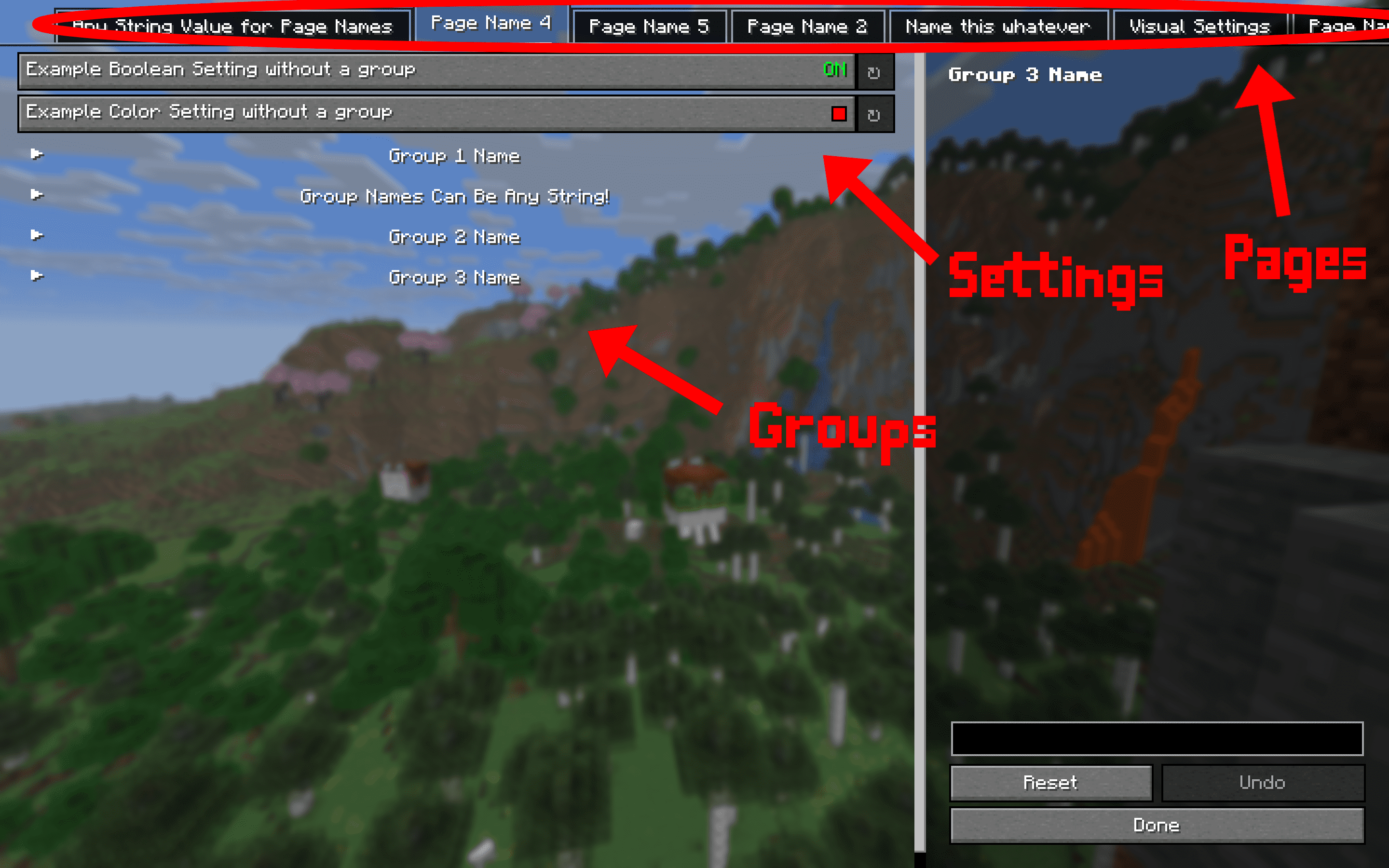
Settings are organized by pages and groups. Refer to the image below for an example. The page is the bar at the top, and you can open one page at a time. A group is a collapsible collection of settings. You can have unlimited groups and unlimited settings on each page. Each setting must have a page, but does not require a group. To create a setting without a group as shown in the image below, set the group to “” or “none”.
Dependencies:
This mod requires multiple other mods in order to function.
- YACL
- Mod Menu
- Fabric API
常见问题
SettingsManagerLib 支持哪些 Minecraft 版本?
SettingsManagerLib 支持 Minecraft Java 版 1.21.3–26.3,共 14 个版本,可用的加载器:Fabric。下载时注意选择和你游戏版本一致的文件。
SettingsManagerLib 怎么安装?
先用 PCL2 或 HMCL 启动器安装对应版本的 Fabric,再把下载的 .jar 文件放进游戏目录的 mods 文件夹,重新启动游戏即可。开启了版本隔离的,mods 文件夹在 versions/版本名 下面。运行环境:仅客户端。
wildbeast42 的其他作品
查看全部 → SettingsManagerLib
A simple, easy-to-set-up config library using YACL and Mod Menu to create simple or complex config menus

Block HightlightFX
A simple visual mod that spices up your game with custom colorful block highlights and outlines!

CrosshairFX
A simple visual mod that spices up your game with custom crosshair colors & shapes!

Unbreakable Leads
Stop leads (leashes) from breaking. No matter your speed or distance from the leashed entity, the lead will never snap.
评论
登录后评论和评分