
Setthings
A setting manager that allows creating "Profiles" - sets of options that can be swapped between to easily change settings
截图
介绍
Setthings
An option manager.
Still in development – many features are planned.
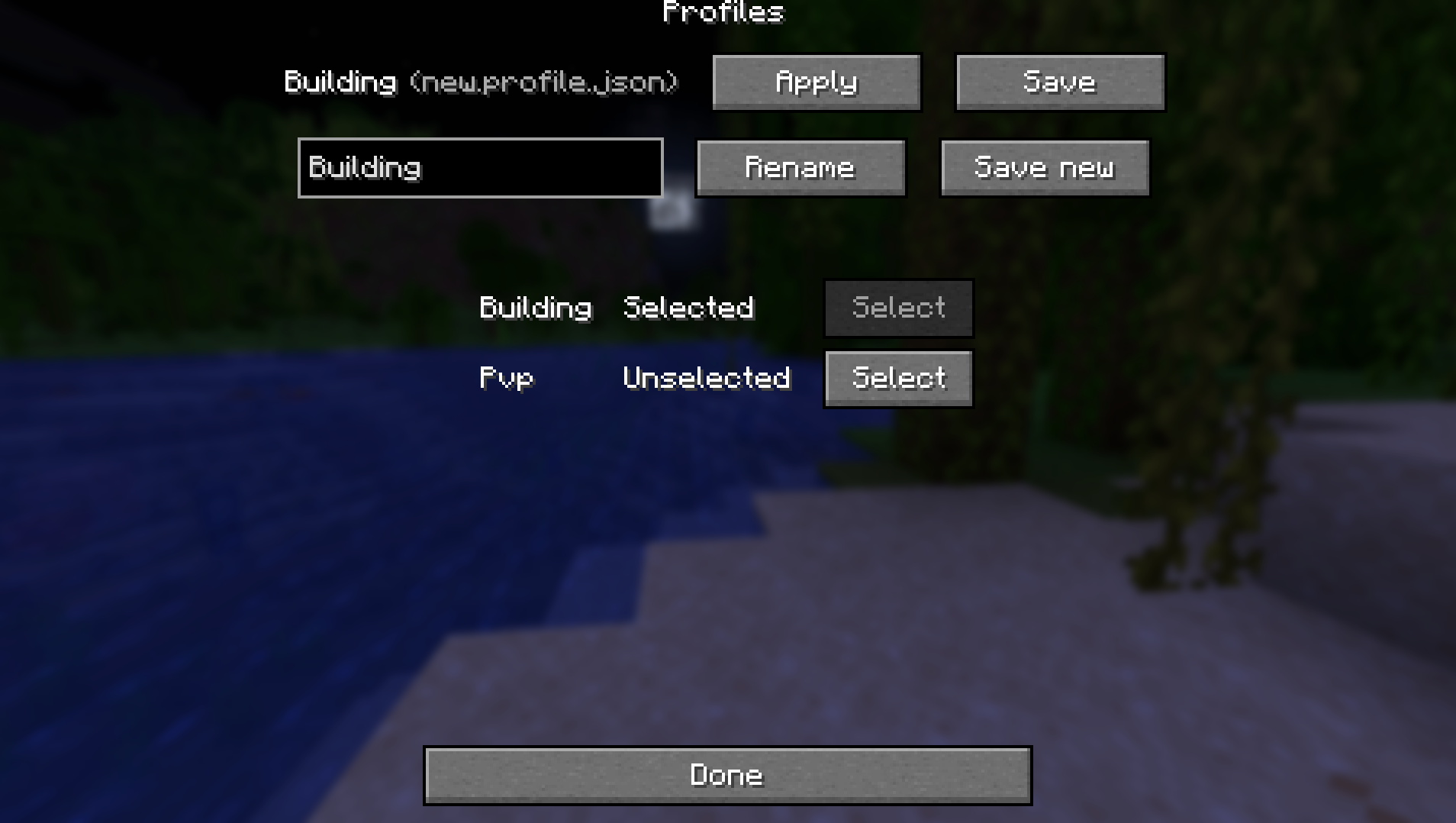
Settings are managed through the normal vanilla menus, and a profile screen lets you save and load profiles with these settings.
Features
- Profiles – save sets of option values
- Extensible – add-ons can add new options that can be saved to profiles
- Options added by extensions are preserved, even when the add-on is removed
Currently supported settings:
- Keybinds (vanilla and modded)
- Fov
- Sound Volumes
- Render and Simulation distance
- Toggle Crouch and Toggle Sprint
- Sensitivity
More will be added as the mod is developed
Usage
A Profiles button is added to the option screen. It opens the profile menu.
Planned
- Sharing Profiles online – in development
- Porting to other versions – planned
Add-ons
To add this mod to your dependencies, add the following to your build.gradle:
repositories {
  maven {
      name "nexusrealmsReleases"
      url "https://maven.riftrealms.de/releases"
  }
}
dependencies {
  modImplementation "de.nexusrealms:setthings:${setthings_version}:${minecraft_version}"
}
Defining settings
A setting is defined by several function
- Its getter
- Its setter
- Its default values – a check whether it is default, and a default value supplier
- Its serializer
- Its deserializer
Static methods of the Setting class let you create Setting definitions from these functions, or by using helper objects like codecs.
Registration
In your client mod initializer, call SettingRegistry.register() with your Identifier and Setting definition.
Join our discord if you have any questions, you can ping me (@Farpo) for help
常见问题
Setthings 支持哪些 Minecraft 版本?
Setthings 支持 Minecraft Java 版 1.21.11,可用的加载器:Fabric。下载时注意选择和你游戏版本一致的文件。
Setthings 怎么安装?
先用 PCL2 或 HMCL 启动器安装对应版本的 Fabric,再把下载的 .jar 文件放进游戏目录的 mods 文件夹,重新启动游戏即可。开启了版本隔离的,mods 文件夹在 versions/版本名 下面。运行环境:仅客户端。
nexusrealms 的其他作品
查看全部 →Rift Realms Utility
A utility mod for the Rift Realms server

Create: Aloft
An engineering-first Modpack built around Create Aeronautics.
Riftname
Style names on servers - Player-set nicknames, prefixes, colors, gradients and more

Era of Rails
A railway expansion mod! Adds new minecart and rail types to make rail travel more efficient and fun
评论
登录后评论和评分