
Pocket Backpack!
A backpack that opens your Pocket Door pocket from anywhere. Press P or right-click, step in, use it again to come back out. Add-on for Pocket Door.
截图
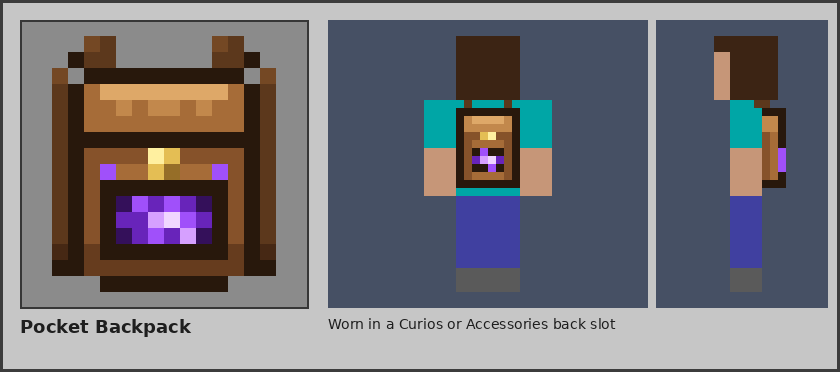
介绍
Your pocket, without the door. The **Pocket Backpack** is one item for Pocket Door players who are tired of carrying
and placing doors: right-click it anywhere and step straight into your pocket; use it again inside and you are back
where you stood. Press **P** and it works from anywhere in your inventory, or from a Curios / Accessories back slot.
**Wear it.** Put it in a Curios or Accessories back slot and it shows on your back, portal and all (1.21.1, 26.2, 1.20.1).
With Curios installed the mod adds the back slot itself, so nothing else is needed to unlock it.
**It plays by Pocket Door’s rules.** If you live in your team’s pocket (`/pocket use team`) or a friend’s, that is where
it takes you. Locked and banned pockets stay shut. Pets, leashed animals and your mount come along. From the Hub or
someone else’s pocket it takes you home.
**Balanced for packs.** Out of the box, entering starts a one-minute cooldown, leaving is free, and it won’t open for ten
seconds after a fight. `pocketbackpack-common.toml` (1.12.2: `pocketbackpack.cfg`) lets you set the cooldown and whether
leaving counts, an opening delay that a hit interrupts, a combat lock, an item each trip burns (ender pearls, anyone?),
dimensions where it never opens, one-way use (in only, or out only), sneak-to-use, and whether the key works at all.
**Recipe:**
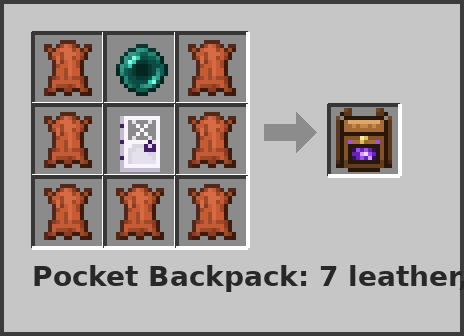
**Requires Pocket Door** 1.10.1+ (Minecraft 1.21.1 and 26.2) or 1.9.1+ (1.20.1 and 1.12.2).
Builds: 1.21.1 NeoForge, 26.2 NeoForge, 1.20.1 Forge, 1.12.2 Forge.
Optional: Curios or Accessories for the back slot (not on 1.12.2).
Found a bug? Say which Minecraft version and Pocket Door version you run.
常见问题
Pocket Backpack! 支持哪些 Minecraft 版本?
Pocket Backpack! 支持 Minecraft Java 版 1.12.2–26.2,共 4 个版本,可用的加载器:Forge / NeoForge。下载时注意选择和你游戏版本一致的文件。
Pocket Backpack! 怎么安装?
先用 PCL2 或 HMCL 启动器安装对应版本的 Forge / NeoForge,再把下载的 .jar 文件放进游戏目录的 mods 文件夹,重新启动游戏即可。开启了版本隔离的,mods 文件夹在 versions/版本名 下面。
ChuckleForge 的其他作品
查看全部 →
Pocket Door
创建你自己的口袋维度!非常简单!
Atomic Sky
A nuke that changes the weather. Built on ProtoManly's Weather: flash and heat, a crater and dead zone, wildfires, a shockwave on the wind, drifting fallout with radiation sickness, a radiation suit and a nuclear winter.
Pocket Themes!
Give your Pocket Door pocket the sky, weather and landscape of the Nether, the End, the deep sea, a storm or a snowfall. Add-on for Pocket Door.
Pocket Market!
Rent your Pocket Door pocket out to other players for in-game money. Server add-on for Pocket Door.
评论
登录后评论和评分