
Player Location Share
See your friends live, anywhere on the server. Client-side, encrypted, no server mod needed.
截图

介绍

Player Link
Player Link lets you and a friend share your live locations with each other, as long as you both have the mod. You send a link request, they accept, and from then on you can each see exactly where the other one is. No more pinging coords back and forth in chat.
It’s completely client-side. There’s nothing to install on the server, no plugin, no permissions to beg an admin for. If the two of you can /msg each other, it works.
How it works
- Run
/plink request <player>. They get a little clickable [Accept] in chat. - Once they accept, you’re linked. Done.
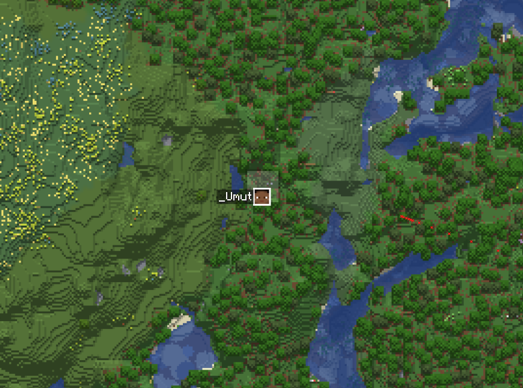
- You’ll see each other as a player head on Xaero’s Minimap and World Map (if you use Xaero), plus a small on-screen tracker with their name, how far away they are, and an arrow pointing the way.
- Links are saved, so relogging or restarting doesn’t break anything. You only set it up once.
Your positions ride along the server’s normal private-message system, and the mod hides those messages so your chat stays clean.
Your coords stay yours
Coordinates are encrypted end-to-end. When you link up, both clients quietly agree on a secret key (X25519) that never actually gets sent across chat, and every position is sealed with it (AES-256). Anyone snooping just sees a blob of nonsense.
Commands
/plink request <player>– ask someone to link/plink accept/deny <player>– answer a request/plink unlink <player>/unlinkall– stop sharing/plink list– see your links and where they are/plink config– settings menu (also available through Mod Menu)
Good to know
- Both of you need the mod installed.
- You have to be on the same server to see each other live.
- If your server’s whisper command isn’t
/msg, just set it once:/plink set whisperCommand w(ortell,pm, whatever yours uses).
It’s vibecoded btw
常见问题
Player Location Share 支持哪些 Minecraft 版本?
Player Location Share 支持 Minecraft Java 版 1.21.11,可用的加载器:Fabric。下载时注意选择和你游戏版本一致的文件。
Player Location Share 怎么安装?
先用 PCL2 或 HMCL 启动器安装对应版本的 Fabric,再把下载的 .jar 文件放进游戏目录的 mods 文件夹,重新启动游戏即可。开启了版本隔离的,mods 文件夹在 versions/版本名 下面。运行环境:仅客户端。
_Umut 的其他作品
查看全部 →
Auto Hotbar
Configure your hotbar automatically

Chat Waypoint
Automatically turns coordinates in chat into clickable links that instantly create a Xaero's Minimap waypoint. Highly customizable!

Auto Hotbar (Fair Play)
Same rule system as AutoHotbar but never moves items for you. Open your inventory and matching items show the hotbar key you should press. Safe on anticheat servers.
Party Inviter (mcpvp.club)
A customisable party inviter for mcpvp.club (and other servers :))
评论
登录后评论和评分