Party Inviter (mcpvp.club)
A customisable party inviter for mcpvp.club (and other servers :))
截图
介绍
MCPVP Party Inviter
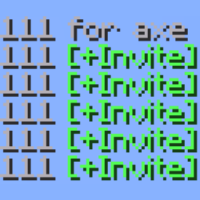
Host a party by typing a number — everyone who replies with it becomes one click to invite.
Type 222 for axe, and the next players who type 222 in chat get a clickable [+Invite] on their message. Click it (or let it auto-invite) and they’re in. No more squinting at chat and re-typing names.
How it works
- You host — send a message with a number and
for(e.g.222 for axe). - Joiners light up — anyone who then types
222gets their message highlighted with a clickable [+Invite]. - One click invites them — runs your invite command (
/p invite {player}by default). - Someone else claims it? If another player posts the same number with
for, your party hands off and your invites stop.
Features
- One-click invites — joiner messages become clickable; the whole line or a tidy
[+Invite]button. - Auto-invite mode — skip the click entirely. The first joiner is invited instantly, the rest are queued and released one per interval (default 700 ms) so you don’t get muted for spam.
- Hand-off detection — if another host claims your number, your invites switch off automatically.
- Smart auto-stop — the party ends when you enter a match or switch sub-servers.
- Anti-spam aware — if the server blocks your host message (“sending too quickly”, “too similar”), the party simply never starts.
- Fully configurable — color, underline, invite command, keywords, sounds, and more.
Config
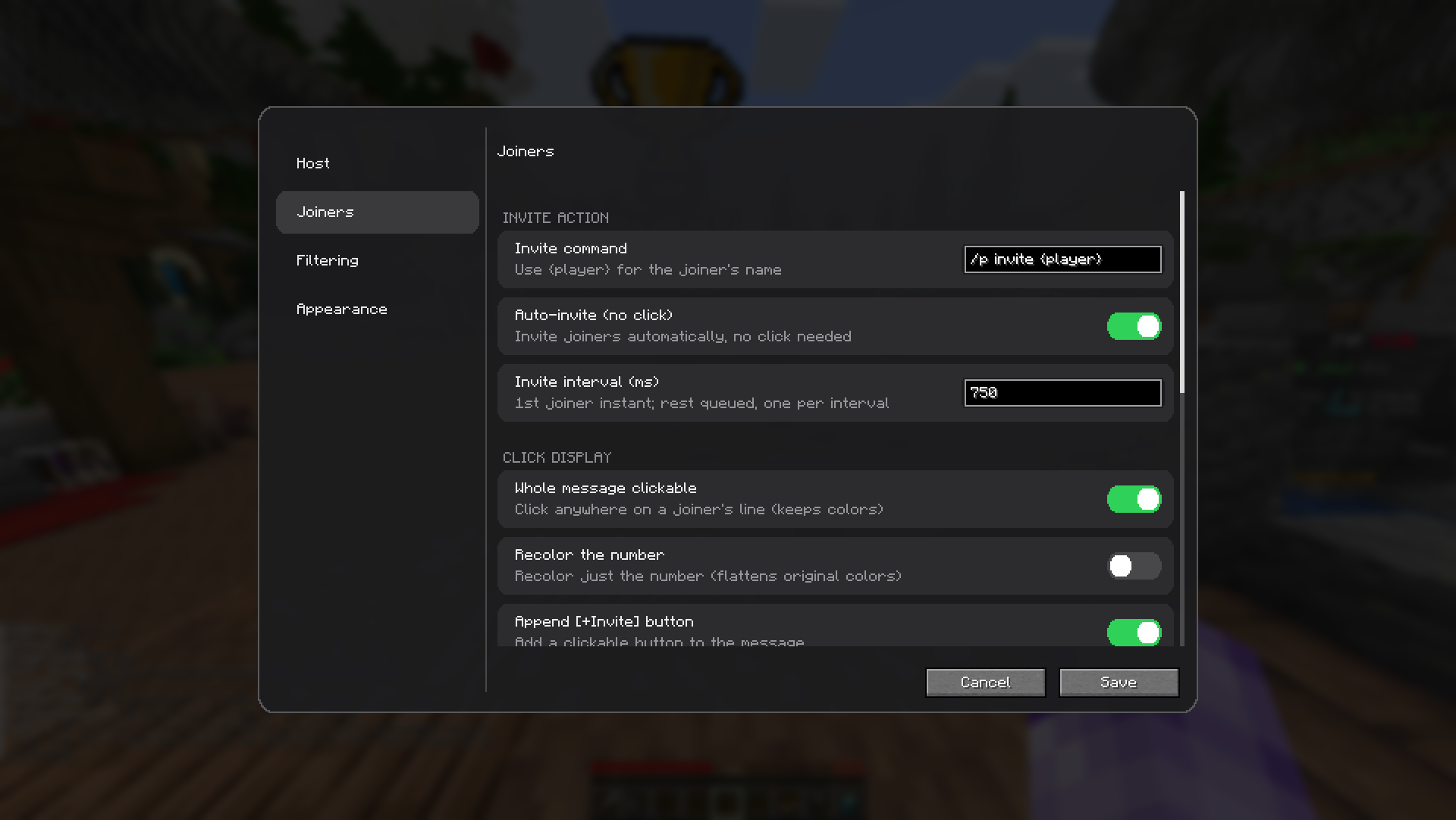
Open it from Mod Menu → MCPVP Party Inviter, or with /pinv config. Every option is also settable via command and saved to config/partyinviter.json.
| Setting | Default | What it does |
|—|—|—|
| inviteCommand | /p invite {player} | Command run on invite ({player} = name) |
| autoInvite | false | Invite automatically, no click |
| autoInviteCooldownMs | 700 | Spacing between queued invites |
| requireForToHost | true | Only host when your message has for |
| stopPartyOnServerChange | true | End the party when you enter a match |
| cancelPartyOnDeniedMessage | true | Don’t start if the server blocks your message |
Commands
| Command | Description |
|—|—|
| /pinv status | Show current party and settings |
| /pinv host <number> | Start hosting a number manually |
| /pinv clear | Stop hosting |
| /pinv set <key> <value> | Change a setting |
| /pinv config | Open the config GUI |
| /pinv test <text> | Preview how a chat line is parsed |
it’s vibe coded btw
常见问题
Party Inviter (mcpvp.club) 支持哪些 Minecraft 版本?
Party Inviter (mcpvp.club) 支持 Minecraft Java 版 1.21.2–26.2,共 14 个版本,可用的加载器:Fabric。下载时注意选择和你游戏版本一致的文件。
Party Inviter (mcpvp.club) 怎么安装?
先用 PCL2 或 HMCL 启动器安装对应版本的 Fabric,再把下载的 .jar 文件放进游戏目录的 mods 文件夹,重新启动游戏即可。开启了版本隔离的,mods 文件夹在 versions/版本名 下面。运行环境:仅客户端。
_Umut 的其他作品
查看全部 →
Auto Hotbar
Configure your hotbar automatically

Chat Waypoint
Automatically turns coordinates in chat into clickable links that instantly create a Xaero's Minimap waypoint. Highly customizable!

Auto Hotbar (Fair Play)
Same rule system as AutoHotbar but never moves items for you. Open your inventory and matching items show the hotbar key you should press. Safe on anticheat servers.

Player Location Share
See your friends live, anywhere on the server. Client-side, encrypted, no server mod needed.
评论
登录后评论和评分