
Player Finder
A Minecraft Mod for Fabric 1.21 that allows users to find the co-ordinates of other players on your server using a command
截图

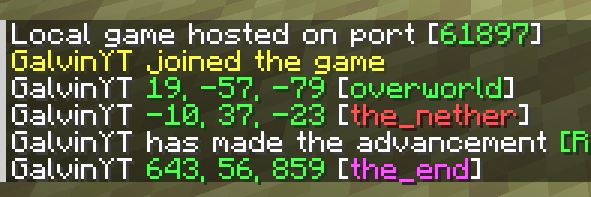
介绍
Player Finder
Player Finder is a Minecraft Mod for Fabric 1.21 that allows users to find the co-ordinates of other players on your server
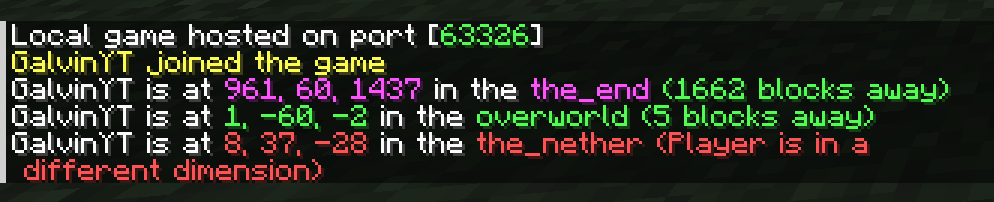
Note: The “the” in the dimensions have been removed since this screenshot was taken
Usage
Use the /findplayer command and enter the player’s name. There is also a dropdown of players, so you don’t have to type it in full and can use autocomplete!

Compatible Versions
AutoTorcher is available for Minecraft versions 1.20 and above!
Due to the frequency of Minecraft updates now, each Minecraft version has its own .jar file from 1.21.9 and above. This is mainly to prevent crashes from each drop.
Please also keep your loader and Fabric API up to date to ensure the best compatibility!
Important Note
This mod is a server-side mod! You are not required to install this mod on the client-side, unless you are using the “Open to LAN” feature to create a server on your world.
Also: This mod requires the Fabric API and Fabric Loader 0.16.0 or higher to be installed.
PS: You cannot use this mod on servers that don’t use this mod. The commands are created server-side
Changelog
1.0.4 (1.21.11)
- For 1.21.11 compatibility
- Updated dependencies
1.0.3 (1.21.10)
- For 1.21.10 compatibility
- Updated dependencies
1.0.2 (1.21.9)
- For 1.21.9 compatibility
- Updated dependencies (this is really important!)
1.0.1
- Added colours to the co-ordinates depending on the dimension
- Updated dimensions to remove “the” in the name
- Added the distance in blocks to the player
- Updated links in the mod metadata
常见问题
Player Finder 支持哪些 Minecraft 版本?
Player Finder 支持 Minecraft Java 版 1.20–26.1.2,共 22 个版本,可用的加载器:Fabric / Quilt。下载时注意选择和你游戏版本一致的文件。
Player Finder 怎么安装?
先用 PCL2 或 HMCL 启动器安装对应版本的 Fabric / Quilt,再把下载的 .jar 文件放进游戏目录的 mods 文件夹,重新启动游戏即可。开启了版本隔离的,mods 文件夹在 versions/版本名 下面。运行环境:仅服务端。
GalvinPython 的其他作品
查看全部 →
Server Day Counter
Server Day Counter is a mod (designed for servers) to broadcast and show the day of the world, just like you can in singleplayer!

Force Port
A mod that forces the port to always be the same when using the "Open To LAN" feature!

No Elytras
Bans Elytras from everyone's inventory!

Auto LAN
Opens up a world to LAN automatically - cut the manual work!
评论
登录后评论和评分