
Player Spotlight
Shows the names of the players when you are in observer mode or in creative mode
截图

介绍
ENG:
The Player SpotLight mod for Minecraft, which allows you to see the names of players who are invisible, provided you are in creative or observer mode, is an extremely useful tool for various game situations.
Firstly, this mod will prove indispensable for administrators and moderators of servers. In large multiplayer worlds there are often situations that require the intervention of the administration: for example, suspicions of foul play, rule violations or conflicts between players. The ability to see invisible players greatly simplifies the moderation process, allowing administrators to quickly and efficiently identify violators, monitor their actions and take the necessary measures to maintain order on the server.
Secondly, the mod can be useful for content creators and builders. In creative mode, builders often work on large projects where it is important to control the actions of the entire team. The ability to see where your colleagues are, even if they use invisibility potions to work, will help to better coordinate efforts, avoid accidental collisions and distribute tasks more efficiently. This is especially relevant in case of large-scale construction events or when preparing for video shootings.
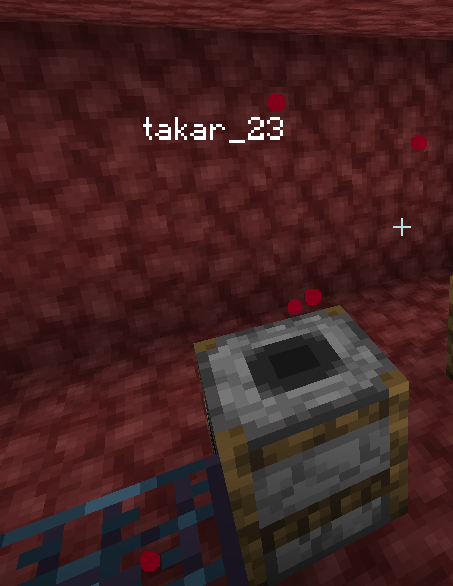
In addition, this mod can be useful in the process of training and coaching. Teachers and mentors in Minecraft can use it to observe students, even if they decide to remain invisible. This will allow a more accurate assessment of each player’s progress, give timely advice and correct mistakes on the spot, providing a better educational process.
Thus, the mod that allows you to see the names of invisible players in creative or observer mode significantly expands the possibilities of management and coordination in Minecraft, making the game more convenient and manageable for all participants.
RU:
Мод для Minecraft Player SpotLight, который позволяет видеть имена игроков, находящихся в невидимости, при условии, что вы находитесь в креативном режиме или режиме наблюдателя, является чрезвычайно полезным инструментом для различных игровых ситуаций.
Во-первых, этот мод окажется незаменимым для администраторов и модераторов серверов. В крупных многопользовательских мирах часто возникают ситуации, требующие вмешательства администрации: например, подозрения в нечестной игре, нарушении правил или конфликты между игроками. Возможность видеть невидимых игроков значительно упрощает процесс модерации, позволяя администраторам быстро и эффективно выявлять нарушителей, следить за их действиями и принимать необходимые меры для поддержания порядка на сервере.
Во-вторых, мод может быть полезен для создателей контента и строителей. В режиме креатива строители часто работают над крупными проектами, где важно контролировать действия всей команды. Возможность видеть, где находятся ваши коллеги, даже если они используют зелья невидимости для работы, поможет лучше координировать усилия, избегать случайных столкновений и более эффективно распределять задачи. Это особенно актуально в случае масштабных строительных мероприятий или при подготовке к съёмкам видео.
Кроме того, данный мод может пригодиться в процессе обучения и тренировки. Учителя и наставники в Minecraft могут использовать его для того, чтобы наблюдать за учениками, даже если те решают остаться невидимыми. Это позволит более точно оценивать прогресс каждого игрока, давать своевременные советы и корректировать ошибки на месте, обеспечивая более качественный образовательный процесс.
Таким образом, мод, позволяющий видеть имена невидимых игроков в креативе или режиме наблюдателя, существенно расширяет возможности управления и координации в Minecraft, делая игру более удобной и управляемой для всех участников.
常见问题
Player Spotlight 支持哪些 Minecraft 版本?
Player Spotlight 支持 Minecraft Java 版 1.16.5–1.20.1,共 3 个版本,可用的加载器:Fabric。下载时注意选择和你游戏版本一致的文件。
Player Spotlight 怎么安装?
先用 PCL2 或 HMCL 启动器安装对应版本的 Fabric,再把下载的 .jar 文件放进游戏目录的 mods 文件夹,重新启动游戏即可。开启了版本隔离的,mods 文件夹在 versions/版本名 下面。运行环境:仅客户端。
z1mg1 的其他作品
查看全部 →
Health Indicator New Vision
Health Indicator New Vision - mod for display player health in nametag

pvpcomfy
Middle Click Pearl Legit/Non Cheat Version

Little Utility
Little Utility is a small client-side Fabric mod with practical quality-of-life tools for everyday Minecraft play.

AutoScreenShot
Make a screenshots if u push a command like a kick,ban,mute,freeze
评论
登录后评论和评分