
截图
介绍
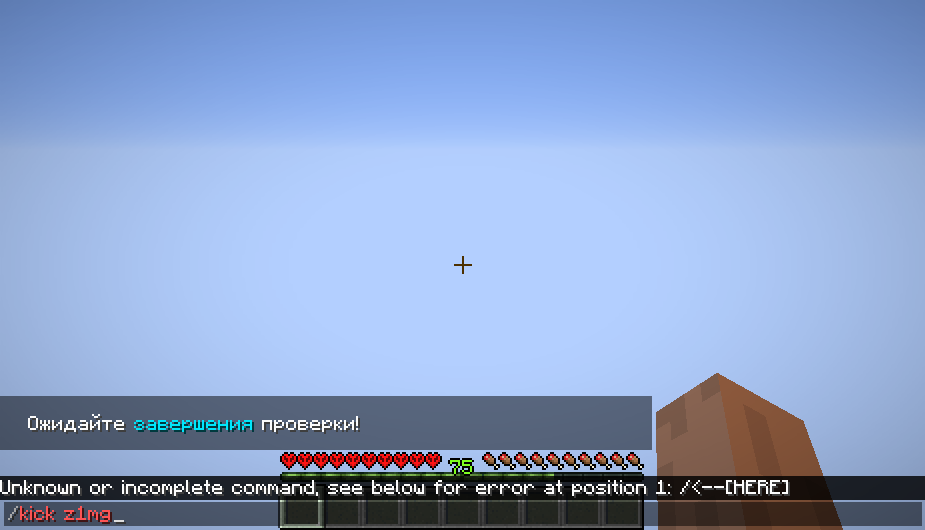
Enhance your Minecraft moderation experience with the Screenshot Organizer Mod! This powerful tool automatically captures and organizes screenshots when you use important moderation commands, ensuring you have a visual record of every action.
Key Features:
Automatic Screenshots: Captures images when you use /mute, /ban, /freeze, or /kick commands.
Server-Specific Organization: Automatically sorts screenshots into folders named after the server’s IP address.
High-Quality PNG Format: All screenshots are saved in crystal-clear PNG format for the best image quality.
Timestamped Filenames: Each screenshot is named with the exact date and time it was taken.
Whether you’re a server admin, moderator, or just want to keep track of your actions, the Screenshot Organizer Mod is your perfect companion. Never lose an important moment again!
Note: This mod is designed for Forge and requires the Forge mod loader to function.
常见问题
AutoScreenShot 支持哪些 Minecraft 版本?
AutoScreenShot 支持 Minecraft Java 版 1.16.5,可用的加载器:Forge。下载时注意选择和你游戏版本一致的文件。
AutoScreenShot 怎么安装?
先用 PCL2 或 HMCL 启动器安装对应版本的 Forge,再把下载的 .jar 文件放进游戏目录的 mods 文件夹,重新启动游戏即可。开启了版本隔离的,mods 文件夹在 versions/版本名 下面。运行环境:仅客户端。
z1mg1 的其他作品
查看全部 →
Player Spotlight
Shows the names of the players when you are in observer mode or in creative mode

Health Indicator New Vision
Health Indicator New Vision - mod for display player health in nametag

pvpcomfy
Middle Click Pearl Legit/Non Cheat Version

Little Utility
Little Utility is a small client-side Fabric mod with practical quality-of-life tools for everyday Minecraft play.
评论
登录后评论和评分