
介绍
Not compatible with the latest version (3.0.0+)
If there any issues in that version I recommend creating an issue report on their GitHub
When EMI and Obscure Tooltips are installed it will turn this:
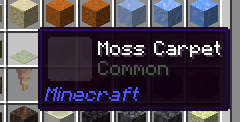
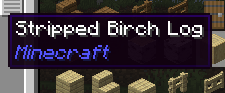
Into this:
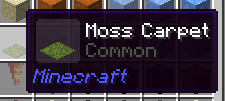
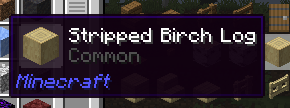
It also fixes:
- A similar issue is also fixed when just JEI is present
- A similar issue is also fixed when REI is present
- An issue with Apotheosis containers (and the anvil menu when it is present)
- Some issues with FTB Quests (+ client config to not render the side panels when viewing quests)
NBT filters are now properly supported – example:
(This file is located in /assets/obscure_tooltips/tooltips/styles/*.json)
{
  "priority": 1500,
  "panel": "obscure_tooltips:golden",
  "frame": "obscure_tooltips:bones",
  "icon": "obscure_tooltips:epic",
  "effects": [
    "obscure_tooltips:enchantment",
    "obscure_tooltips:ender"
  ],
  "filter": {
    "tag": {
      "affix_data": {
        "rarity": "apotheosis:mythic"
      }
    }
  }
}
Proper support for item tags:
(Since with items you define single items)
{
  "priority": 1500,
  "panel": "obscure_tooltips:golden",
  "frame": "obscure_tooltips:bones",
  "icon": "obscure_tooltips:epic",
  "effects": [
    "obscure_tooltips:enchantment",
    "obscure_tooltips:ender"
  ],
  "filter": {
    "item_tags": ["minecraft:pickaxes"]
  }
}
常见问题
Obscure Tooltips Fix 支持哪些 Minecraft 版本?
Obscure Tooltips Fix 支持 Minecraft Java 版 1.20–1.20.1,共 2 个版本,可用的加载器:Forge / NeoForge。下载时注意选择和你游戏版本一致的文件。
Obscure Tooltips Fix 怎么安装?
先用 PCL2 或 HMCL 启动器安装对应版本的 Forge / NeoForge,再把下载的 .jar 文件放进游戏目录的 mods 文件夹,重新启动游戏即可。开启了版本隔离的,mods 文件夹在 versions/版本名 下面。
Cadentem 的其他作品
查看全部 →
Pufferfish’s Unofficial Additions
Additional experience sources and rewards

Additional Attributes
Adds additional attributes to the game
Quality Food
This mod adds quality to food and certain food-related material (e.g. crops)

Cave Dweller Evolved
Fork of the Cave Dweller mod with additional changes
评论
登录后评论和评分