截图
介绍
if this doesn’t get updated here check on
https://modrinth.com/mod/norender
NoRender
NoRender is a lightweight, optimization mod for Minecraft designed to give you control over what your game client renders. By disabling overlays, unnecessary entities and particles, which can significantly boost fps.
Key Features
* GUI: You can set a bind in the settings for the gui
* Entity : Hide dropped items, item frames, and armor stands
* Particle Control: You will be able to turn off particles including explosions, campfire smoke, block breaks, totem particles and animations which can help in pvp.
* Overlays: Remove annoying screen effects like fire, pumpkin blurs, portal shifts, and the “nausea” tilt.
Configuration Categories
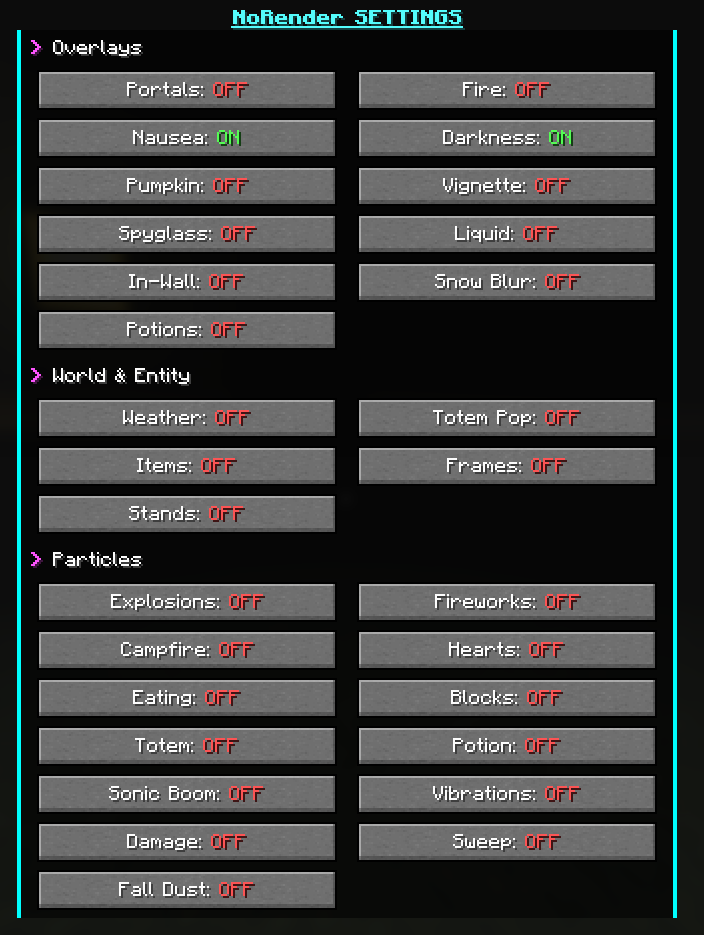
* Overlays: Portals, Fire, Nausea, Darkness, Pumpkin, Vignette, Spyglass, Liquid, In-Wall, and HUD Potion Icons.
* World & Entities: Weather, Totem Pop animations, Dropped Items, Item Frames, and Armor Stands.
* Particles: Explosions, Fireworks, Campfire Smoke, Hearts, Eating, Blocks, Totems, Potions, Sonic Booms, Vibrations, and more.
常见问题
NoRenderPlus 支持哪些 Minecraft 版本?
NoRenderPlus 支持 Minecraft Java 版 1.21.11,可用的加载器:Fabric / Quilt。下载时注意选择和你游戏版本一致的文件。
NoRenderPlus 怎么安装?
先用 PCL2 或 HMCL 启动器安装对应版本的 Fabric / Quilt,再把下载的 .jar 文件放进游戏目录的 mods 文件夹,重新启动游戏即可。开启了版本隔离的,mods 文件夹在 versions/版本名 下面。
CIOCOLATA47 的其他作品
查看全部 →
AntiAfk
防挂机模组,防止玩家在 Minecraft 中进入挂机状态。

AutoWalk
让你可以朝任意方向行走的模组。

NoRender+
允许停止渲染粒子、覆盖层、世界和实体,有助于 PvP 和提升帧率。

Player Health Indicator Plus
A mod that displays player health, armor, and equipment information.
评论
登录后评论和评分