
NoRender+
Allows you to stop rendering particles,overlays,world and entity good for pvp and fps
截图
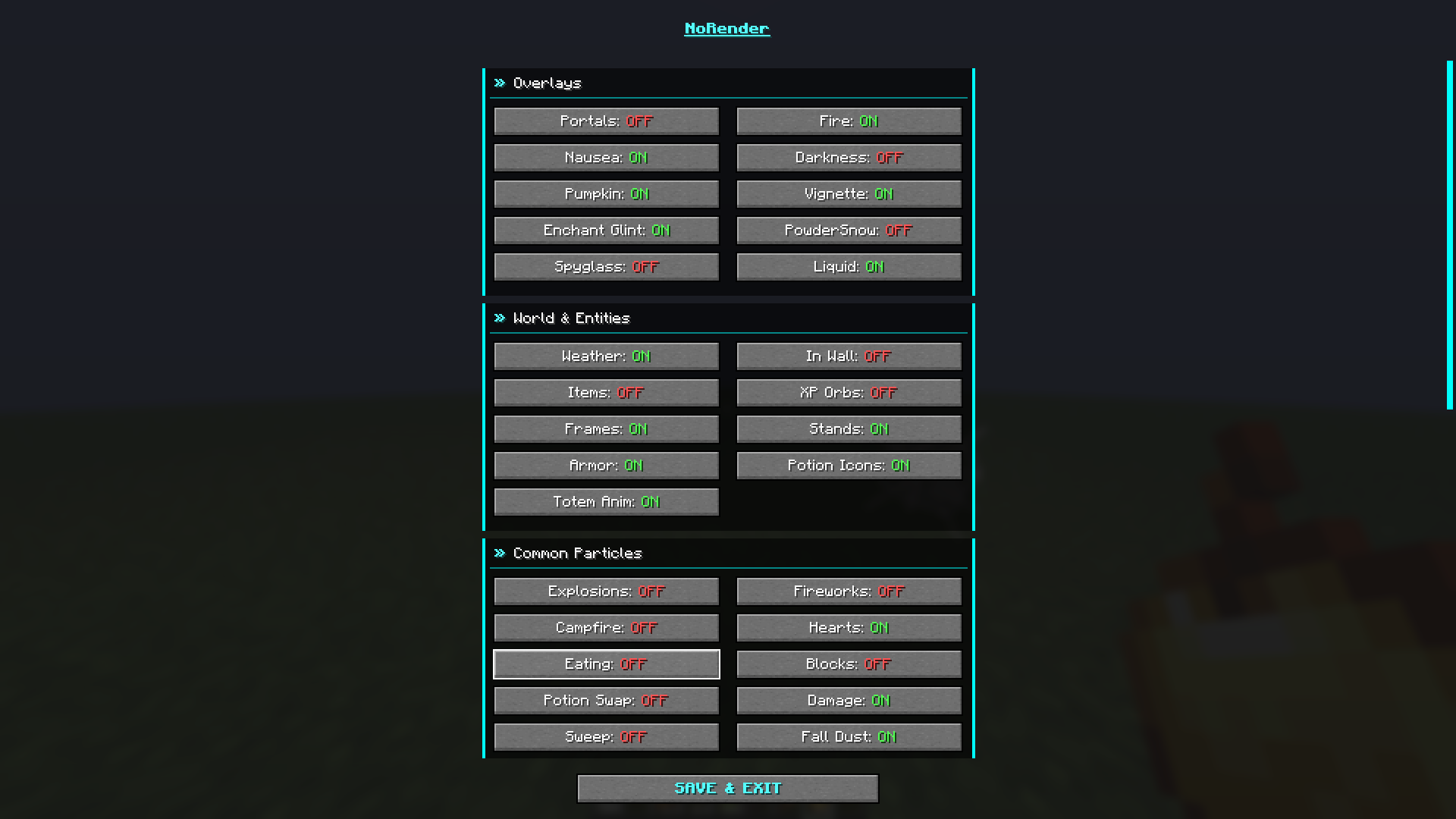
介绍
☕ Support My Work
If you would like to support me and my projects, feel free to buy me a coffee!


NoRender
NoRender is a lightweight optimization mod for Minecraft that gives you full control over what your client renders. By disabling overlays, unnecessary entities, and particles, it can significantly improve FPS and reduce visual clutter.
Key Features
- GUI: Set a keybind to open the configuration GUI.
- Entity Control: Hide dropped items, item frames, armor stands, experience orbs, and more.
- Particle Control: Disable particles including explosions, campfire smoke, block breaks, totem particles, and others usefull for PvP and performance.
- Overlay Removal: Remove screen effects like fire, pumpkin blur, portal shifts, nausea tilt, darkness, and vignette.
Configuration Categories
- Overlays: portal, fire, nausea, darkness, pumpkin, vignette, spyglass, liquid, in-wall overlays, and HUD potion icons.
- World & Entities: Disable weather, totem pop animations, dropped items, item frames, armor stands, and other environmental effects.
- Particles:explosions, fireworks, campfire smoke, hearts, eating, block breaks, totems, potions, sonic booms, vibrations, sculk effects, and more.
常见问题
NoRender+ 支持哪些 Minecraft 版本?
NoRender+ 支持 Minecraft Java 版 1.21.11–26.3,共 6 个版本,可用的加载器:Fabric / Quilt。下载时注意选择和你游戏版本一致的文件。
NoRender+ 怎么安装?
先用 PCL2 或 HMCL 启动器安装对应版本的 Fabric / Quilt,再把下载的 .jar 文件放进游戏目录的 mods 文件夹,重新启动游戏即可。开启了版本隔离的,mods 文件夹在 versions/版本名 下面。运行环境:仅客户端。
CIOCOLATA47 的其他作品
查看全部 →
AntiAfk
Anti-AFK mod that stops players from going idle in Minecraft.

AutoWalk
A mod that makes you walk in all directions

Player Health Indicator Plus
A mod that displays player health, armor, and equipment information.

Proxy Server Updated
Fiw's mod that allows you to connect to servers through a proxy but updated
评论
登录后评论和评分