
截图
介绍
中文介绍正在准备中,下面暂时显示原文。
AutoTorch is a simple yet effective Minecraft mod that ensures you’ll never be left in the dark again!
Features:
- Automatic Torch Placement: When your surroundings get too dark (based on a configurable light level), the mod will automatically place a torch to illuminate the area.
- Customizable Configurations:
- Set the minimum light level at which torches are placed.
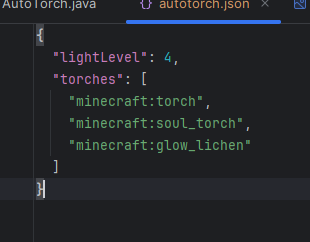
- Add support for custom torches from mods (e.g., soul torches, modded torches, etc.) by editing the config file.
- Toggle On/Off: Enable or disable the auto-placing functionality with a convenient keybind (default:
Y).
Perfect For:
- Cave explorers who want to focus on mining instead of lighting.
- Builders working in dark areas.
- Players who use modpacks with additional torches and want them to work seamlessly.
Custom LightBlock Support:
With the configuration file, you can easily add your favorite modded torches or another light block, making it compatible with most modpacks.
Stay safe, stay bright, and let AutoTorch handle the lighting for you!
常见问题
MT AutoTorch 支持哪些 Minecraft 版本?
MT AutoTorch 支持 Minecraft Java 版 1.21.4,可用的加载器:Fabric。下载时注意选择和你游戏版本一致的文件。
MT AutoTorch 怎么安装?
先用 PCL2 或 HMCL 启动器安装对应版本的 Fabric,再把下载的 .jar 文件放进游戏目录的 mods 文件夹,重新启动游戏即可。开启了版本隔离的,mods 文件夹在 versions/版本名 下面。运行环境:仅客户端。
MEGATREX4 的其他作品
查看全部 →
MT Created Applied Energistics
by MEGATREX4
将 AE2 方块和物品改成机械动力风格
23.7万
3 年前
Modrinth · CurseForge

MT Random Block Placement
by MEGATREX4
Simple placement of random blocks from hotbar
13.4万
2 天前
Modrinth

MT Random Block Placement
by MEGATREX4
Simple placement of random blocks from hotbar
2.1万
2 天前
CurseForge

MT Inventory Weight
by MEGATREX4, pyrod3v
Weight mechanics! Manage your load, balance inventory, and enhance survival or RPG-like gameplay.
1.9万
4 个月前
Modrinth
评论
登录后评论和评分