
截图


介绍
zh_cn:
该模组添加了一个领地方块,放置后可以在世界中建立一个领地。
权限默认关闭破坏和放置。
可以使用默认快捷键【右Alt】键进行搬家。
搬家冷却时间为10分钟。
添加的指令:
/house 传送回自己的领地
/house tp 传送到开启传送权限的领地
/house add 添加玩家为该领地的权限者
/house remove 移除玩家为该领地的权限者
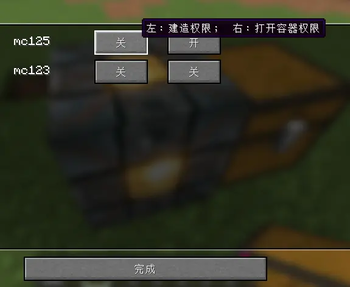
使用指令添加玩家后,右键领地方块进行权限配置
en_us:
This mod adds a house block, which can be placed to create a territory in the world.
Permission defaults to disabling break and placement.
You can use the default shortcut key 【Right Alt】 to move your house.
The cooling time for moving is 10 minutes.
Commands:
/house [teleport to your house ]
/house tp Teleport to other territory
/house add [add player to the Permission list of house]
/house remove [remove player to the Permission list of house]
First,use the command to add player, then click the house_block to change settings.
常见问题
MoveYourHouse 支持哪些 Minecraft 版本?
MoveYourHouse 支持 Minecraft Java 版 26.2–26.3,共 2 个版本,可用的加载器:Fabric / NeoForge。下载时注意选择和你游戏版本一致的文件。
MoveYourHouse 怎么安装?
先用 PCL2 或 HMCL 启动器安装对应版本的 Fabric / NeoForge,再把下载的 .jar 文件放进游戏目录的 mods 文件夹,重新启动游戏即可。开启了版本隔离的,mods 文件夹在 versions/版本名 下面。运行环境:客户端和服务端都要装。
ChongYu668 的其他作品
查看全部 →
DangerousWorld(危险世界求生)
Difficult and fun to survive, come to a dangerous world(危险世界求生)

Magic Moon
Just a blood moon
No Recipe Book
No Recipe Book .

SimplePrivateChest
A simple mod that can create private chest
评论
登录后评论和评分