
截图


介绍
🌐 Language / 语言选择
English(expand/collapse)
If the light and shadow effect is turned on, the special moon color-changing effect will not be displayed.
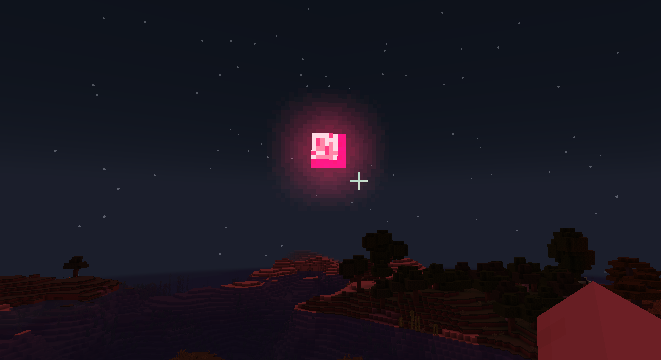
Added 4 types of moons:
Blood Month: Thunderstorm weather during the day and a large number of monsters at night.
Magic Moon:Thunderstorm weather during the day ,and spawns hell monsters, predators, etc. at night
Yellow moon: There is a double chance of harvesting crops at night.
Blue moon: At night, the ground hardly brushes monsters.
Commands: day(/time setDay ),night(/time setDayNight )
Time command:
/time setDay ,
/time setDaySleeping ,
/time setDayNight , etc
Configure the file at the path: .minecraft\versions\saveWorld\config\magicmoon.json
{
  "magic_moon": {
    "custom_model": {
      "desc1:": "大于等于4; startDay greater than or equal to 4 ",
      "startDay": 4,
      "desc2:": "大于等于2;perDay greater than or equal to 2 ",
      "perDay": 2
    }
  }
}
中文(展开/收起)
如果开了光影,则不显示特殊月亮变色效果.
添加了4种月亮:
血月:白天雷暴天气,晚上大量怪物。
幻月:白天雷暴天气,晚上生成地狱怪物、掠夺者等
黄月:晚上收获农作物有几率双倍。
蓝月:晚上地面几乎不刷怪。
可用指令:白天(/time setDay ),晚上(/time setDayNight )
time指令修改:
/time setDay ,
/time setDaySleeping ,
/time setDayNight 等
配置文件路径为 .minecraft\versions\saveWorld\config\magicmoon.json
{
  "magic_moon": {
    "custom_model": {
      "desc1:": "大于等于4; startDay greater than or equal to 4 ",
      "startDay": 4,
      "desc2:": "大于等于2;perDay greater than or equal to 2 ",
      "perDay": 2
    }
  }
}
常见问题
Magic Moon 支持哪些 Minecraft 版本?
Magic Moon 支持 Minecraft Java 版 1.19.2–26.3,共 12 个版本,可用的加载器:Fabric / NeoForge。下载时注意选择和你游戏版本一致的文件。
Magic Moon 怎么安装?
先用 PCL2 或 HMCL 启动器安装对应版本的 Fabric / NeoForge,再把下载的 .jar 文件放进游戏目录的 mods 文件夹,重新启动游戏即可。开启了版本隔离的,mods 文件夹在 versions/版本名 下面。运行环境:客户端和服务端都要装。
ChongYu668 的其他作品
查看全部 →
DangerousWorld(危险世界求生)
Difficult and fun to survive, come to a dangerous world(危险世界求生)
No Recipe Book
No Recipe Book .

SimplePrivateChest
A simple mod that can create private chest

Alive Well
Difficult survival mod specifically designed for the modpack 'Dangerous World'
评论
登录后评论和评分