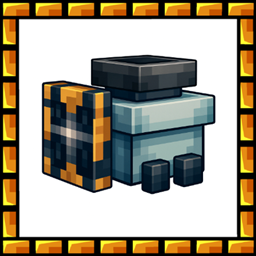
MineDrill
MineDrill is a 3×3 automatic mining drill that supports multiple fuels, places torches every few blocks, and builds Cobblestone beneath itself for safe tunneling. Simple, efficient, and survival-friendly.
截图


介绍
🔩 MineDrill Mod – Major Update v1.1.0
🚀 Overview
The MineDrill is an automatic 3×3 block drill designed for safe and efficient tunneling. This update completely rewrites the mod from MCreator-generated code to pure Java, fixing all major bugs and adding powerful new features.
✨ What’s New in v1.1.0
🔥 Critical Fixes
- Fuel consumption – Completely reworked. No more infinite fuel or duplication.
- Torch system – Torches now properly consume from inventory (1 torch every 8 blocks).
- Item duplication – Fixed the bug where coal and torches would duplicate behind the drill.
- Bedrock protection – Drill now stops immediately when bedrock is detected ahead.
- Unbreakable blocks – Cannot break End Portal Frames, Command Blocks, Spawners, Barrier, etc.
🆕 New Features
- Cobblestone support – Automatically places Cobblestone beneath the drill when crossing lava, water, or empty gaps.
- Improved Hitbox – Collision shape now perfectly matches the visual model.
- Tooltip system – Hover over the item for helpful information (hold Shift for details).
- Arabic translation – Full Arabic language support (ar_sa).
- Proper tool system – Requires at least a stone pickaxe to break and drop the drill.
📦 Technical Improvements
- Clean code – Rewritten from scratch, no more MCreator spaghetti code.
- Performance – Optimized block breaking and movement logic.
- Better GUI – Fixed slot positions and responsive interface.
🎮 Features
| Feature | Description |
|---|---|
| 🪓 3×3 Mining | Mines a full 3×3 area at once |
| ⛽ Flexible Fuel | Coal, Charcoal, Coal Block, Blaze Rod, Dried Kelp Block |
| 🕯️ Auto Torch | Places torch every 8 blocks behind the drill |
| 🧱 Path Safety | Places Cobblestone under the drill when needed |
| 🛡️ Bedrock Stop | Drill stops before bedrock |
| 📦 2 Slots | Slot 1 = Fuel, Slot 2 = Torches |
⛽ Fuel Values
| Fuel Type | Blocks Mined |
|---|---|
| Block of Coal | 80 |
| Dried Kelp Block | 20 |
| Blaze Rod | 12 |
| Coal | 8 |
| Charcoal | 8 |
🛡️ Protected Blocks (Cannot Break)
- Bedrock
- End Portal Frame
- End Portal
- Command Blocks (all types)
- Barrier
- Structure Block
- Spawner
- Reinforced Deepslate
🔧 How to Use
- Craft the Mine Drill (see recipe in JEI/REI or recipe book)
- Place it facing the direction you want to dig
- Right-click to open the GUI
- Add fuel to the left slot
- Add torches to the right slot
- Press the green button to activate
📋 Changelog v1.1.0
- Fixed fuel consumption system
- Fixed torch duplication bug
- Fixed item duplication when moving
- Added bedrock protection
- Added unbreakable block protection
- Added automatic Cobblestone placement
- Improved hitbox accuracy
- Added tooltip (hold Shift for info)
- Added Arabic translation
- Rewrote code from MCreator to pure Java
- Fixed GUI slot positions
- Fixed crafting recipe
- Requires stone pickaxe or better to break
text
📜 Permissions
✅ Free to use in modpacks.
常见问题
MineDrill 支持哪些 Minecraft 版本?
MineDrill 支持 Minecraft Java 版 1.20.1–1.21.1,共 2 个版本,可用的加载器:Forge。下载时注意选择和你游戏版本一致的文件。
MineDrill 怎么安装?
先用 PCL2 或 HMCL 启动器安装对应版本的 Forge,再把下载的 .jar 文件放进游戏目录的 mods 文件夹,重新启动游戏即可。开启了版本隔离的,mods 文件夹在 versions/版本名 下面。
3lbash3 的其他作品
查看全部 →
Day Counter Plus
自定义你的天数计数器、游戏内时钟和坐标,支持字体、颜色、特效以及实时 HUD 编辑器。
Scuba Suit
让我们探索海洋吧

Counter Day
距离100天挑战还有几天

Minecar Drill
Minecraft Mod "Drill" is a modification that enhances the gameplay of Minecraft by introducing a drill tool for mining and excavation activities beneath the surface.
评论
登录后评论和评分