Day Counter Plus
Customize your day counter, in-game clock and coordinates with fonts, colors, effects and a live HUD editor.
截图







介绍
Day Counter Plus
A customizable day counter for Minecraft. Display your world day, in-game time, and coordinates, with full control over how they look and where they appear.
Features
- Display the day counter, clock, and coordinates.
- Choose from Minecraft, Original, and Pixel fonts.
- Adjust text and icon sizes.
- Customize colors, opacity, and text effects.
- Switch between compact and stacked layouts.
- Move HUD elements freely around your screen.
- Preview changes directly in the settings menu.
- Customize the clock format, icons, outlines, and animations.
How to Open Settings
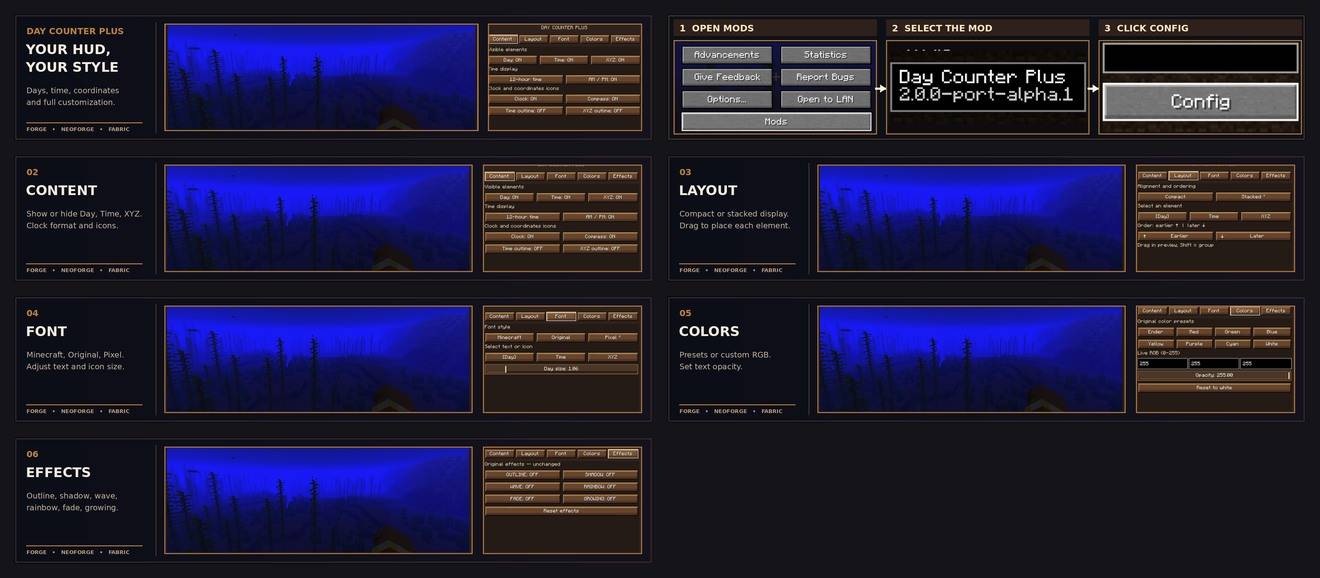
Pause the game and go to Mods → Day Counter Plus → Config.
The settings menu includes a live HUD preview on the left and customization options on the right. Use Edit HUD fullscreen to position elements directly on your game screen.
Compatibility
Day Counter Plus is developed for multiple Minecraft versions and mod loaders, including Forge, NeoForge, and Fabric.
Supported Minecraft versions and loaders vary by release. Check the Files tab to download the correct version for your installation.
Some versions may be released before others.
Documentation
A full setup and customization guide is available in the GitHub Wiki.
常见问题
Day Counter Plus 支持哪些 Minecraft 版本?
Day Counter Plus 支持 Minecraft Java 版 1.20.1–26.2,共 3 个版本,可用的加载器:Fabric / Forge / NeoForge。下载时注意选择和你游戏版本一致的文件。
Day Counter Plus 怎么安装?
先用 PCL2 或 HMCL 启动器安装对应版本的 Fabric / Forge / NeoForge,再把下载的 .jar 文件放进游戏目录的 mods 文件夹,重新启动游戏即可。开启了版本隔离的,mods 文件夹在 versions/版本名 下面。
3lbash3 的其他作品
查看全部 →
Scuba Suit
Let's explore the ocean

Counter Day
Counting the days to the 100 day challenge

Minecar Drill
Minecraft Mod "Drill" is a modification that enhances the gameplay of Minecraft by introducing a drill tool for mining and excavation activities beneath the surface.

Craft Nest
Adds crafting recipes for uncraftable items.
评论
登录后评论和评分