
Mine Trading Cards Open Source Edition
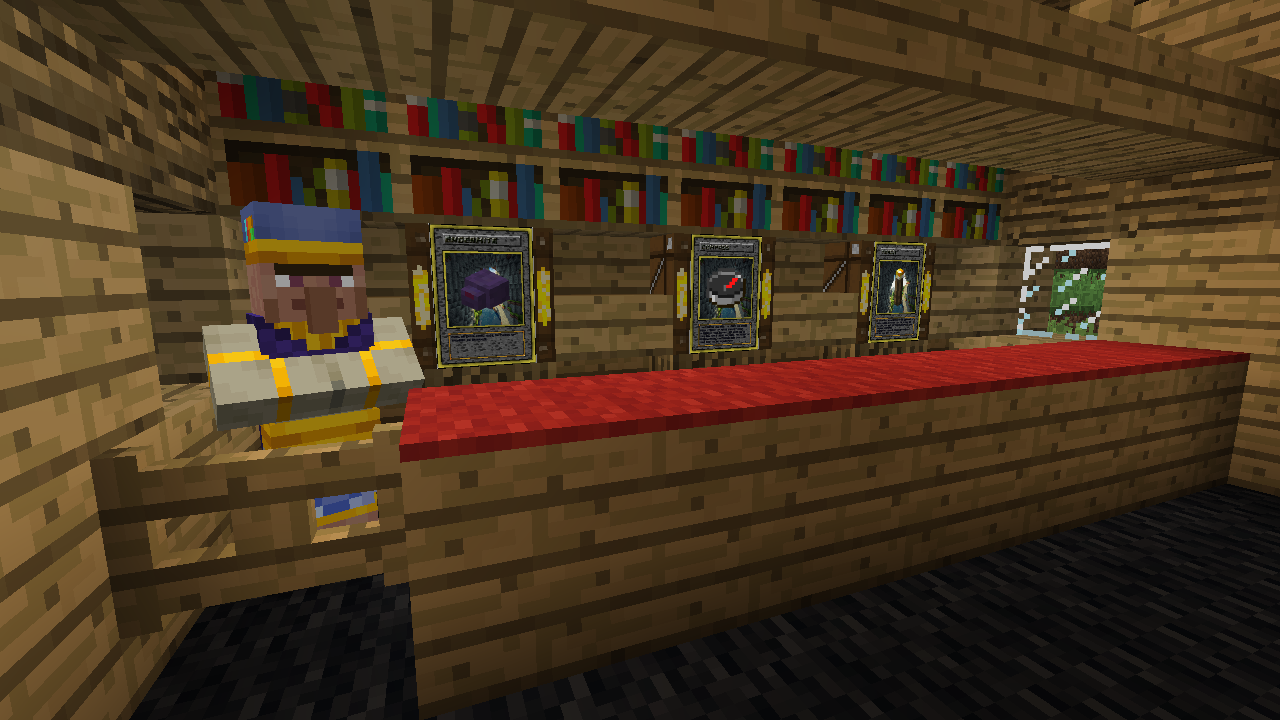
Mine Trading Cards is a mod about collecting trading cards
截图
介绍
Mine Trading Cards is a mod about collecting trading cards.
Mobs will occasionally drop Cards Packs, Edition Packs, or packs of a given rarity. These packs contain Common, Uncommon, Rare, Ancient and Legendary cards.
You can also meet various villagers who specialize in selling or trading cards.
Cards are loaded in “editions” (sets or groups) from files separate from the mod. New cards and even new editions can be created by adding new files to the mtc folder.
Installation
Installing the mod works just like any other forge mod—put the .jar file in your mods folder.
Mine Trading Cards has extra files that must be downloaded and installed separately to load the default card sets.
Earlier versions
Before 3.1
Download the “mtc” folder here (both branches have the same mtc folder) and extract it to a folder in your Minecraft directory.
Alternatively, create an “mtc” folder in your Minecraft directory and extract any of the content packs found here or in the discord server’s #content-packs channel into that folder.
After installation, you should have a structure like the following, with \assets, \cards and \editions inside your \mtc folder:
.minecraft
      ---->mtc
            ---->assets
            ---->cards
            ---->editions
            ---->packs (optional—see "Custom Packs" section below)
As of update 3.1, MTC loads content packs from resource packs to save memory
Extract any of the content packs found here or in the discord server’s #content-packs channel into that resource pack
There are template resource packs in the mega link
This new structure should look like this:
<resource pack folder or zip>
      ---->assets
            ---->is_mtc
                  ---->mtc
                        ---->assets
                        ---->cards
                        ---->editions
                        ---->packs (optional—see "Custom Packs" section below)
Edition Packs:
Various pack editions are specified in the /editions folder, like so:
{
    "id": "my_edition",
    "name": "My Edition Pack",
    "color": "#55ff00" (optional—see below)
}
You do not need to specify a “color” field. If you don’t, MTC will procedurally generate a color for the pack icon based on the id.
Custom Packs:
You can create custom packs, with amounts of cards based on categories and rarities!
Example:
{
    "id": "test_pack",
    "name": "Test Custom Pack",
    "categories": [
        "Minecraft Mob:2:common",
        "World Item:3:common"
    ],
    "color": "#ff0088"  (optional—see below)
}
Place this .json file into the /mtc/packs/ folder.
You do not need to specify a “color” field. If you don’t, MTC will procedurally generate a color for the pack icon based on the id.
This pack would contain two common cards with the “Minecraft Mob” category, and three common cards with the “World Item” category.
All .json files in /mtc/packs will be loaded as custom packs.
Discord Server:
If you want to post a content pack, put a link in the discord server!
https://discord.gg/TWDcAaX
I (Powerthegreat) WILL NOT BE ACTIVE ON DISCORD FOR THE FORESEEABLE FUTURE. Please be respectful of the moderators there.
Forum thread:
https://www.minecraftforum.net/forums/mapping-and-modding-java-edition/minecraft-mods/2913625-mine-trading-cards-open-source-updated-by
This mod was originally developed by Tradeworld (Minecraft Forums username, AKA nogier (github) or R4p3lay (on curseforge)), then made open source.
Source code for 1.7.10 – https://github.com/Powerthegreat/Mine-Trading-Cards-Source
Source code for 1.12.2 – https://github.com/Powerthegreat/Mine-Trading-Cards-Source-1.12.2
常见问题
Mine Trading Cards Open Source Edition 支持哪些 Minecraft 版本?
Mine Trading Cards Open Source Edition 支持 Minecraft Java 版 1.7.10–1.16.5,共 3 个版本,可用的加载器:Forge。下载时注意选择和你游戏版本一致的文件。
Mine Trading Cards Open Source Edition 怎么安装?
先用 PCL2 或 HMCL 启动器安装对应版本的 Forge,再把下载的 .jar 文件放进游戏目录的 mods 文件夹,重新启动游戏即可。开启了版本隔离的,mods 文件夹在 versions/版本名 下面。运行环境:客户端和服务端都要装。
AstroTibs 的其他作品
查看全部 →
Village Names
Backports modern village structures and villager designs, and generates names for villages and villagers, and other entities and structures.

Modernity
将现代原版和模组材质包移植到旧版本

Not Enough Pets
Adds a variety of cats, dogs, and parrots. Parrots are backported to versions older than 1.12.2

ASMC
Backports sounds to earlier Minecraft versions
评论
登录后评论和评分