Mikasa Mob Health Bar
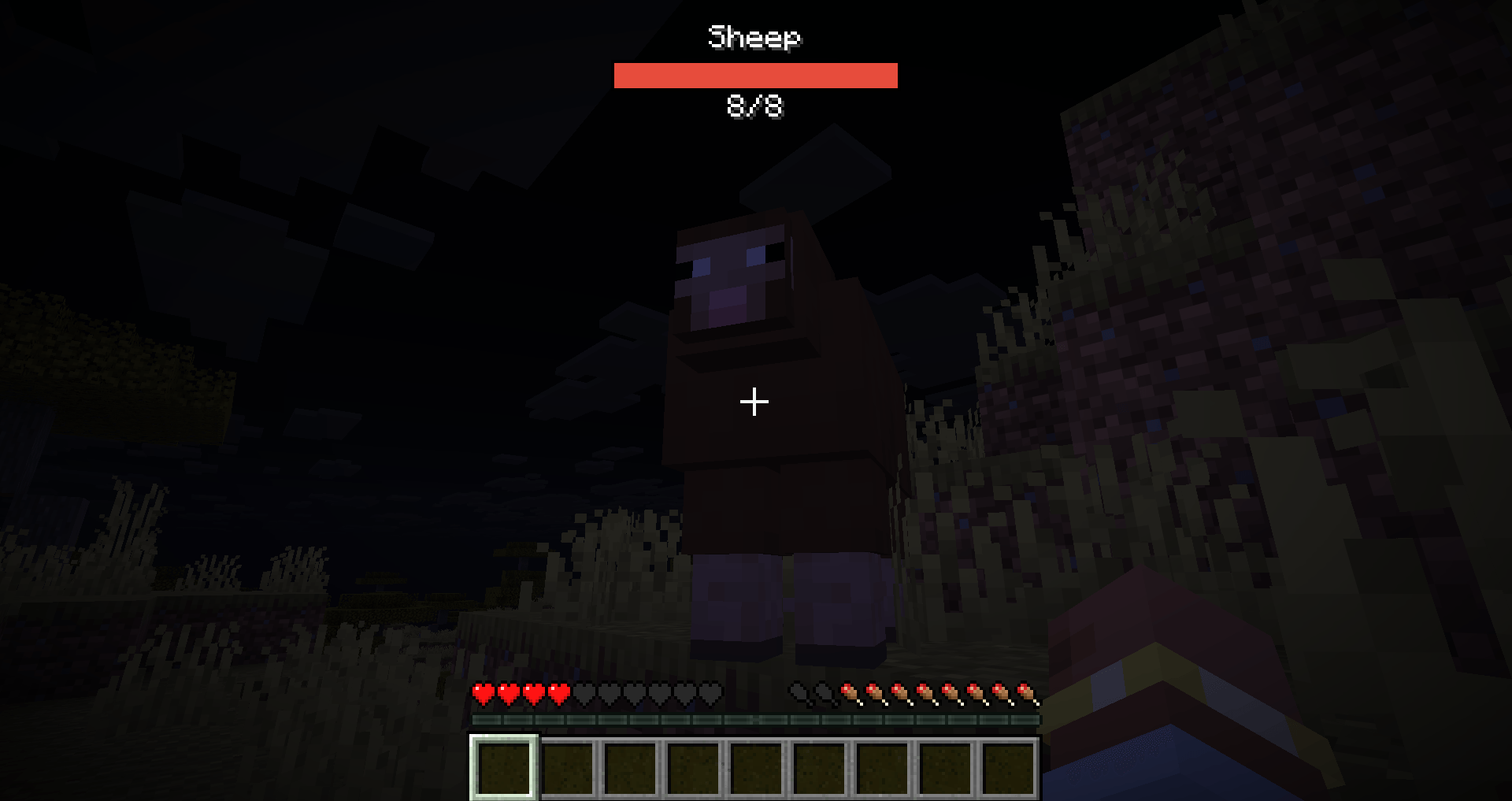
A minimalist client-side HUD that displays the target's name, a red health bar, and exact Current/Max HP at the top center of your screen when looking at any mob.
截图
介绍
📊 Mikasa-bars — Minimalist Top-Center Target HUD
Mikasa-bars is a sleek, high-performance client-side HUD utility for Fabric. It provides a clean, static overlay at the top center of your screen whenever you look at a living entity, giving you vital combat information without cluttering your world view.
Unlike traditional nameplate mods that float awkwardly above mobs, Mikasa-bars stays fixed at the top of your screen and only appears when you actually need it.
✨ Key Features
- Target-Only Display: The HUD only activates when you place a living entity (player, mob, NPC, or monster) in your crosshair. Looking away immediately hides it.
- Static Top-Center HUD: Keeps your world clean. The health bar stays fixed at the top center of the screen, not floating in the 3D world.
- Comprehensive Info: Displays the entity’s name, a clean red health bar, and exact numeric values (
CurrentHP/MaxHP). - Extended Range: The targeting detection range is 2× further than the vanilla entity interaction range.
- Localization Support: Fully respects your client’s language settings for translated mob and NPC names.
- Immersive Friendly: Automatically hides when you toggle off the vanilla GUI using the F1 key.
🛠 Feature Overview
| Element | Purpose |
|---|---|
| Entity Name | Shows the localized display name of the targeted living entity. |
| Health Bar | A vibrant red progress bar that scales dynamically based on current vs max health. |
| CurrentHP/MaxHP | Precise numeric health readout positioned cleanly underneath the bar. |
| Targeting System | Activates instantly when looking at a living entity within the extended range. |
Note: This mod has no commands and works completely automatically.
📦 Compatibility & Dependencies
Required:
- Minecraft: 26.3
- Fabric Loader:
0.19.5or later (IMPORTANT: older loader versions like 0.19.3 are NOT supported!). - Fabric API: Required for Minecraft 26.3.
- Java: Version 25+.
⚙️ Configuration
Mikasa-bars has no config files. It is designed to work perfectly out of the box with zero setup. No files are generated on launch, and no manual editing is required!
🚀 Installation Guide
- Install Fabric Loader (
0.19.5+) for Minecraft 26.3 on your client. - Drop this mod jar and the official Fabric API into your client’s
modsfolder. - Launch your game, find any mob, and look at it to see the new HUD in action!
Note: This is a client-side HUD mod. Players must install it on their own clients. It is completely optional (not required) on dedicated servers.
📄 License & Credits
- License: MIT
- Author: Mikasa
📄 Source
常见问题
Mikasa Mob Health Bar 支持哪些 Minecraft 版本?
Mikasa Mob Health Bar 支持 Minecraft Java 版 1.20.1–26.3,共 4 个版本,可用的加载器:Fabric。下载时注意选择和你游戏版本一致的文件。
Mikasa Mob Health Bar 怎么安装?
先用 PCL2 或 HMCL 启动器安装对应版本的 Fabric,再把下载的 .jar 文件放进游戏目录的 mods 文件夹,重新启动游戏即可。开启了版本隔离的,mods 文件夹在 versions/版本名 下面。
MikasaNotAvailable 的其他作品
查看全部 →
Mikasa Copy That Building
Client-side Fabric tool to copy loaded-chunk builds into JSON, NBT, .schem or .litematic. Set two corners, scan in the background without freezing gameplay, track progress and missing chunks, then export for later paste. No server mod required.
Mikasa TP Commands
Server-side Fabric teleport toolkit: /tp, TPA requests, and homes with JSON or optional PostgreSQL/MySQL storage. No client mod required!
评论
登录后评论和评分