
截图

介绍

Press – and every loot container around you will be emptied into your inventory, or into your storage system if you’ve set a transfer target.
Fabric needs Fabric API. Install Mod Menu and Cloth Config to edit the config in game.
Features
Loots chests, barrels and any other container with a loot table, within a radius you set.
Works with Lootr (Forge and NeoForge).
Auto-loot mode empties nearby containers on a timer.
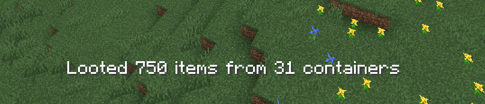
On-screen text shows how many items you got and from how many containers.
Loot Transfer
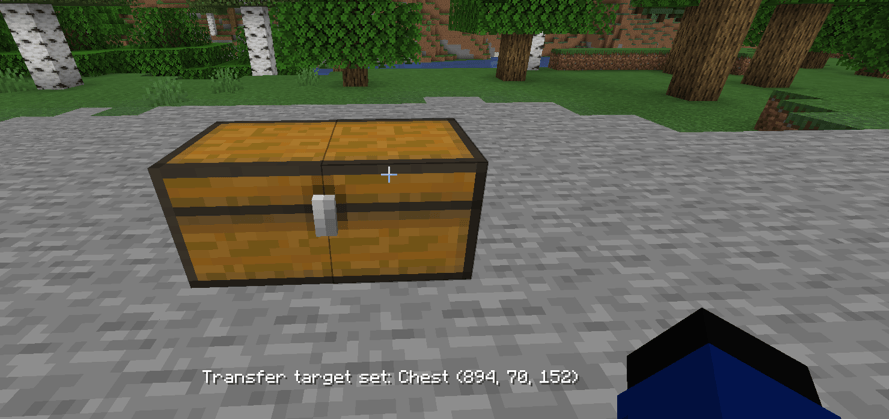
Look at a storage block, or hover an item in your inventory, and press = to make it your transfer target. Everything you loot after that goes straight into it, from any distance and even from another dimension (both configurable).
Bind a chest, drawer, ME terminal, backpack, wireless grid, or anything else with an inventory.
Items are not voided. Whatever doesn’t fit goes to your inventory, then the ground.
HUD text will tell you where your loot went: “Transferred to …”.
On Fabric, only blocks can be targets, not items.
Mod Support
Loot Transfer works with any block or item that has a standard inventory. These mods also have dedicated support on Forge and NeoForge:
Mod Supported Stuff
Applied Energistics 2 ME Network
Refined Storage Network + Wireless Grid
Mekanism QIO Dashboard / Drive Array + Portable QIO Dashboard
Tom’s Simple Storage Storage Terminal + Inventory Connector
Simple Storage Network Master / Request Table
Pretty Pipes Item Terminal
ProjectE EMC: Klein Stars, Transmutation Table and Tablet
Curios Backpacks and other inventories in Curios slots
On Forge, you can also lock Loot All’s features behind stages with Game Stages.
Configuration
range: how far to search for containers (default 20).
includeMinecarts: also loot minecarts that have loot tables.
autoLooting and autoLootingTimer: loot nearby containers on a timer.
excludeBlockedContainers: skip chests that can’t be opened.
feedbackMessage and playSound: turn the on-screen message and the pickup sound on or off.
enableLootingTransfer: turn the transfer system on or off.
maxLootTransferDistance, transferRequireSameDimension, transferRequireLoadedChunk: limit how far transfers can reach.
Item Filters
Filters apply to both looting and transfers.
skipList: items to not loot. Each entry can be:
modid:item, a single item (e.g. minecraft:stick)
#modid:tag, an item tag (e.g. #minecraft:stairs)
@modid, every item from a mod (e.g. @alexsmobs)
skipListMode:
BLACKLIST (default): loot everything except what’s in skipList.
WHITELIST: loot only what’s in skipList.
skipArmorAndTools: skip all armor, tools and weapons.
skipNonStackable: skip items that only stack to 1.
skipUnenchantedGear: skip armor, tools and weapons unless they’re enchanted.
rarityFilterMode and rarityList: filter by rarity. Set the mode to ONLY to loot only the listed rarities, or SKIP to loot everything except them.
Default Keybinds
-: loot nearby containers.
=: set or clear the transfer target.
常见问题
Loot All 支持哪些 Minecraft 版本?
Loot All 支持 Minecraft Java 版 1.12.2–1.21.11,共 7 个版本,可用的加载器:Fabric / Forge / NeoForge。下载时注意选择和你游戏版本一致的文件。
Loot All 怎么安装?
先用 PCL2 或 HMCL 启动器安装对应版本的 Fabric / Forge / NeoForge,再把下载的 .jar 文件放进游戏目录的 mods 文件夹,重新启动游戏即可。开启了版本隔离的,mods 文件夹在 versions/版本名 下面。运行环境:客户端和服务端都要装。
Sxilverr 的其他作品
查看全部 →
Mutationcraft
为游戏加入了恐怖的新型寄生变异生物!

FTB Quests Entity Visualization
为FTB任务添加实体可视化功能!
TACZ Turrets
Simple automated turrets for TACZ guns!

TACZ Turrets
Simple automated turrets for TACZ guns!
评论
登录后评论和评分