
Hud Menu
This mod allows you to trigger vanilla game key bindings by clicking the HUD icon in the top right corner.
介绍
This mod allows you to trigger vanilla game key bindings by clicking the HUD icon in the top right corner.
Many mods add a large number of key bindings, making it difficult to remember and use them all. HUD Menu lets you assign icons to key bindings and place them in a compact in-game HUD. Hold the configured mouse key, hover an icon to see its function name, and click it to simulate the corresponding key press.
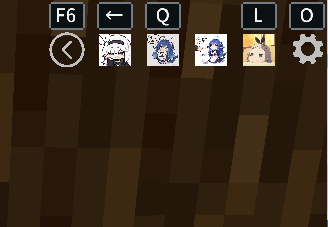
Features:
- Display key binding icons directly on the HUD
- Support Minecraft vanilla item icons and resource textures
- Support PNG, JPG, and JPEG icons
- Configure vanilla and mod key bindings
- Keys can remain unbound while still being triggered from the HUD
- Expand and collapse the HUD with an animated toggle
- Drag HUD placement and adjust its scale
- Drag icons to change their order
- Support up to 9 HUD slots
- Save and restore modpack author presets
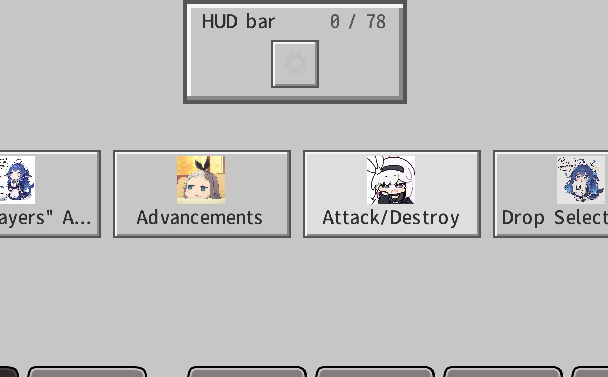
Default keys:
- O: Open the HUD editor
- F6: Expand or collapse the HUD
- Left Alt: Release the mouse for HUD interaction
- Hold alt + scroll wheel: select an icon and use it with left click
Custom image path:
.minecraft/config/Hud_Menu/icons/
Modpack presets:
.minecraft/config/Hud_Menu/hud-menu-preset.json
The Reset button restores the modpack author’s preset. Reset All restores all keys, icons, slots, HUD position, and scale to the mod defaults.
常见问题
Hud Menu 支持哪些 Minecraft 版本?
Hud Menu 支持 Minecraft Java 版 1.20.1–1.20.6,共 6 个版本,可用的加载器:Forge。下载时注意选择和你游戏版本一致的文件。
Hud Menu 怎么安装?
先用 PCL2 或 HMCL 启动器安装对应版本的 Forge,再把下载的 .jar 文件放进游戏目录的 mods 文件夹,重新启动游戏即可。开启了版本隔离的,mods 文件夹在 versions/版本名 下面。运行环境:仅客户端。
Kuzhizaizheli 的其他作品
查看全部 →
Find me
Find Me 是一个用于存储、召唤和管理生物与载具的模组。

Starter Cabin
Starter Cabin is a Minecraft mod that lets you save a player-built structure and automatically place it near the spawn point of any new world.

Building Blueprint
Building Blueprint lets players save buildings as blueprint items, preview them in the world, rotate the preview, and place the saved structure later.

Inner voice
Inner Voice is a client‑side mod that displays floating, typewriter‑style “inner voice” text in the world when you fight or approach specified mobs, and can also assign custom BGM with synchronized lyrics/subtitles to each mob.
评论
登录后评论和评分