
Starter Cabin
Starter Cabin is a Minecraft mod that lets you save a player-built structure and automatically place it near the spawn point of any new world.
介绍
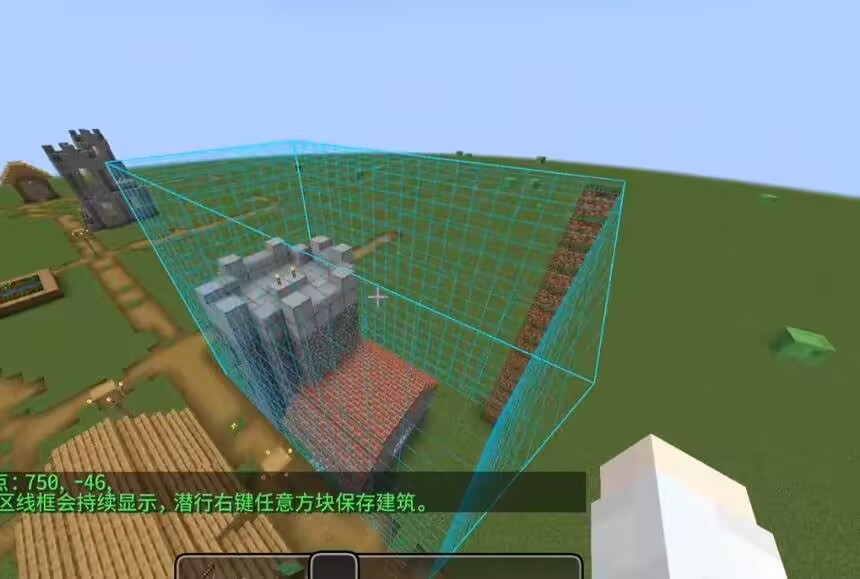
How to use it in 4 s
teps
- 1.Build your structure, then place a Spawn Carpet inside it where you want players to appear.
- 2.Hold the Building Saver item, right‑click one corner of the building, then right‑click the opposite corner – a selection outline appears.
- 3.Sneak + right‑click any block to save the selected area as a template.
- 4.When you create a new world, the mod will automatically find a suitable flat spot near spawn, place your building, and set the world spawn to the carpet position.
Key items
Building Saver – a carrot‑on‑a‑stick styled tool for selecting and saving.
Spawn Carpet – a marker block that records the spawn point; it is removed after saving (configurable).
Notes
- The template is saved to config/starter_cabin/template.nbt
- Each world generates the building only once – delete world data to force regeneration.
- If placement looks off, increase placementSearchRadius or lower maxSurfaceVariation.
- Recommended workflow
- Build and save your structure in a test world.
- Create a new world to verify the generation.
- Tweak config values if needed, then re‑save the template after major changes.
常见问题
Starter Cabin 支持哪些 Minecraft 版本?
Starter Cabin 支持 Minecraft Java 版 1.20.1–1.21.1,共 2 个版本,可用的加载器:Forge / NeoForge。下载时注意选择和你游戏版本一致的文件。
Starter Cabin 怎么安装?
先用 PCL2 或 HMCL 启动器安装对应版本的 Forge / NeoForge,再把下载的 .jar 文件放进游戏目录的 mods 文件夹,重新启动游戏即可。开启了版本隔离的,mods 文件夹在 versions/版本名 下面。运行环境:客户端和服务端都要装。
Kuzhizaizheli 的其他作品
查看全部 →
Building Blueprint
Building Blueprint lets players save buildings as blueprint items, preview them in the world, rotate the preview, and place the saved structure later.

Find me
Find Me is a mod for storing, summoning, and managing creatures and vehicles.
Find me
Find Me is a mod for storing, summoning, and managing creatures and vehicles.

Blabby World
Blabby World gives Minecraft mobs configurable speech and ordered A/B conversations based on combat state, time, weather, and nearby entities.
评论
登录后评论和评分