
HarvestStats
Press H to see exactly how many of each crop you've harvested, with percentages and progress bars saved permanently per world.
介绍
HarvestStats
Ever wondered how many crops you’ve harvested? HarvestStats keeps track of every harvest and shows detailed statistics for each crop.
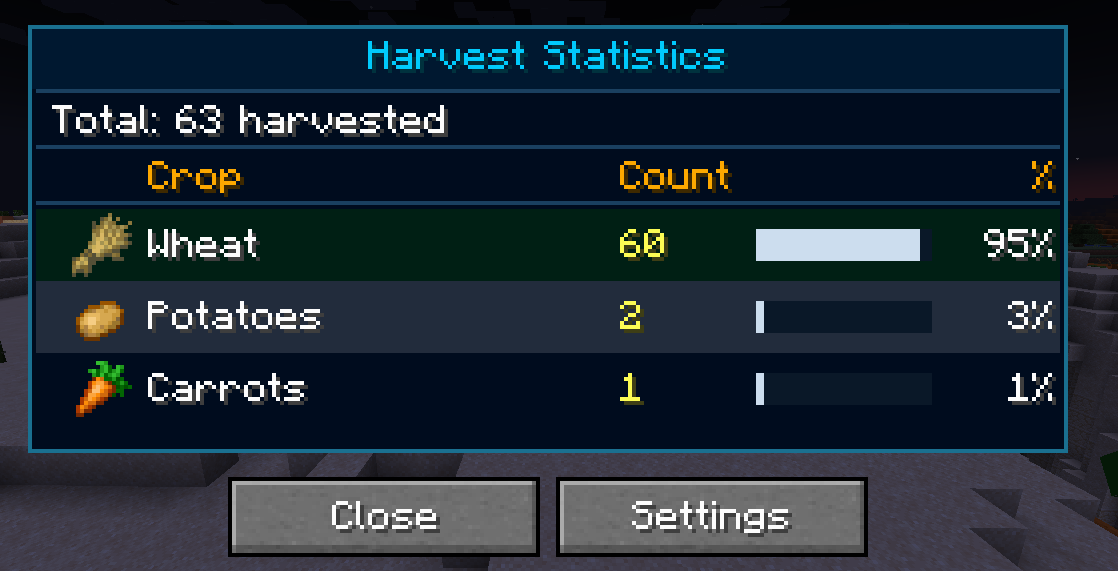
Open the statistics screen with H to view harvest counts, percentages, and progress bars. Your progress is saved automatically and stored separately for every world.
Features
Press H to open your harvest statistics.
View the total harvested amount for every supported crop.
See percentages and progress bars in a clean interface.
Right-Click Harvest
Right-click fully grown crops to harvest and automatically replant them in one click.
Auto Harvest
Automatically harvest fully grown crops within a 3-block radius.
Can be enabled or disabled in the settings.
Per-World Data
Statistics are stored separately for every world.
Progress is automatically saved.
Reset Statistics
Reset your statistics at any time.
Includes a confirmation screen to prevent accidental resets.
Requirements
Minecraft 1.21.1
Fabric Loader
Fabric API
常见问题
HarvestStats 支持哪些 Minecraft 版本?
HarvestStats 支持 Minecraft Java 版 1.21.1–1.21.4,共 4 个版本,可用的加载器:Fabric。下载时注意选择和你游戏版本一致的文件。
HarvestStats 怎么安装?
先用 PCL2 或 HMCL 启动器安装对应版本的 Fabric,再把下载的 .jar 文件放进游戏目录的 mods 文件夹,重新启动游戏即可。开启了版本隔离的,mods 文件夹在 versions/版本名 下面。运行环境:仅客户端。

评论
登录后评论和评分