GOD AUTHORITY · ENTITY LOCK
Search and block registered entity types with reversible hostile restrictions and an F7 control panel.
介绍
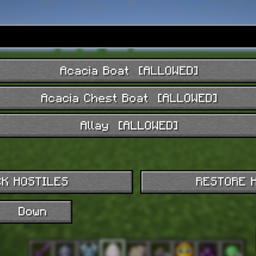
God Authority · Entity Lock provides an English-language control panel for
restricting registered entity types. Rules can be set individually, or a bulk
hostile filter can be enabled and reversed without rebuilding the mod setup.
KEY FEATURES
– F7 opens the Entity Lock control panel.
– Search by registered entity name or identifier; inspect and change rules.
– Individual entries toggle between [ALLOWED] and [BLOCKED].
– Scroll with the mouse wheel or use Up / Down to navigate the list.
– BLOCK HOSTILES applies the bulk filter to the explicitly listed dangerous
types and to registered types in the MONSTER spawn group.
– RESTORE HOSTILES removes bulk-filter restrictions, while preserving
unrelated individually configured restrictions.
– The bulk buttons remain available for repeated use.
– Designed to recognize normally registered third-party entity types.
– The restriction list uses entity identifiers, not translated display names.
– Restoring a restriction does not recreate targets that were previously removed.
HOW TO USE
1. Press F7.
2. To change one entry, find it through Search or scroll the list, then
click [ALLOWED] or [BLOCKED].
3. To apply the bulk hostile filter, click BLOCK HOSTILES.
4. To undo the bulk hostile filter, click RESTORE HOSTILES.
5. Click Done to close the panel.
The complete original v1.2.2 guide follows, including the explicit list of
36 entity IDs, additional registry rules, upgrade instructions, verification
notes, and the full Chinese translation. Its original text is preserved.
==========================================================
COMPLETE ORIGINAL GUIDE (UNCHANGED)
==========================================================
GOD AUTHORITY · ENTITY LOCK
BLOCK / RESTORE HOSTILES — OPERATING GUIDE & CURSEFORGE DESCRIPTION
Version: 1.2.2
Platform: Fabric 1.21.11
==========================================================
1. OPENING THE CONTROL PANEL
==========================================================
Press F7 to open Entity Lock.
Use the Search field to find an individual registered entity type.
Click its [ALLOWED] / [BLOCKED] button to change the individual rule.
Use the mouse wheel or the Up / Down buttons to navigate the list.
Select Done to close the control panel.
==========================================================
2. BULK BUTTONS (REVERSIBLE)
==========================================================
BLOCK HOSTILES
– Adds the listed hostile and dangerous entity types to the blocked set.
– Also detects entity types in the MONSTER spawn group through the current registry.
– The blocked settings are saved.
RESTORE HOSTILES
– Removes the bulk hostile restrictions so the targets may appear again.
– Settings unrelated to the bulk hostile list are not cleared.
– If the current version previously saved an individual hostile restriction before bulk blocking, that individual restriction is restored.
– Existing targets removed while blocked are NOT recreated by pressing Restore.
IMPORTANT FOR UPGRADING FROM v1.2.1:
– The old BLOCK ALL HOSTILES button had no undo action.
– In v1.2.2, press RESTORE HOSTILES to remove the old bulk restrictions.
– Both Block and Restore are always visible and can be used repeatedly.
==========================================================
3. EXPLICIT HOSTILE/DANGEROUS TARGET LIST
==========================================================
The following 36 registered entity IDs are included explicitly.
These IDs are selected regardless of their ordinary spawn-group classification.
01 minecraft:blaze Blaze
02 minecraft:bogged Bogged
03 minecraft:breeze Breeze
04 minecraft:cave_spider Cave Spider
05 minecraft:creeper Creeper
06 minecraft:drowned Drowned
07 minecraft:elder_guardian Elder Guardian
08 minecraft:ender_dragon Ender Dragon
09 minecraft:enderman Enderman
10 minecraft:endermite Endermite
11 minecraft:evoker Evoker
12 minecraft:ghast Ghast
13 minecraft:giant Giant
14 minecraft:guardian Guardian
15 minecraft:hoglin Hoglin
16 minecraft:husk Husk
17 minecraft:illusioner Illusioner
18 minecraft:magma_cube Magma Cube
19 minecraft:phantom Phantom
20 minecraft:piglin_brute Piglin Brute
21 minecraft:pillager Pillager
22 minecraft:ravager Ravager
23 minecraft:shulker Shulker
24 minecraft:silverfish Silverfish
25 minecraft:skeleton Skeleton
26 minecraft:slime Slime
27 minecraft:spider Spider
28 minecraft:stray Stray
29 minecraft:vindicator Vindicator
30 minecraft:warden Warden
31 minecraft:witch Witch
32 minecraft:wither Wither
33 minecraft:wither_skeleton Wither Skeleton
34 minecraft:zoglin Zoglin
35 minecraft:zombie Zombie
36 minecraft:zombie_villager Zombie Villager
==========================================================
4. ADDITIONAL AUTOMATIC TARGETS
==========================================================
Besides the explicit list, Block Hostiles attempts to include every registered
entity type classified under the MONSTER spawn group, including types supplied
by installed third-party mods. The additional names are discovered at runtime,
so the exact extended list depends on the installed content.
Neutral animals, villagers, boats, dropped items, and other non-MONSTER types
are not automatically included unless they appear in the explicit list.
They can still be blocked individually through the entity list.
The bulk rule checks registered entity IDs, not the display language or name.
The Restore button removes the matching bulk rules. It does not restore targets
that were already removed before the restriction was disabled.
==========================================================
5. INSTALLATION / UPDATE
==========================================================
1. Remove the earlier GodAuthority-EntityLock JAR from the mods folder.
2. Place GodAuthority-EntityLock-1.2.2+1.21.11.jar in the mods folder.
3. Keep Fabric API installed.
4. Open Entity Lock with F7. If the old bulk filter is active, select
RESTORE HOSTILES once before creating a new selection.
常见问题
GOD AUTHORITY · ENTITY LOCK 支持哪些 Minecraft 版本?
GOD AUTHORITY · ENTITY LOCK 支持 Minecraft Java 版 1.21.11,可用的加载器:Fabric。下载时注意选择和你游戏版本一致的文件。
GOD AUTHORITY · ENTITY LOCK 怎么安装?
先用 PCL2 或 HMCL 启动器安装对应版本的 Fabric,再把下载的 .jar 文件放进游戏目录的 mods 文件夹,重新启动游戏即可。开启了版本隔离的,mods 文件夹在 versions/版本名 下面。
Ruochen_Liu 的其他作品
查看全部 →
Nightmare Survival — Enhanced Mobs 🌟
Nightmare Survival — Enhanced Mobs 🌟 I (SERIES M LABEL: M2 ):Armored and enchanted hostile mobs, devastating creepers, daytime enemy spawns, and expanded villager trading for harder survival.
GOD AUTHORITY · WORLD CONTROL
A command-free Fabric 1.21.11 world-control panel for instantly managing time, game mode, difficulty, weather, and special testing utilities from an in-game GUI.
God Authority · Enchantment Lab
Edit item enchantments from a compact F1 + F2 panel with Vanilla and Merged modes and levels 1–255.
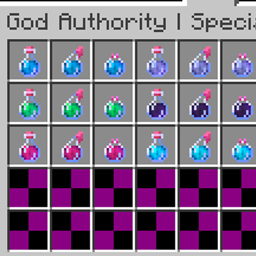
God Authority · Special Effects Potions
Individual status-effect testing bottles, two cleansing options and automatic support for registered third-party effects.
评论
登录后评论和评分