Ghostbys Totem Highlights
Highlights every Totem of Undying in your inventory and containers with a customizable color, so you can spot and grab them instantly.
截图
介绍
GhostbyTMGs Totem Highlights
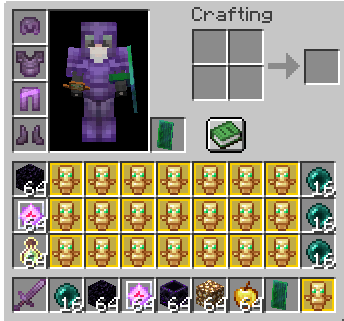
Never dig through your inventory for a totem again. This mod puts a colored highlight behind every Totem of Undying whenever you open your inventory, so you can see and grab them instantly, even in a full inventory mid-fight.
Features
- Highlights totems everywhere: survival inventory, creative inventory, offhand, chests, shulker boxes, ender chests and any other container
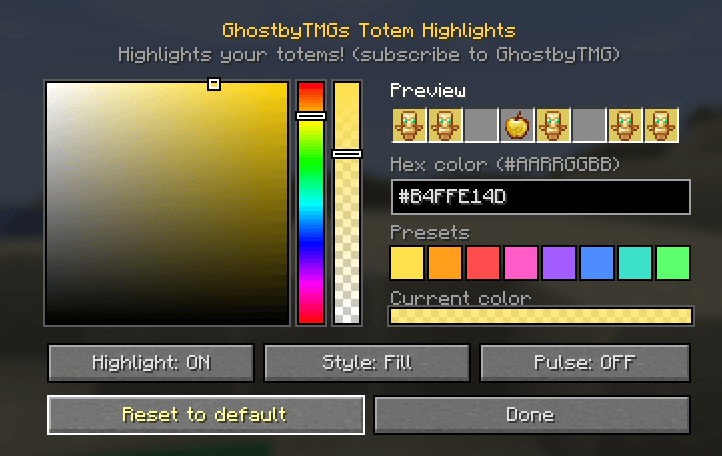
- Pick any color with a built-in color picker (color square, hue bar and opacity bar)
- Hex color input: type a code like
#FFE14Dor#B4FFE14D(with opacity) - 8 quick color presets
- 4 highlight styles: Fill, Gradient, Outline, Fill + Outline
- Pulse animation you can turn on or off
- Live preview in the settings screen
- Client-side only: works on any server, nothing needed on the server side
How to use
Press J in-game to open the settings. You can change the key under Options → Controls → Key Binds.
With Mod Menu installed, you can also open them from the mod list’s Configure button.
Requirements
- Fabric Loader
- Fabric API
- Mod Menu (optional)
常见问题
Ghostbys Totem Highlights 支持哪些 Minecraft 版本?
Ghostbys Totem Highlights 支持 Minecraft Java 版 1.21–26.3,共 16 个版本,可用的加载器:Fabric。下载时注意选择和你游戏版本一致的文件。
Ghostbys Totem Highlights 怎么安装?
先用 PCL2 或 HMCL 启动器安装对应版本的 Fabric,再把下载的 .jar 文件放进游戏目录的 mods 文件夹,重新启动游戏即可。开启了版本隔离的,mods 文件夹在 versions/版本名 下面。
GhostbyTMG 的其他作品
查看全部 →
Ghostbys Skyboxes
Shows custom skies from your texture packs without OptiFine, plus built-in sky presets you can switch between
Ghostbys Shulker Previews
Hover a shulker box to see everything inside it. Also remembers your ender chest, so you can check what’s in it from any inventory.
评论
登录后评论和评分