
Falings’ Summonings
Adds a new ender mob with trades to spare, a new currency and a new magic structure
截图


介绍
What is it?
The order of the eye lives once more. A long-lost race of traders from another plane have made their answer to extinction: by interjecting Ender magic into villagers, they are able to create a gateway to the Overworld to find a new life and spread their trades to all.
Features
Faling

This is the Faling. It’s summoned by throwing an eye of ender at a villager, and harnessing their ancient ender magic, a faling will take its place.
Trading with falings
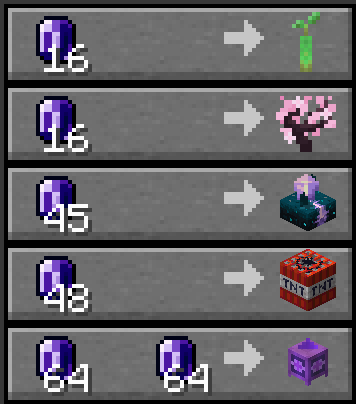
Falings have collected a specific collection of rare items that they intend to trade off to players, seeing as these are some of the rarest items out there.
Endmeralds
The falings trade for a rare material dubbed endmerald, due to them looking similar to emeralds.

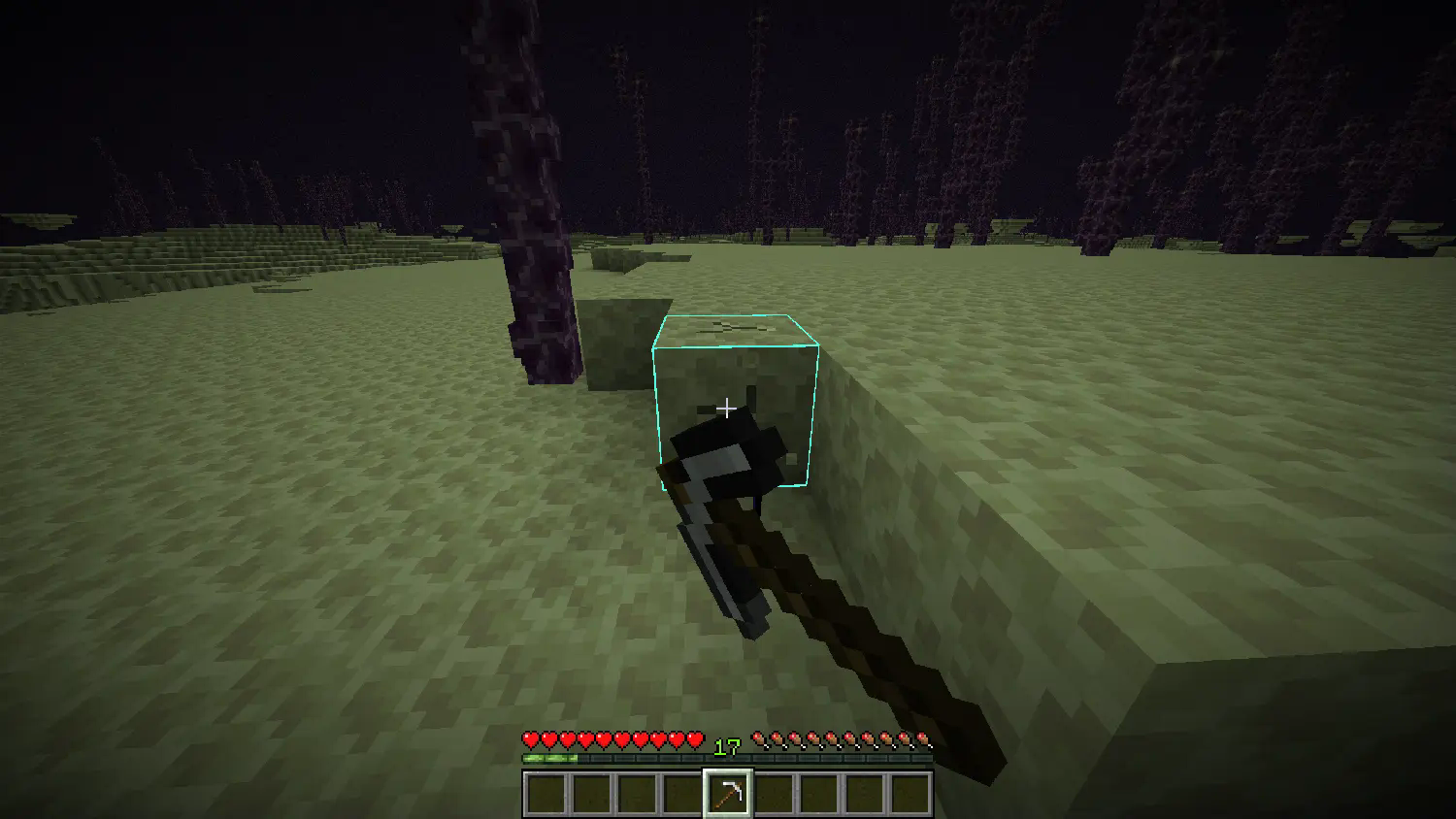
Endmeralds can be obtained by mining endstone with a pickaxe and hoping luck is on your side. The Fortune enchantment on the pickaxe increases the amounts of endmeralds dropped.
The End Combine

The faling race’s newest genius: the End Combine, a machination that utilizes mysterious hammerspace tech to build itself when placed. Upon so, it provides the Slow Falling effect to all players nearby, useful for places with a lot of vertical travel.
Advancements
- Faling From the Deep: Summon a Faling by throwing an Eye of Ender at a Villager
- World Trade: Trade with a Faling using Endmeralds
- Acquire Floatware: Buy and End Combine from a Faling
- Combined Power: Place an End Combine
Installation Guide:
Data Pack version:
- Make sure your Minecraft version matches the data pack version
- Download the data pack
- Download the resource pack provided with the data pack by clicking on the data pack at the downloads page
- Exit the world you want to install the data pack in
- Select that world in the world selection screen, click on “Edit”, then “Open world folder”.
- Open the folder named “datapacks”, and put the downloaded ‘faling[version you downloaded]-data.zip’ file into it.
- Go back to the main “.minecraft” folder and enter the “resourcepacks” folder
- Place the “faling[version you downloaded]-resources.zip” file provided with the data pack file into this folder
- Now enter the world, and have fun 🙂
Mod version:
- Make sure your Minecraft version matches the mod version
- Download the mod
- Go to your main “.minecraft” folder
- Enter the “mods” folder (or if you don’t have one yet create one)
- Place the downloaded mod into the mods folder
- Now enter the world, and have fun 🙂
Using the Modrinth App on desktop:
- Install the mod/data pack
- That’s it, have fun 🙂
常见问题
Falings’ Summonings 支持哪些 Minecraft 版本?
Falings’ Summonings 支持 Minecraft Java 版 1.21.2–26.2,共 14 个版本,可用的加载器:Fabric / Forge / NeoForge / Quilt。下载时注意选择和你游戏版本一致的文件。
Falings’ Summonings 怎么安装?
先用 PCL2 或 HMCL 启动器安装对应版本的 Fabric / Forge / NeoForge / Quilt,再把下载的 .jar 文件放进游戏目录的 mods 文件夹,重新启动游戏即可。开启了版本隔离的,mods 文件夹在 versions/版本名 下面。运行环境:客户端 / 服务端。
owlycode 的其他作品
查看全部 →
Call of the King
Name any mob "King" and watch it size up!

More Stands
Craft more armor stands in vanilla
More Stands
Craft more armor stands in vanilla

Slightly Lighter Acacia Fence Mod
A mod that adds the highly requested feature Slightly Lighter Acacia Fences.
评论
登录后评论和评分