
DUATAR: Private Trade
A secure, server-authoritative private trading system for Minecraft. Players can send timed trade requests and safely exchange items with each other.
截图
介绍
DUATAR: Private Trade
DUATAR: Private Trade allows players on the same server to trade items from anywhere using a mutual confirmation system.
Features
- Send private trade requests using player names
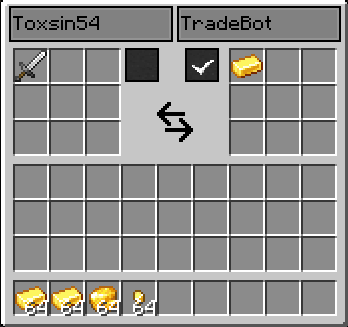
- 9 trade slots for each player
- View the other player’s offer in real time
- Mutual ready/confirmation system
- Ready status automatically resets when an offer changes
- 30-second trade request timeout
- Items are returned to their owners if the trade is cancelled
- Players cannot take items directly from the other player’s offer
- Server-managed trade transactions
How to Use
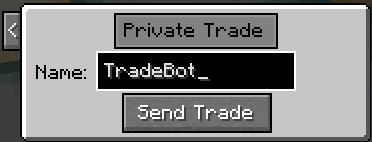
- Press R by default to open the trade request menu.
- Enter the exact Minecraft username of the player you want to trade with.
- Click Send Trade.
- The receiving player can accept the request with ✓ or decline it with X.
- When the request is accepted, both players are taken to the trade screen.
- Place the items you want to offer into your 9 trade slots.
- Review the other player’s offer and select your confirmation box when ready.
- The trade is automatically completed when both players are ready.
If either player changes their offer, the ready statuses are reset and both players must confirm the updated trade again. This prevents unnoticed last-second offer changes.
Closing the trade screen or pressing Esc cancels the transaction. If the trade has not been completed, the items you offered are returned to your inventory.
Tip: You can change the trade key from Minecraft’s Options → Controls menu.
Requirements
- Minecraft: 26.1.2
- Mod Loader: NeoForge 26.1.2.95 or newer
- Required Dependency: MCreator Link
- The mod must be installed on both the server and all connecting clients.
常见问题
DUATAR: Private Trade 支持哪些 Minecraft 版本?
DUATAR: Private Trade 支持 Minecraft Java 版 26.1.2,可用的加载器:NeoForge。下载时注意选择和你游戏版本一致的文件。
DUATAR: Private Trade 怎么安装?
先用 PCL2 或 HMCL 启动器安装对应版本的 NeoForge,再把下载的 .jar 文件放进游戏目录的 mods 文件夹,重新启动游戏即可。开启了版本隔离的,mods 文件夹在 versions/版本名 下面。运行环境:客户端和服务端都要装。
Toxsin54 的其他作品
查看全部 →
DUATAR: Minimap & Map
A clean minimap and full-screen explored-world map with cave layers, coordinates, and map-only marks—without waypoints, radar, or navigation clutter.

DUATAR: Safeguard
Keep your inventory after death, prevent zero-durability items from breaking, and display exact durability values for vanilla and modded equipment.

DUATAR: Weight
A configurable carrying-weight system with item tooltips, a color-coded HUD, container-aware calculations, and progressive overload penalties.
评论
登录后评论和评分