
Daily TODO
A lightweight client-side TODO overlay for tracking daily tasks directly in Minecraft.
截图

介绍
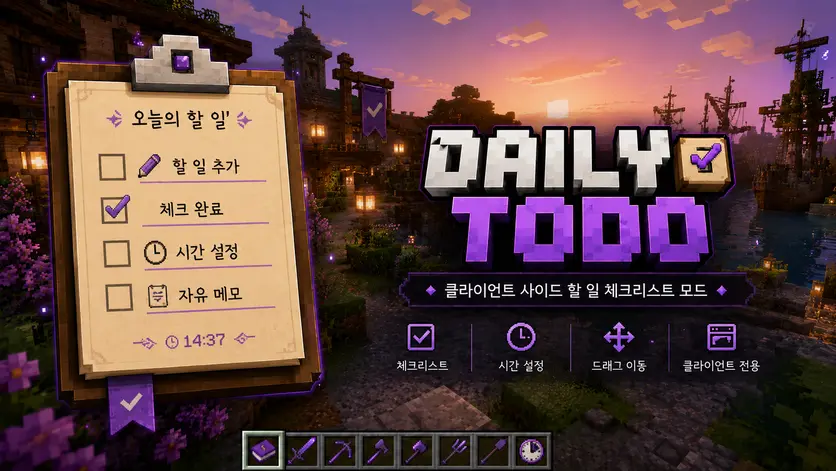
Daily TODO
Daily TODO is a lightweight client-side Minecraft mod that lets you keep track of your daily tasks directly on your screen.
It works like a small in-game memo pad or checklist.
You can add your own daily routines, set optional deadlines, check completed tasks, and move the overlay freely by dragging it while a mouse cursor is available.
✨ Features
- 📝 Add your own daily TODO items
- ✅ Click checkboxes to mark tasks as completed
- 🕒 Optional deadline support
- ⏰ Real-time clock display
- 🖱️ Drag the overlay directly on screen
- 🧹 Delete completed tasks
- 🌐 English and Korean language support
- 🎮 Client-side only
🖱️ How to use
- Press M to open the Daily TODO screen.
- Add a task name.
- Optionally enter a deadline using 24-hour format, such as
1500. - Click the checkbox to mark a task as completed.
- Hover over shortened text to view the full task.
- Drag the overlay while a mouse cursor is available, such as when chat or another GUI screen is open.
📌 Notes
This mod does not automatically sync with server quests, missions, or custom server systems.
It is designed as a simple personal checklist for players who want to remember daily routines such as:
- Daily quests
- Any custom task you want to track
한국어 설명
Daily TODO는 마인크래프트 화면 위에 매일 할 일을 기록하고 체크할 수 있는 가벼운 클라이언트 전용 TODO 오버레이 모드입니다.
메모장이나 체크리스트처럼 사용할 수 있으며, 서버 시스템과 자동으로 연동되지 않아도 사용자가 원하는 루틴을 직접 등록해서 관리할 수 있습니다.
✨ 주요 기능
- 📝 원하는 할 일 직접 등록
- ✅ 체크박스 클릭으로 완료 처리
- 🕒 선택적 마감 시간 입력
- ⏰ 실시간 시간 표시
- 🖱️ 오버레이 직접 드래그 이동
- 🧹 완료 항목 삭제
- 🌐 한국어 / 영어 지원
- 🎮 클라이언트 전용 모드
🖱️ 사용 방법
- M 키를 눌러 Daily TODO 설정 화면을 엽니다.
- 할 일 이름을 입력합니다.
- 필요하면
1500같은 24시간제 형식으로 마감 시간을 입력합니다. - 체크박스를 클릭하면 완료 처리됩니다.
- 생략된 문구에 마우스를 올리면 전체 문구를 확인할 수 있습니다.
- 채팅창이나 GUI 화면처럼 마우스 커서가 보이는 상태에서 오버레이를 드래그해 위치를 조정할 수 있습니다.
📌 참고
이 모드는 서버의 의뢰, 퀘스트, 미션 시스템과 자동 연동되지 않습니다.
대신 사용자가 직접 원하는 루틴을 기록하는 개인용 체크리스트 모드입니다.
예시:
- 오늘 할 일
- 기타 개인 루틴
常见问题
Daily TODO 支持哪些 Minecraft 版本?
Daily TODO 支持 Minecraft Java 版 1.21.4,可用的加载器:Fabric。下载时注意选择和你游戏版本一致的文件。
Daily TODO 怎么安装?
先用 PCL2 或 HMCL 启动器安装对应版本的 Fabric,再把下载的 .jar 文件放进游戏目录的 mods 文件夹,重新启动游戏即可。开启了版本隔离的,mods 文件夹在 versions/版本名 下面。运行环境:仅客户端。
Codeboy 的其他作品
查看全部 →
Count Easy
An unofficial client-side utility mod for DdingTycoon that automatically counts container items and displays totals, prices, and server-specific information in a clean overlay. 띵타이쿤을 위한 비공식 클라이언트 편의성 모드로, 컨테이너의 아이템을 자동 계산하고 개수·가격·서버 전용 정보를 깔끔한 오버레이로 표시합니다

Grid Easy
A lightweight 3D grid overlay for precise building, alignment, and per-axis spacing control. 정밀한 건축과 축별 간격 조절을 위한 가볍고 최적화된 3D Grid Overlay 모드입니다.

Build Blueprint Preview
A client-side building helper that shows a blue blueprint-style preview of where your held block will be placed. 블록 설치 위치를 파란 청사진 오버레이로 미리 확인하세요!
评论
登录后评论和评分