
介绍
About the Mod Name
The name “Custom Attack” may give the impression that it modifies vanilla village raids.
In fact, this mod does not alter the mobs or waves of vanilla raids; instead, it provides an independent custom raid system. It is closer to “custom combat events.”
How to Use
The editor requires command permissions. Enable cheats in single‑player, or have administrator privileges on a server.
Enter the following command to open the manager:
“`text
/custom_attack editor
“`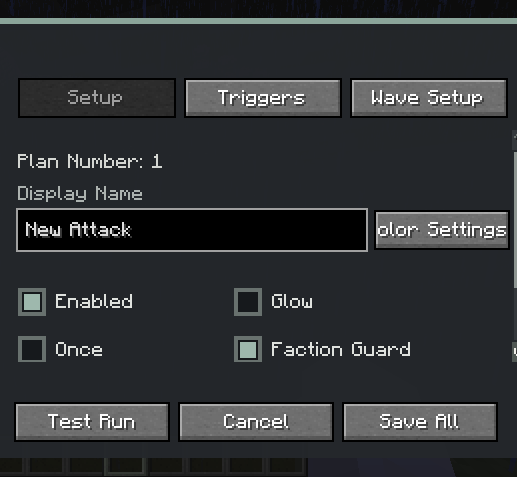
After opening:
1. Click “New” in the lower‑left corner to create a raid plan.
2. In “Basic Settings”, fill in the display name, and set enabled, glowing, trigger once, same‑team protection, attack target, and color.
3. In “Trigger Conditions”, add trigger methods, and set the target, match mode, probability, and cooldown.
4. In “Wave Arrangement”, add waves, and set preparation time, timeout, spawn radius, mobs, NBT, and count.
5. For friendly mobs or those without melee behaviour, enable “Melee” to make them actively chase and attack players.
6. Click “Save All” to save the configuration to the current world.
7. Click “Test Run” to immediately test the current raid.
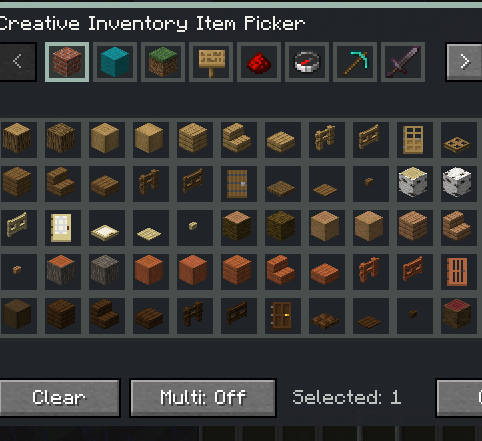
Mobs, items, blocks, effects, biomes, dimensions, and advancements can be selected via visual lists, or you may enter the registry name directly. Mobs and some trigger targets support NBT input.
Attack Target
Each raid can set the target selection method for its mobs:
– Triggering player
– Nearest player
– Keep the mob’s original AI
“Force Melee” allows friendly mobs such as chickens to gain chasing and attacking capabilities, and can also supplement modded mobs that lack conventional melee behaviour.
When “Same‑Team Protection” is enabled, mobs spawned by the same raid will not target or damage each other. This protection also handles friendly fire from melee, projectiles, area effects, and certain summoned entities.
Trigger Conditions
Currently supported:
– Kill a specified mob
– A specified mob’s health drops below a certain percentage
– Player’s health drops below a certain percentage
– Gain a specified potion effect
– Right‑click with a specified item
– Obtain a specified item
– Break a specified block
– Place a specified block
– Interact with a specified block
– Interact with a specified mob
– Enter a specified biome
– Enter a specified dimension
– Complete a specified advancement
A raid can have multiple conditions, and can be set to “match any” or “match all”.
Waves and Health Bar
Each raid can contain multiple waves. Each wave can be independently configured with:
– Preparation time
– Combat timeout
– Spawn radius
– Mob type(s)
– Mob count
– Entity NBT
– Force Melee
When a raid starts, a boss health bar similar to vanilla raids and a preparation progress bar are displayed. After a player kills a raid mob for the first time, the health bar shows the current wave and remaining count.
Text supports precise RGB/HEX colours, and the boss health bar supports seven vanilla preset colours.
Management Commands
“`text
/custom_attack editor
“`
Opens the visual manager.
“`text
/custom_attack start <plan ID>
“`
Immediately starts the specified raid. Plan IDs are automatically generated in list order, e.g. `1`, `2`, `3`.
“`text
/custom_attack stop
“`
Stops the ongoing raid for the current player and clears all mobs spawned by that raid.
“`text
/custom_attack reset_once
“`
Resets the current player’s “trigger once” records, allowing related raids to be triggered again.
The above commands require permission level 2.
Main Features
– Custom waves, mobs, counts, and entity NBT
– Supports modded mobs and special bosses
– Multiple trigger conditions with any/all matching
– Gives friendly mobs forced melee capability
– Same‑team target and friendly fire protection
– Custom text colours with RGB/HEX
– Optional mob glowing, item consumption, and trigger‑once
– Supports visual lists for mobs, items, blocks, effects, biomes, dimensions, and advancements
常见问题
Custom Attack 支持哪些 Minecraft 版本?
Custom Attack 支持 Minecraft Java 版 1.20.1–1.21.1,共 2 个版本,可用的加载器:Forge / NeoForge。下载时注意选择和你游戏版本一致的文件。
Custom Attack 怎么安装?
先用 PCL2 或 HMCL 启动器安装对应版本的 Forge / NeoForge,再把下载的 .jar 文件放进游戏目录的 mods 文件夹,重新启动游戏即可。开启了版本隔离的,mods 文件夹在 versions/版本名 下面。
Kuzhizaizheli 的其他作品
查看全部 →
Find me
Find Me 是一个用于存储、召唤和管理生物与载具的模组。

Starter Cabin
Starter Cabin 是一款 Minecraft 模组,可让你保存自己建造的建筑,并在每个新世界的出生点附近自动放置。

Inner Voice
Inner Voice 是一个模组,当你与指定生物战斗或靠近它们时,会在世界中显示漂浮的打字机风格“内心独白”文字,还可以为每个生物分配带有同步歌词/字幕的自定义背景音乐。

Building Blueprint
Building Blueprint 允许玩家将建筑保存为蓝图物品,在世界中预览并旋转预览,之后再放置保存的建筑。
评论
登录后评论和评分