
Create: Larger Recipe Gauges
Automate Mechanical Crafting recipes up to 9×9 with the two new Factory Gauges. Easy crushing wheel crafting automation!
截图
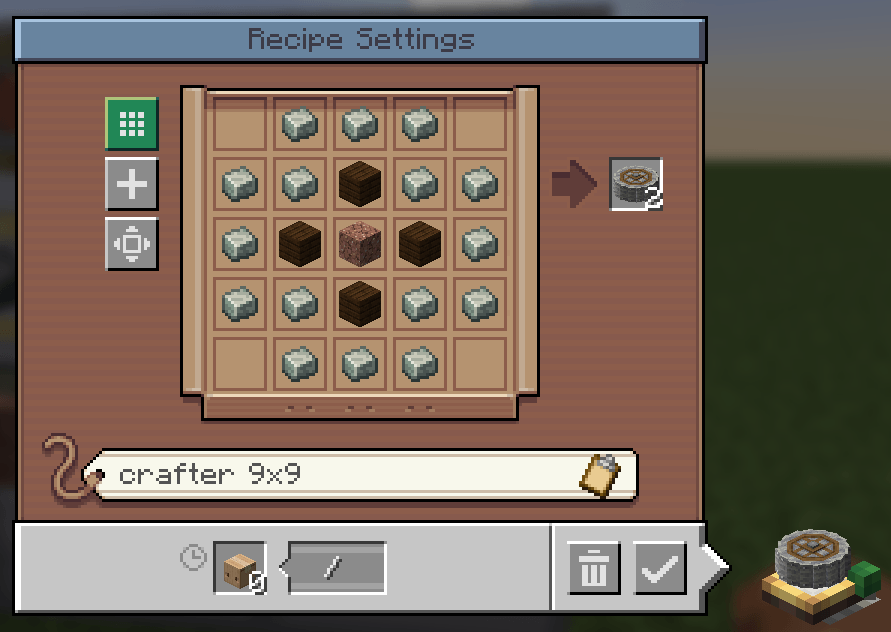
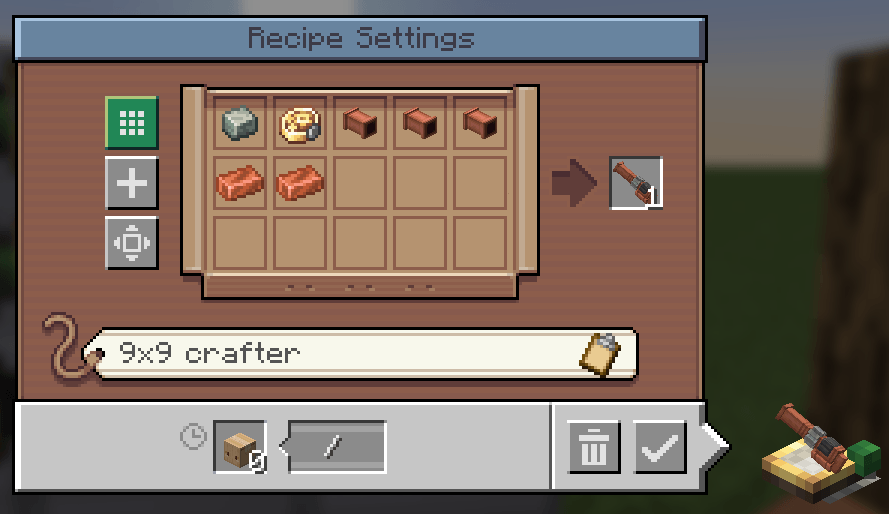
介绍
An addon for Create

Create’s Factory Gauge is built around a 3×3 recipe grid. That limits the Mechanical Crafting recipes you can automate with packages, even when your factory has room for a larger crafter array.
Create: Larger Recipe Gauges adds two upgradeable gauges: the Expanded Factory Gauge for recipes up to 6×6 and the Industrial Factory Gauge for recipes up to 9×9. They use Create’s existing Factory Gauge block and interface, so you can set up package-based Mechanical Crafting with larger recipes.

Larger gauges let you automate larger Mechanical Crafting recipes through Create’s package delivery system.
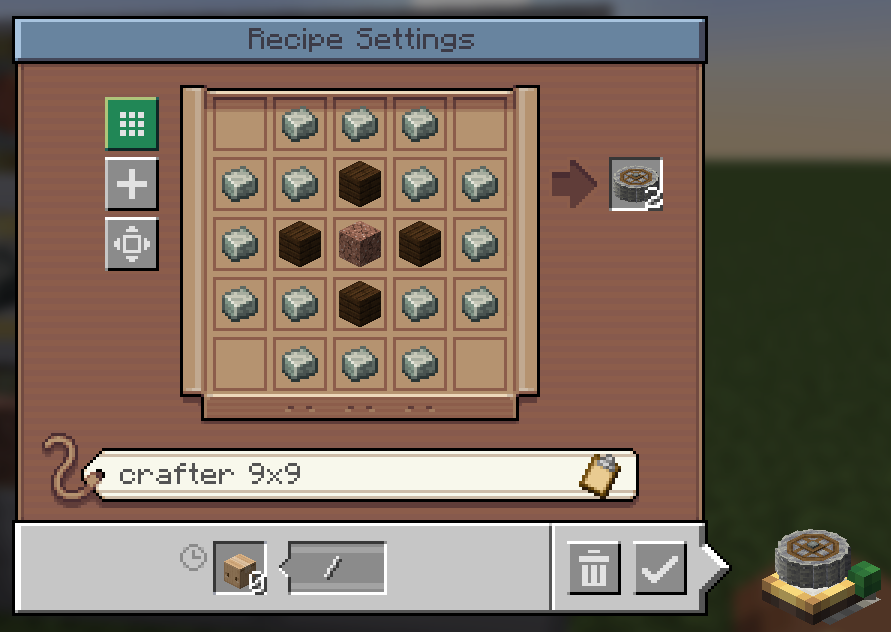
Expanded Factory Gauge
Configure Mechanical Crafting recipes up to 6×6. Craft it by combining two Create Factory Gauges; the recipe is shapeless.
- Use the same gauge interface to choose an output and arrange recipe ingredients.
- It keeps Create’s original Factory Gauge available with its original behavior.
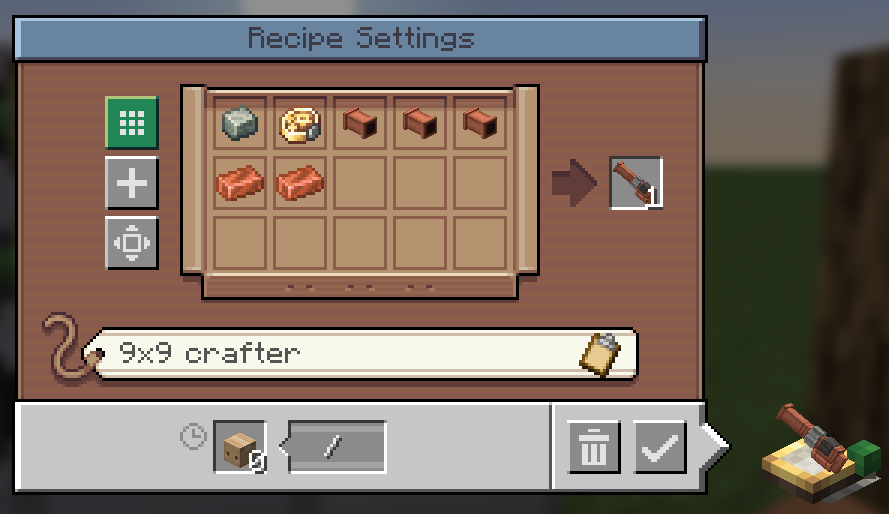
Industrial Factory Gauge
Configure Mechanical Crafting recipes up to 9×9. Craft it by combining two Expanded Factory Gauges; the recipe is shapeless.
- Use it for larger patterns, including recipes with empty spaces between ingredients.
- Your connected Mechanical Crafter array can be larger than the recipe pattern.

- Craft a gauge: combine two Create Factory Gauges for an Expanded Factory Gauge, or two Expanded Factory Gauges for an Industrial Factory Gauge.
- Set up the recipe: choose the output item in the gauge and connect ingredient gauges. Open the recipe settings and enable automatic arrangement for a matching Mechanical Crafting recipe.
- Build and connect the crafters: assemble a powered Mechanical Crafter array large enough for the recipe. Use a wrench to connect the crafters from behind.
- Deliver packages: attach a Packager to the connected crafters, set a delivery address in the gauge, and route packages with that address to the Packager.
Heads up: the crafter array does not need to match the recipe’s exact shape. A 9×9 array can craft a 5×5 recipe, and empty recipe cells stay empty when packages are unpacked.
The mod expands Factory Gauge recipe capacity; it does not add new crafting machines or change the original gauge’s interface.

Install the mod on both the client and server, alongside Create.
- Minecraft 1.21.1 with NeoForge 21.1.236 and Create 6.0.10
- Minecraft 1.20.1 with Forge 47.4.0 and Create 6.0.8

Open an issue on GitHub. Include your Minecraft, loader, Create, and mod versions, plus steps to reproduce the problem. Screenshots of your gauge and crafter setup can help.

Yes. This project is licensed under the GNU Affero General Public License v3.0 (AGPL-3.0). See LICENSE.
For development and technical documentation, see the development guide and documentation index. See the CHANGELOG for version history.
常见问题
Create: Larger Recipe Gauges 支持哪些 Minecraft 版本?
Create: Larger Recipe Gauges 支持 Minecraft Java 版 1.20.1–1.21.1,共 2 个版本,可用的加载器:Forge / NeoForge。下载时注意选择和你游戏版本一致的文件。
Create: Larger Recipe Gauges 怎么安装?
先用 PCL2 或 HMCL 启动器安装对应版本的 Forge / NeoForge,再把下载的 .jar 文件放进游戏目录的 mods 文件夹,重新启动游戏即可。开启了版本隔离的,mods 文件夹在 versions/版本名 下面。
radaeli 的其他作品
查看全部 →
Create: Copycat Replace!
一键替换伪装者的材质——支持连接方块并兼容Copycats+
Sophisticated Backpacks: Digital Storage Expansion (AE2, RS, SCC)
将你的精妙背包连接到你的数字存储!支持应用能源2(AE2)、精致存储(RS)、Super Cool Calculator(SCC)和 Tom's Simple Storage。

[DEPRECATED] – Create: Stock Market – Updated Numismatics
已弃用 - 请使用官方模组 - 这个很快会被删除。
Simply Light: Smart!
An addon for Simply Light that adds redstone-dimmable lights and Smart Switch controls for linked lighting networks.
评论
登录后评论和评分