
Cobblemon Ride Expansion
Unlocks riding for every unrideable Pokémon in Cobblemon 1.8.3 with smart stat scaling, updated animations and mount locators, and an emergency glider. Available as Fabric/NeoForge Mod and Datapack+Resourcepack.
截图

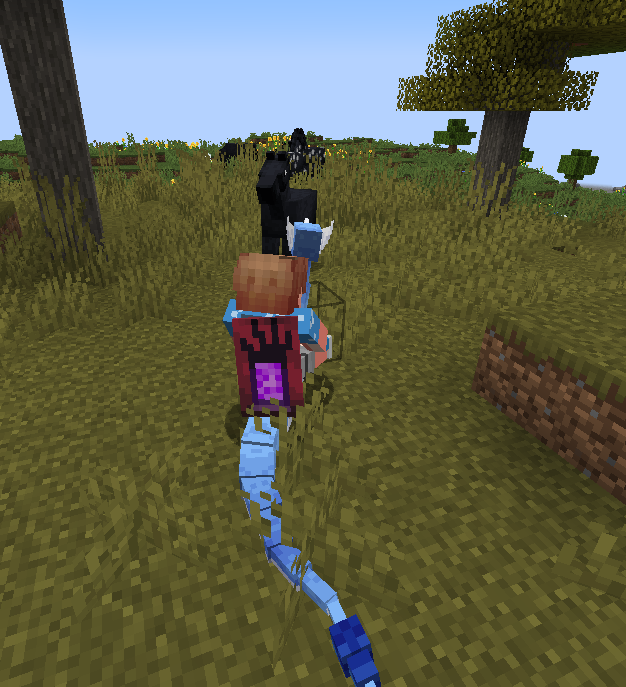
介绍
🚀 Cobblemon Ride Expansion (CRE)
Have you ever wanted to ride Steelix, Torterra, Wailord, Aggron, Mewtwo, or even hop on your favorite starter from day one, only to realize Cobblemon doesn’t have riding enabled for them yet?
Cobblemon Ride Expansion (CRE) unlocks riding for every single unrideable Pokémon in Cobblemon 1.8.1 (~910 species, including Mewtwo and Dragonair), turning the entire Pokédex into your personal mounts! Plus, it includes an essential Emergency Glider (Slow Falling on Dismount) system so you never die from falling when flying at high altitudes.
CRE is available in both Mod format (Fabric & NeoForge) and Datapack + Resource Pack format!
✨ Key Features
- 🌟 Ride Every Pokémon (~910 Species Unlocked):
- Fully expands your mounts across land, air, and water.
- Non-destructive: uses Cobblemon’s official
species_additionssystem, preserving official rideable Pokémon (Charizard,Dragonite,Lapras, etc.) completely untouched. - Corrects official model locators (e.g.
Dragonair,Blaziken) to guarantee flawless movement synchronization.
- 🧠 Smart Dynamic Riding Stats:
- Riding stats aren’t arbitrary—they scale naturally based on each Pokémon’s official base stats:
- Speed & Jump: Scaled according to base Speed.
- Stamina: Scaled according to base HP.
- Acceleration: Scaled according to Attack and Speed.
- Terrain Adaptation: Flying types and winged Pokémon fly in the air (
AIR) with ambient wind audio; Water types cruise seamlessly in liquids (LIQUID) with splash audio; all others traverse smoothly acrossLAND.
- 🪂 Built-in Emergency Glider (Slow Falling on Dismount):
- Ever accidentally pressed Shift in the sky, or ran out of mount stamina 100 blocks above ground?
- CRE automatically applies Slow Falling (6 seconds) and plays a gentle wind glide sound effect whenever you dismount in the air, saving your life and gear!
- Powered by zero-lag vanilla Minecraft predicates.
📦 Choose Your Installation Method
Option A: Mod Format (Recommended – Easiest Setup)
No need to manage separate datapacks or resource packs. Just download the .jar for your mod loader and drop it into your mods/ folder:
- Fabric: Download
CRE-v0.0.1-Fabric.jar - NeoForge: Download
CRE-v0.0.1-NeoForge.jar - Everything works out of the box with zero configuration!
Option B: Datapack & Resource Pack (For Vanilla / Modless Server Admins)
If you prefer running manual packs or need a pure server-side datapack:
- Datapack (
CRE-Datapack-v0.0.1.zip):
- Place into
saves/<yourworld>/datapacks/(or serverworld/datapacks/). - In-game, run
/reload.
- Resource Pack (
CRE-ResourcePack-v0.0.1.zip):
- Place into
.minecraft/resourcepacks/and activate it in Options -> Resource Packs. - Provides seat locators for all 963 Pokémon models so your character stays perfectly in sync with your mount without visual desync!
🐎 Pairs Perfectly with CRSS
Combine Cobblemon Ride Expansion (CRE) with Cobblemon Ride Speed Stabilizer (CRSS) for the ultimate server-friendly riding experience:
- CRE gives you unlimited riding freedom across all 1000+ Pokémon.
- CRSS prevents chunks from lagging the server by stabilizing top flying and swimming speeds.
🧩 Compatibility & Requirements
- Minecraft Version:
1.21.1 - Mod Requirement: Cobblemon 1.8.1+
- Supported Loaders: Fabric, NeoForge, or Vanilla (Datapack mode)
💖 Support the Developer
If this project makes your Cobblemon adventures more enjoyable, feel free to support future updates:
常见问题
Cobblemon Ride Expansion 支持哪些 Minecraft 版本?
Cobblemon Ride Expansion 支持 Minecraft Java 版 1.21–1.21.1,共 2 个版本,可用的加载器:Fabric / NeoForge。下载时注意选择和你游戏版本一致的文件。
Cobblemon Ride Expansion 怎么安装?
先用 PCL2 或 HMCL 启动器安装对应版本的 Fabric / NeoForge,再把下载的 .jar 文件放进游戏目录的 mods 文件夹,重新启动游戏即可。开启了版本隔离的,mods 文件夹在 versions/版本名 下面。运行环境:客户端 / 服务端。

评论
登录后评论和评分