
CraftPilot: AI Control
Let AI assistants like Claude see and control your Minecraft client via MCP: screenshots, GUI, commands, movement.
介绍
CraftPilot: AI Control
Give your AI assistant eyes and hands inside Minecraft. CraftPilot lets AI assistants such as Claude see and control your Minecraft client through the Model Context Protocol (MCP).
Fabric 1.21.1 | Client-side | NeoForge / Forge planned | Author: fr4me | License: MIT
What it does
CraftPilot runs a small local API inside your game client and, together with the craftpilot-mcp bridge, exposes it to MCP-capable AI assistants. The AI can:
- Take screenshots and look at what you see
- Read and press GUI buttons on any screen (menus, inventories, death screen, mod screens)
- Press keys and type text
- Run commands and read their output
- Move, look around, jump, use items and attack
- Inspect your inventory and select hotbar slots
- List, open, create and leave singleplayer worlds
Use cases
- Test your own mods and modpacks automatically
- Reproduce bug reports step by step
- Build with commands while the AI does the typing
- Make screenshots for mod pages
Safety
- Listens only on 127.0.0.1 (loopback), never on your network
- Protected by a secret token generated on first start (reset with
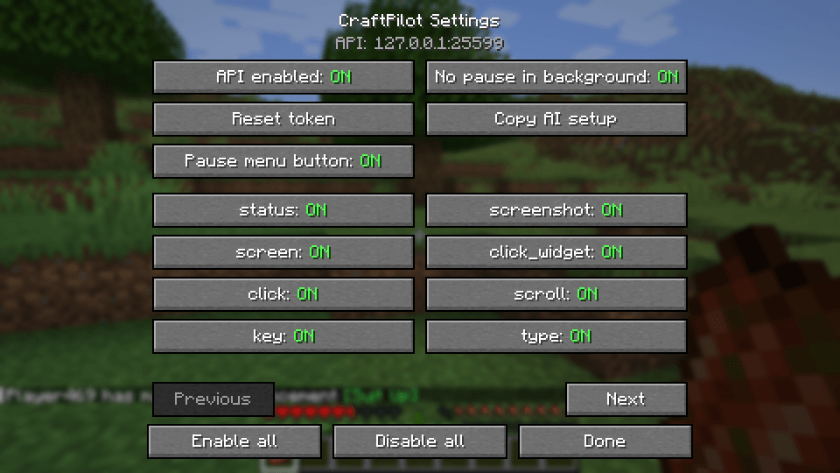
/craftpilot token reset) - Every command can be toggled off in the settings, with tooltips explaining each one
- A master switch turns the whole API off
- The mod itself sends nothing to the internet
- Meant for singleplayer and testing. Not for public servers. Do not use it to cheat.
Setup in 3 steps
- Install the mod and Fabric API into your
modsfolder. - Install Node.js (https://nodejs.org).
- Add this to your
claude_desktop_config.json:
{"mcpServers":{"craftpilot":{"command":"npx","args":["-y","github:laur221/craftpilot"]}}}Tip: run /craftpilot setup in game, or press the Copy AI setup button, to copy this config to your clipboard. Then restart Claude Desktop.
Settings
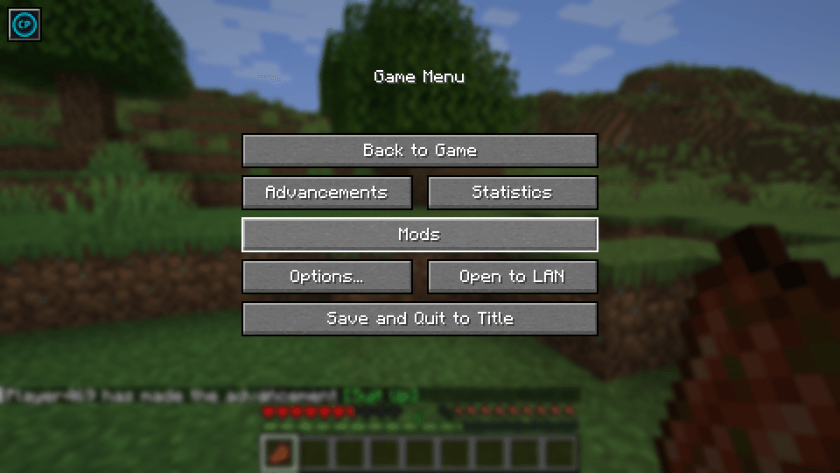
- Click the icon button in the top-left of the pause menu
- Or open the config screen through Mod Menu
- Commands:
/craftpilot config,/craftpilot setup,/craftpilot status,/craftpilot token reset
Tools
| Tool | Description |
|---|---|
mc_status |
Client state: world, screen, player, window, FPS, version |
mc_screenshot |
Take a screenshot and return it as an image |
mc_screen |
List widgets on the current screen with labels and coordinates |
mc_click_widget |
Click a button or widget by label or id |
mc_click |
Click at GUI coordinates |
mc_scroll |
Scroll the mouse wheel at GUI coordinates |
mc_key |
Press a key by name |
mc_type |
Type text into the focused field |
mc_command |
Run a slash command and return its output |
mc_chat |
Send a chat message |
mc_chat_log |
Read the last chat lines |
mc_move |
Hold movement keys for N ticks |
mc_look |
Set or adjust player rotation |
mc_hotbar |
Select a hotbar slot |
mc_use |
Hold use (right-click) for N ticks |
mc_attack |
Hold attack (left-click) for N ticks |
mc_inventory |
List inventory contents |
mc_world |
List, open, create or leave singleplayer worlds |
mc_respawn |
Respawn and close the death screen |
mc_capabilities |
Show which tools are enabled or disabled in settings |
FAQ
Does it work with AI clients other than Claude? Yes, any client that supports MCP servers over stdio can use craftpilot-mcp.
Which languages are supported? English and Russian.
Does it work on servers? It is client-side and meant for singleplayer and testing. Do not use it on public servers or to cheat.
Is anything sent to the internet? Not by the mod. Your AI client talks to its own provider as usual.
CraftPilot is not affiliated with Mojang, Microsoft or Anthropic.
常见问题
CraftPilot: AI Control 支持哪些 Minecraft 版本?
CraftPilot: AI Control 支持 Minecraft Java 版 1.21.1,可用的加载器:Fabric / NeoForge。下载时注意选择和你游戏版本一致的文件。
CraftPilot: AI Control 怎么安装?
先用 PCL2 或 HMCL 启动器安装对应版本的 Fabric / NeoForge,再把下载的 .jar 文件放进游戏目录的 mods 文件夹,重新启动游戏即可。开启了版本隔离的,mods 文件夹在 versions/版本名 下面。
SeishiroNagi 的其他作品
查看全部 →
MemGuard
通过缓存 NBT 字符串、监控内存使用情况,并在最佳时机触发垃圾回收,降低大型整合包和服务器的 RAM 占用。

OptimizeMod
通过降低远处实体的刻度更新频率、暂停生物 AI 并限制粒子效果,减少服务器卡顿。

StackRefill
堆叠补充会自动从你的物品栏中替换已用完的堆叠、损坏的工具、盔甲和副手物品,保持快捷栏就绪而不打断游戏

Outlined Wools
一个简单的资源包,为所有羊毛方块添加清晰的轮廓,提升可见度和建造精度。
评论
登录后评论和评分