
Content Creator Integration
Do practically anything you want when a stream event happens. Subs/cheers/tips/hosts/etc. Anything.
截图
介绍
What is Content Creator Integration
Content Creator Integration (CCI) bridges the gap between your stream and Minecraft. It takes the information from your stream, and passes it to you, for you to do whatever you want, such as:
- A message in chat when someone subscribes
- An angry miniature of the streamer raiding you, per viewer
- An explosive flying pig for every 100 bits
- And many many more, limited by only your imagination!
Why pick CCI?
1. Support for multiple services
CCI currently supports:
We also used to support Mixer Chat, RIP Mixer 🙁
2. Detailed, In-Depth Documentation
CCI is fully documented, with in-depth guides and instructions on how to do many frequently accessed functions. It is also community-contributed, which allows the community to give back and guide others.
Documentation is available here.
3. Extensive Editor
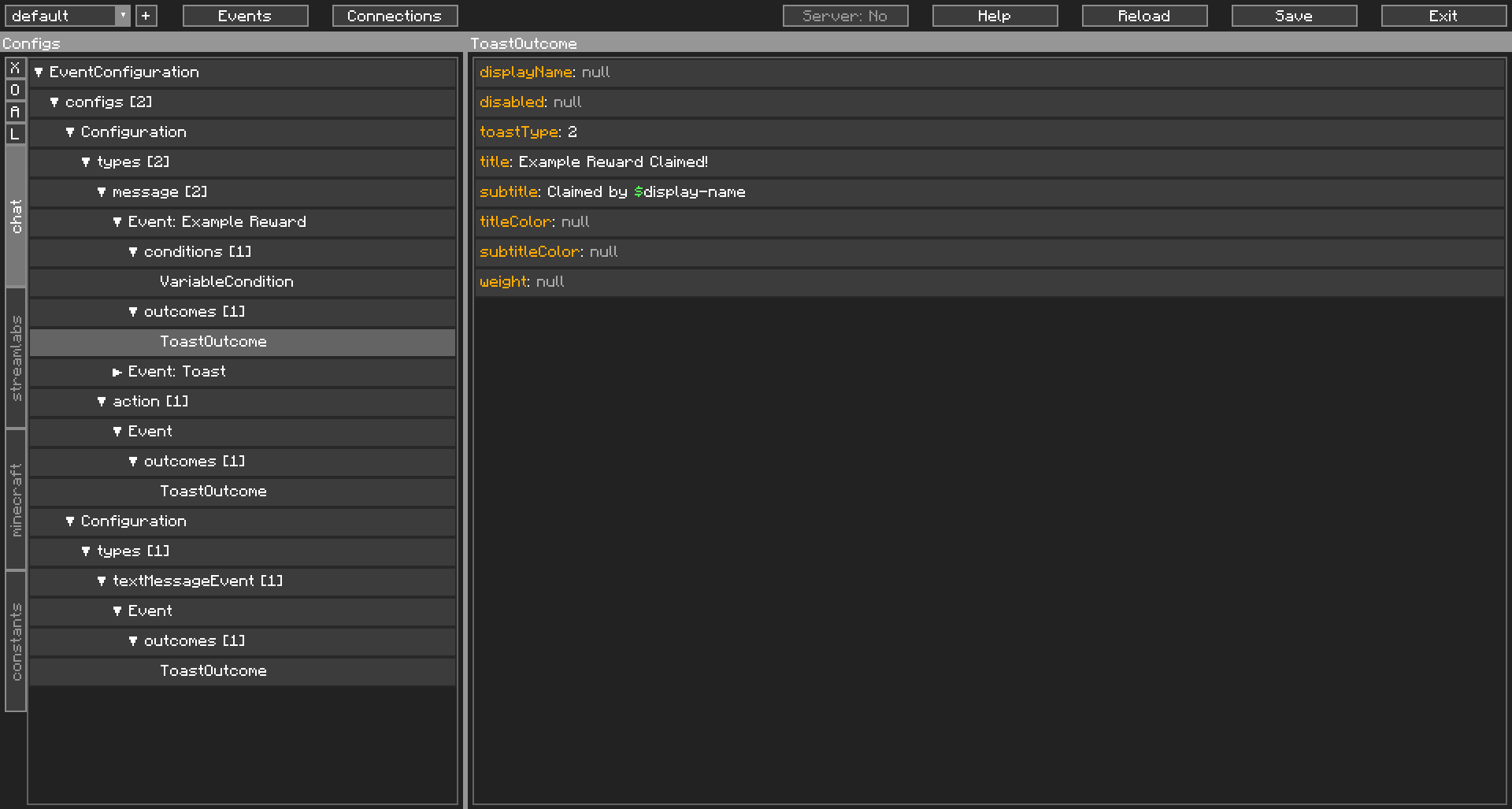
No scripting required! CCI has a detailed and extensive Editor for you to edit the configs it runs off:
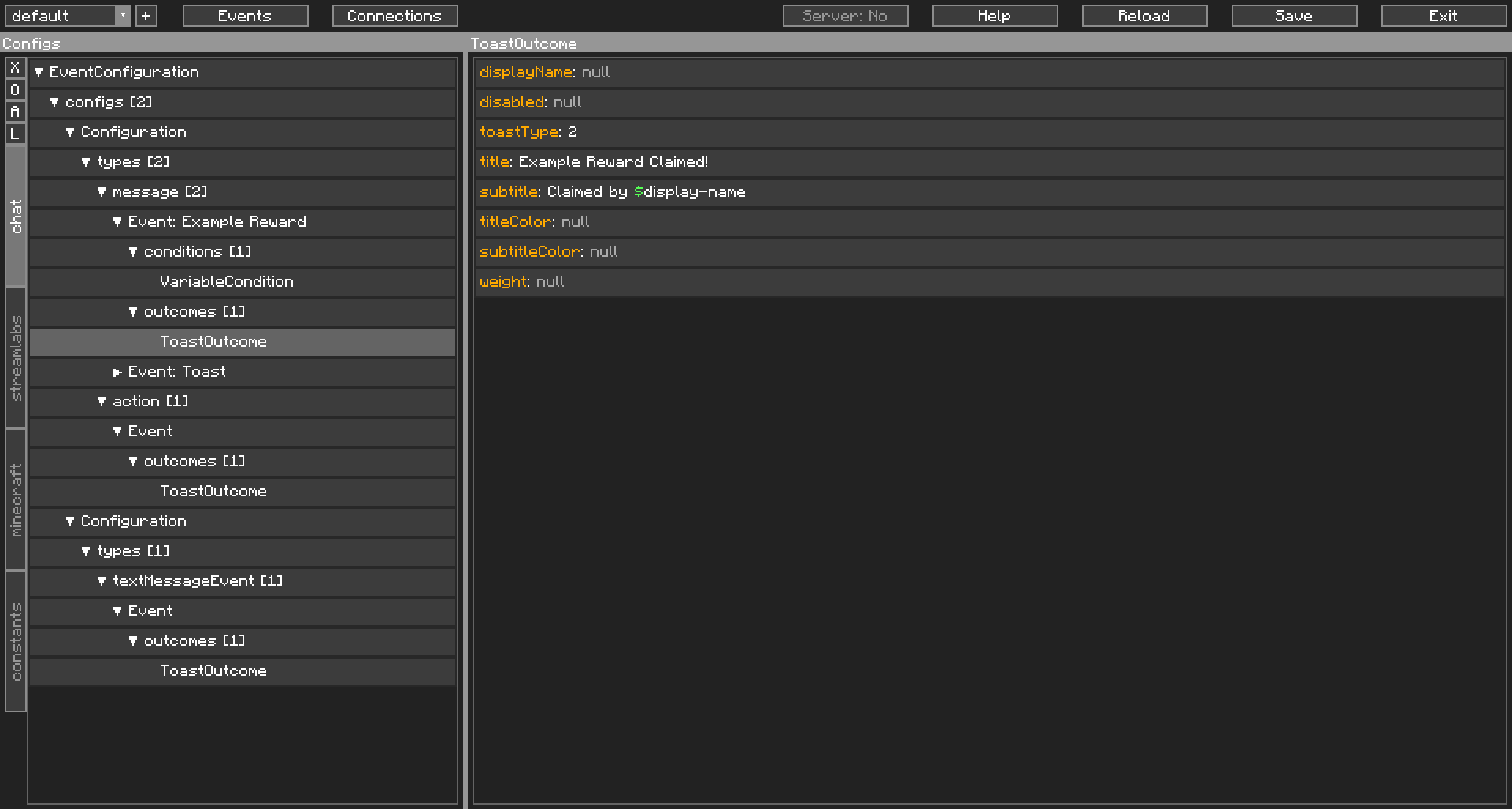
Work then and there, save, and your changes are immediately applied. No need to restart the game!
The editor also shows when you are creating invalid objects, so no scratching your head, wondering what went wrong.
4. Server Optional
CCI works entirely on the client. We don’t need to be installed on a server to function, though it would help CCI do more things than usual. CCI has a full suite of client-only outcomes, for times when the server doesn’t have CCI.
Most of the time though, you’ll want to trigger a Command. Even then, CCI’ll send a chat message in your place. All you have to do, is be Opped.
5. All your connection data in one place
As mentioned, CCI works entirely on the client. No putting multiple user’s sensitive information in one config file, on a server in the middle of nowhere.
Multiple streamers could be running CCI on the same server (which also has CCI), and there won’t be any transfer of your sensitive information at all. Your sensitive data stays on your machine, in your client-config. All the server needs to know, is if you’re whitelisted. That is, if the server even has CCI installed at all.
Having Issues?
CCI is complex and thus, complicated. If you’re having issues, feel free to join our Discord server, we’ve a channel specifically for helping with CCI.
Final Note
Many thanks to Wyld, TheMattaBase, Bacon_Donut, darkphan, generikb and Lewdi for testing the mod in its early development stages.
HUGE thanks to Sublimiter and BeefQL for all the issues reported, testing and support for the mod.
This mod uses the Socket.IO Java and Java Websocket Libraries, both of which are licensed under MIT.
I do not stream as a main source of income and I wrote this mod for streamers to use for free. If you are happy with how CCI has shaped your stream, consider Donating.
常见问题
Content Creator Integration 支持哪些 Minecraft 版本?
Content Creator Integration 支持 Minecraft Java 版 1.16.3–1.21.5,共 21 个版本,可用的加载器:Fabric / Forge / NeoForge。下载时注意选择和你游戏版本一致的文件。
Content Creator Integration 怎么安装?
先用 PCL2 或 HMCL 启动器安装对应版本的 Fabric / Forge / NeoForge,再把下载的 .jar 文件放进游戏目录的 mods 文件夹,重新启动游戏即可。开启了版本隔离的,mods 文件夹在 versions/版本名 下面。运行环境:客户端和服务端都要装。
iChun 的其他作品
查看全部 →
iChunUtil
iChun 的模组共用的前置库

Ding (Forge)
当 Minecraft 加载完成并进入主菜单、连接到服务器或完成资源重载时,播放可配置的音效。

Portal Gun
这个模组为 Minecraft 添加了传送枪,以及其他多种与传送门相关的内容!

Hats
第一届ModJam亚军,为玩家和生物添加可解锁的帽子
评论
登录后评论和评分