
Container Data Dumper
Copy container and inventory data as Data Components directly to your clipboard - works with any container block or entity in Minecraft 1.20-1.21+
截图
介绍
Container Data Dumper



Concept
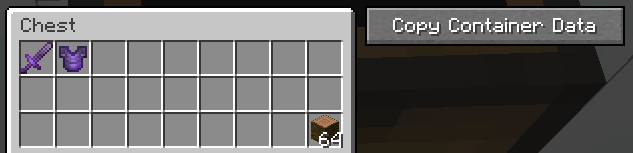
This mod allows you to easily copy the contents of containers (like Chests, Barrels, Shulker Boxes, etc.) in the form of Data Components (SNBT) directly to your clipboard. It adds a convenient “Copy” button to the container UI, making it perfect for developers, technical players, or anyone who needs to extract inventory data.
The mod works with any block or entity that has a container inventory – including Chests, Barrels, Shulker Boxes, Hoppers, Furnaces, Brewing Stands, Chest Boats, Hopper Minecarts, and more.
Version Compatibility & Data Format
Supported Versions: Minecraft 1.20 – 1.21.11
⚠️ Important Note on Data Format
This mod always outputs item data using the Data Components format (introduced in Minecraft 1.20.5).
- If you are playing on Minecraft 1.21+, this is the standard format.
- If you are playing on Minecraft 1.20 – 1.20.4 (in which NBT is the standard format), the mod will still output Data Component format (it does NOT convert from the older NBT structure – it directly generates the modern format).
This ensures that the output is consistent and future-proof, regardless of which version you are currently using to capture the data.
Note on Slot Indices: This mod uses Storage/NBT indices (not GUI indices) for slot numbers. This is the correct format for use in commands, datapacks, and NBT data. For more information about the difference between GUI and Storage indices, see the Slot Index Documentation.
Output Example
Here is an example of what the copied data looks like (Data Components format):
[
  {
    "slot": 0,
    "item": {
      "id": "minecraft:netherite_sword",
      "count": 1,
      "components": {
        "minecraft:enchantments": {
          "minecraft:unbreaking": 3
        }
      }
    }
  },
  {
    "slot": 1,
    "item": {
      "id": "minecraft:netherite_chestplate",
      "count": 1,
      "components": {
        "minecraft:enchantments": {
          "minecraft:unbreaking": 3
        }
      }
    }
  },
  {
    "slot": 26,
    "item": {
      "id": "minecraft:jungle_log",
      "count": 1
    }
  }
]
Usage Tip for 1.20.5+
IMPORTANT: Due to chat character limitations, the data copied by this mod is often too long to be pasted directly into the chat window when used in commands.
You typically MUST use a Command Block to execute commands with this data.
Usage Example
To give yourself a chest containing the dumped data, use the following syntax in a command block:
/give @a chest[container=<PASTE_YOUR_COPIED_DATA_HERE>]This images may also help:
This converts to:
[
  {
    "slot": 0,
    "item": {
      "id": "minecraft:netherite_sword",
      "count": 1,
      "components": {
        "minecraft:enchantments": {
          "minecraft:unbreaking": 3
        }
      }
    }
  },
  {
    "slot": 1,
    "item": {
      "id": "minecraft:netherite_chestplate",
      "count": 1,
      "components": {
        "minecraft:enchantments": {
          "minecraft:unbreaking": 3
        }
      }
    }
  },
  {
    "slot": 26,
    "item": {
      "id": "minecraft:jungle_log",
      "count": 64
    }
  }
]
常见问题
Container Data Dumper 支持哪些 Minecraft 版本?
Container Data Dumper 支持 Minecraft Java 版 1.20–1.21.11,共 19 个版本,可用的加载器:Fabric。下载时注意选择和你游戏版本一致的文件。
Container Data Dumper 怎么安装?
先用 PCL2 或 HMCL 启动器安装对应版本的 Fabric,再把下载的 .jar 文件放进游戏目录的 mods 文件夹,重新启动游戏即可。开启了版本隔离的,mods 文件夹在 versions/版本名 下面。运行环境:仅客户端。
HelixCraft 的其他作品
查看全部 →
AFK Utilitys
Advanced AFK management mod for Minecraft Fabric with anti-kick protection, auto-reconnect, safety disconnect, and hunger management

Fabric Packet Logger
Deep packet logging mod for Minecraft Fabric - captures all network traffic with full NBT/Component data

Slot Click Macros
A Minecraft Fabric mod that records and replays inventory click sequences to automate repetitive container interactions.

Crystal per Second HUD
Mod that displays End Crystals destroyed per second (CPS) as an in-game HUD overlay, with full multi-version support via Stonecutter.
评论
登录后评论和评分