Chronicle – Build Timelapse
Records how your builds grow in the background and replays weeks of building as a cinematic timelapse with an orbiting camera. Client-side, works on servers.
截图
介绍
Chronicle – Build Timelapse
Ever wished you had recorded your build from the very beginning? With Chronicle you always have.
Features
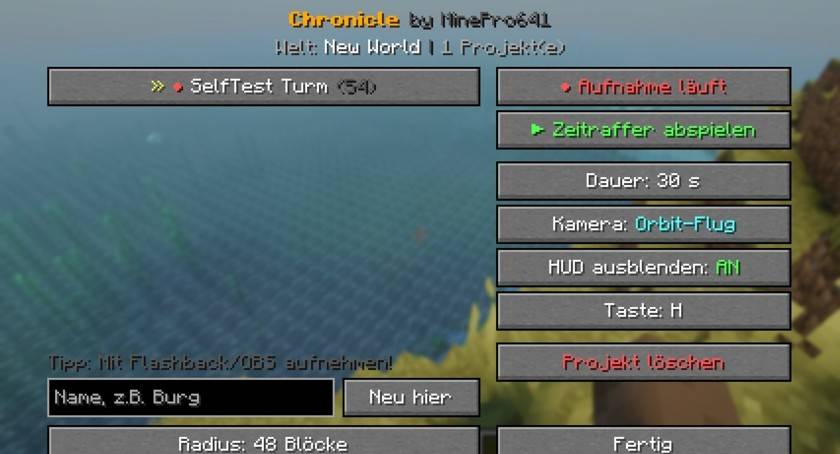
- Stand in your build area, press H and click “Neu hier” (New here) – that’s it. Chronicle quietly records every block change in the area
- Costs no FPS and needs very little storage – only changes are saved, compressed
- Timelapse playback: the area rewinds to the start and rebuilds itself in 10 – 120 seconds with a smooth ease-in/ease-out
- Orbit camera: the camera flies around your build during playback, the HUD is hidden automatically
- Multiple projects per world, adjustable radius (16 – 128 blocks)
- Works in singleplayer and on servers – 100% client-side
- After playback your world looks exactly like before – nothing is changed on the server
Perfect for content creators
Record the playback with Flashback or OBS and you have a ready-made clip for TikTok, YouTube Shorts or your build showcase.
Controls
- H – open Chronicle (during playback: stop)
- Settings also through Mod Menu
Requirements
Fabric Loader. No Fabric API needed. Supported versions: 1.20 – 1.20.6, 1.21 – 1.21.11 and 26.1 (pick the file for your version).
More by MinePro641
Check out my shaders and my other mods ShaderLab (live shader editor) and SmartFPS (adaptive graphics)!
Made by MinePro641
常见问题
Chronicle – Build Timelapse 支持哪些 Minecraft 版本?
Chronicle – Build Timelapse 支持 Minecraft Java 版 1.20–26.1.2,共 22 个版本,可用的加载器:Fabric。下载时注意选择和你游戏版本一致的文件。
Chronicle – Build Timelapse 怎么安装?
先用 PCL2 或 HMCL 启动器安装对应版本的 Fabric,再把下载的 .jar 文件放进游戏目录的 mods 文件夹,重新启动游戏即可。开启了版本隔离的,mods 文件夹在 versions/版本名 下面。
MinePro641 的其他作品
查看全部 →
Shadolimetto
Shadolimetto 是一款轻量且高度优化的光影,通过改进光照、色彩和氛围,让 Minecraft 更加真实;即使在低端设备上也能保持流畅运行。

VEXORA SHADERS
A lightweight minecraft shader

alma shaders
ALMA Shaders** brings vibrant lighting, realistic shadows, reflective water, and cinematic skies to Minecraft.

MinePackPVP
MinePackPVP is a clean and powerful Minecraft PvP texture pack with a bold MinePro-inspired style. Designed for fast combat, clear visuals, and a competitive look—perfect for PvP players.
评论
登录后评论和评分