
介绍
BSP RankUp ranks your players automatically. The more they play, fight and raid, the higher they climb ladders of LuckPerms ranks, and every rung pays out: coins, pieces into the bank, items, kits, a title, anything a command can give. Their ranks show around their name in chat and the tab list (the rank before it, their achievements after it), as pictures if you give them some. Made for the Build Secure Protect server, where Shatter Totems are stolen and defended; works on any Forge 1.20.1 server (or Mohist) with BSP-Core and LuckPerms.
Requires: Minecraft 1.20.1, Forge 47 or newer, Java 17, BSP-Core 1.4.5 or newer, and LuckPerms on the server (the Forge mod, or the Bukkit plugin on Mohist). Needed on the client and the server, in the same version. Optional: BSP-Region Guard (0.6.0 needs BSP-Core 1.4.6 or newer), BSP-Teleport.
Ranks you can see
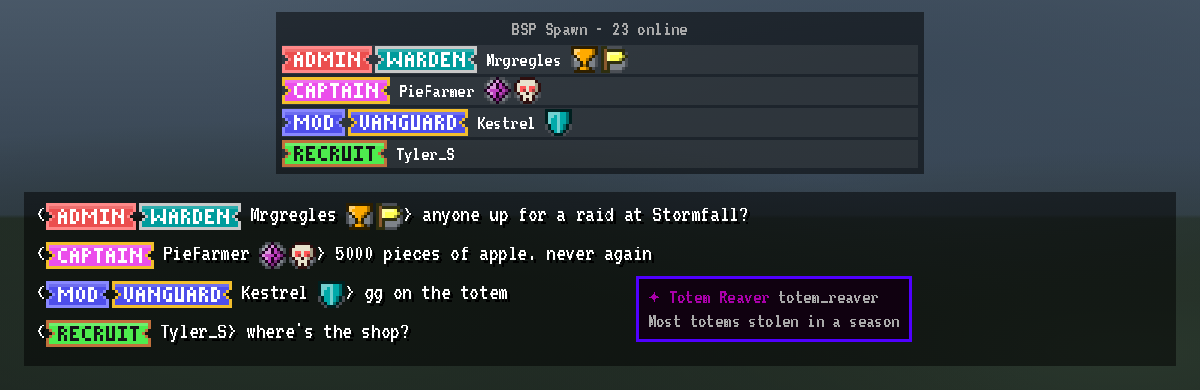
RankUp puts every player’s LuckPerms prefix in front of their name and their suffix after it, in chat and the tab list, in their colours. When LuckPerms is set to show several tags at once (a staff tag, then the ladder rank, then every achievement), all of them show: [Admin] [Warden] name ✦ Totem Reaver.
Give any tag an image (a PNG up to 256 x 64 pixels in the server’s config/bsp_rankup/prefix_images/ folder) and the picture is drawn instead, one line of text high. It works for RankUp’s own titles and for any LuckPerms group’s prefix or suffix, like Admin, Mod or an achievement. Give a tag a short hover note too, such as how an achievement is earned: players read it when they hover the tag in chat. Players get the images when they join; there is nothing to install, and on a network the image only needs to be on one server. The repository’s docs/prefix_images/ has ready-made art for every BSP rank, with the commands that assign it.
How it works
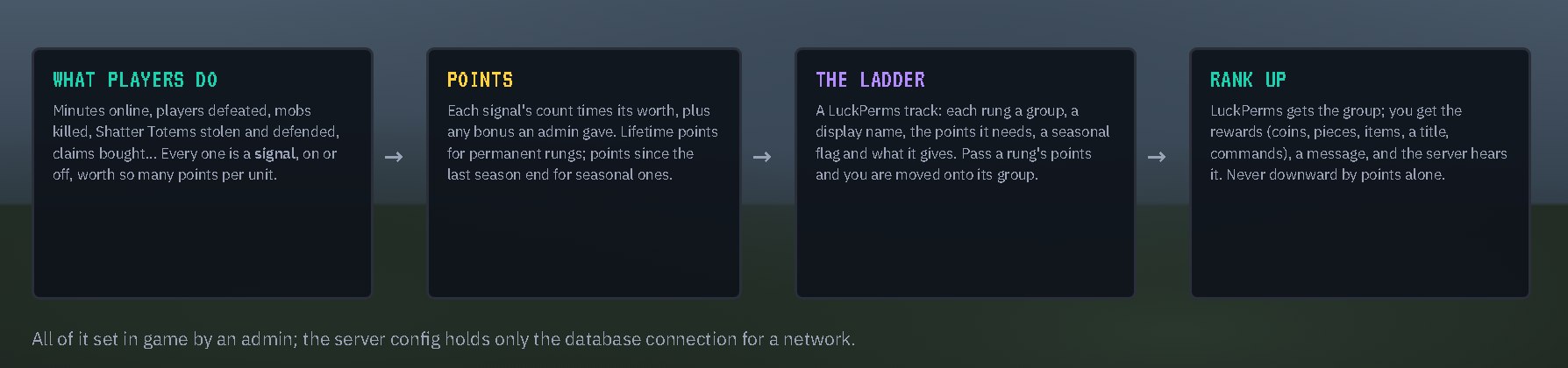
- Signals are what RankUp counts: minutes online, players defeated, mobs killed, Shatter Totems stolen from others, totems defended when someone tried to steal yours, BSP-Core’s season score, claims bought, and more. Each is on or off and worth a number of points per so many units.
- Points add up. Permanent rungs look at lifetime points; seasonal rungs at the points earned since the last season ended.
- Ladders are LuckPerms tracks: each rung is a group, a display name, the points it needs, and what it gives. Run one ladder, or several that each count their own signals (a Playtime ladder for minutes played, a Raider ladder for kills and totems); players climb each one separately.
- Awards are single LuckPerms groups given once their points are reached (“Apple Picker” at 5000 pieces earned), with their own rewards.
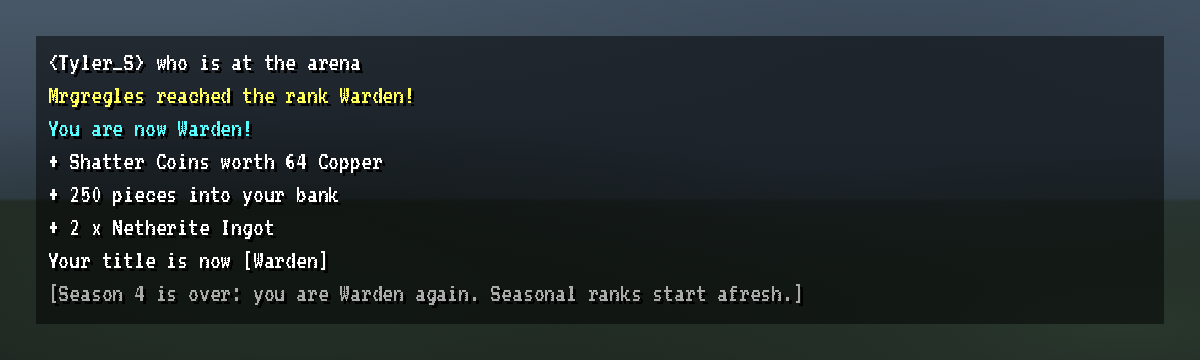
- Rank up: when your points pass a rung, you are moved onto its group, told what you got, and everyone hears about it (only while you’re online, so nobody is announced at a server’s start). Ranks are never taken away because points fell.
For players: your rank screen
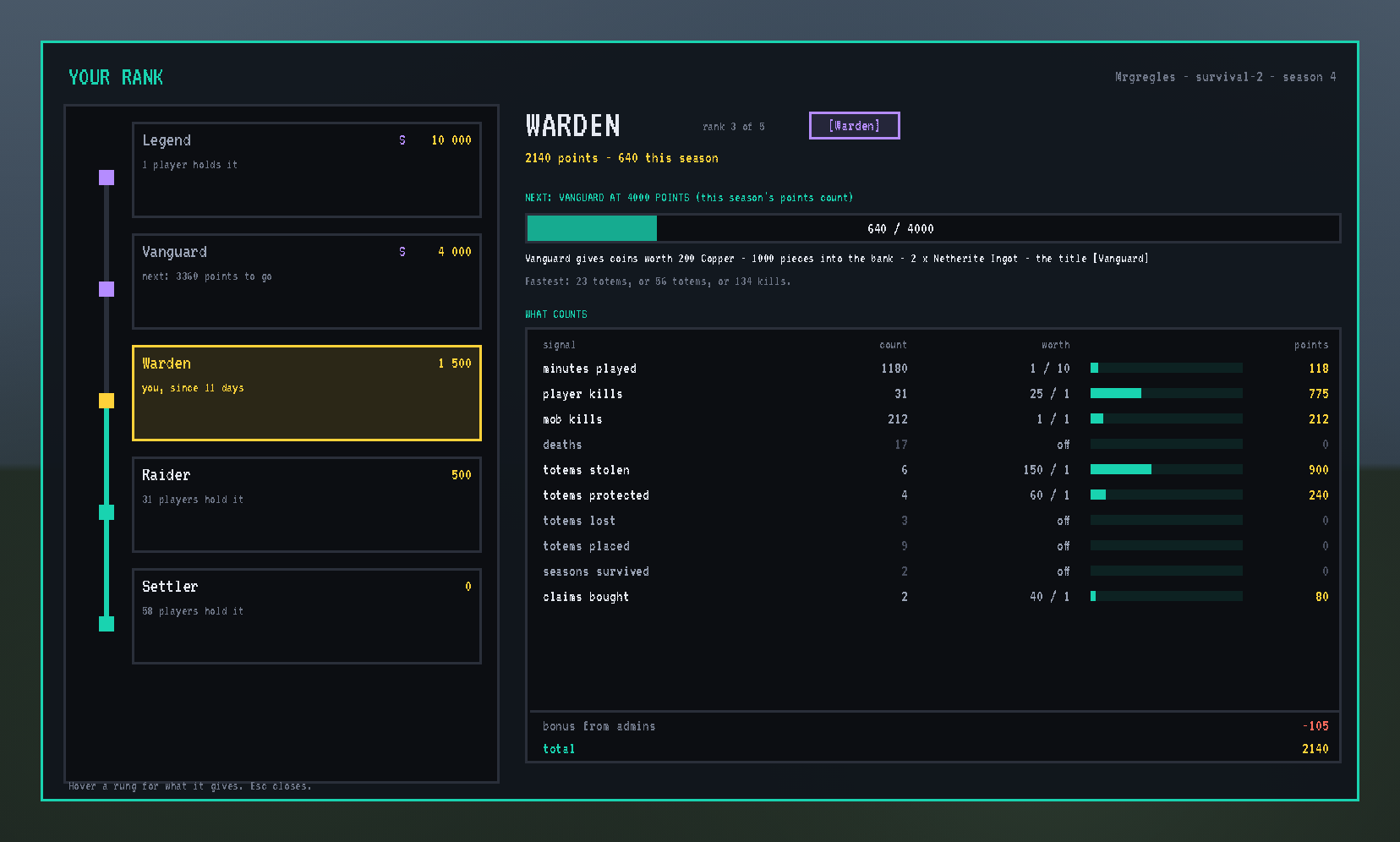
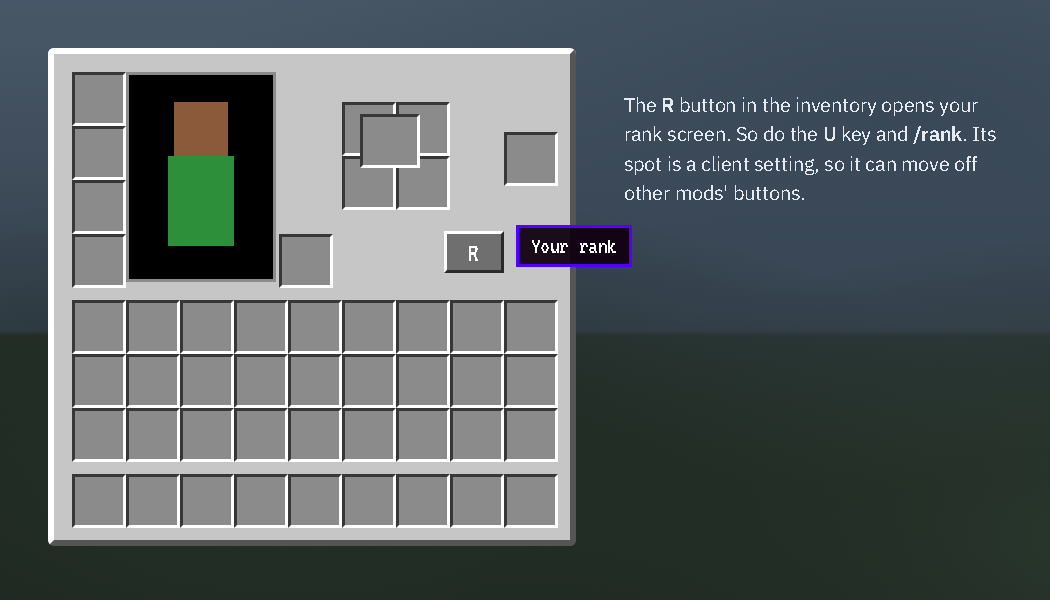
Press U, type /rank, or click the R button in your inventory. A chip for each ladder sits at the top (on more rows when there are many), and AWARDS lists every award with your progress toward it. The chosen ladder stands on the left with your rung in gold and the ones below lit; hover a rung to see what it gives. On the right: your rank and that ladder’s title (as its image when it has one), your points (lifetime and this season), the bar to the next rung, what it gives, the fastest ways to get there, and every signal that ladder counts with its count, worth, share and points. It refreshes every second while open.
When you reach a rung you see it in chat, with each reward on its own line, and the server sees the announcement:
Anything you reached while offline (an admin gave you points, a totem of yours was lost) is waiting at your next login: “While you were away you reached Captain”, with the rewards that need you there. Rank up on another server of the network while you play on this one, and this one tells you and hands the rewards over at once.
For admins: setting up the ladder
Make the track and its groups in LuckPerms, or let RankUp make them from its ladder with one button. Then, as a BSP-Core admin, type /rankup admin.
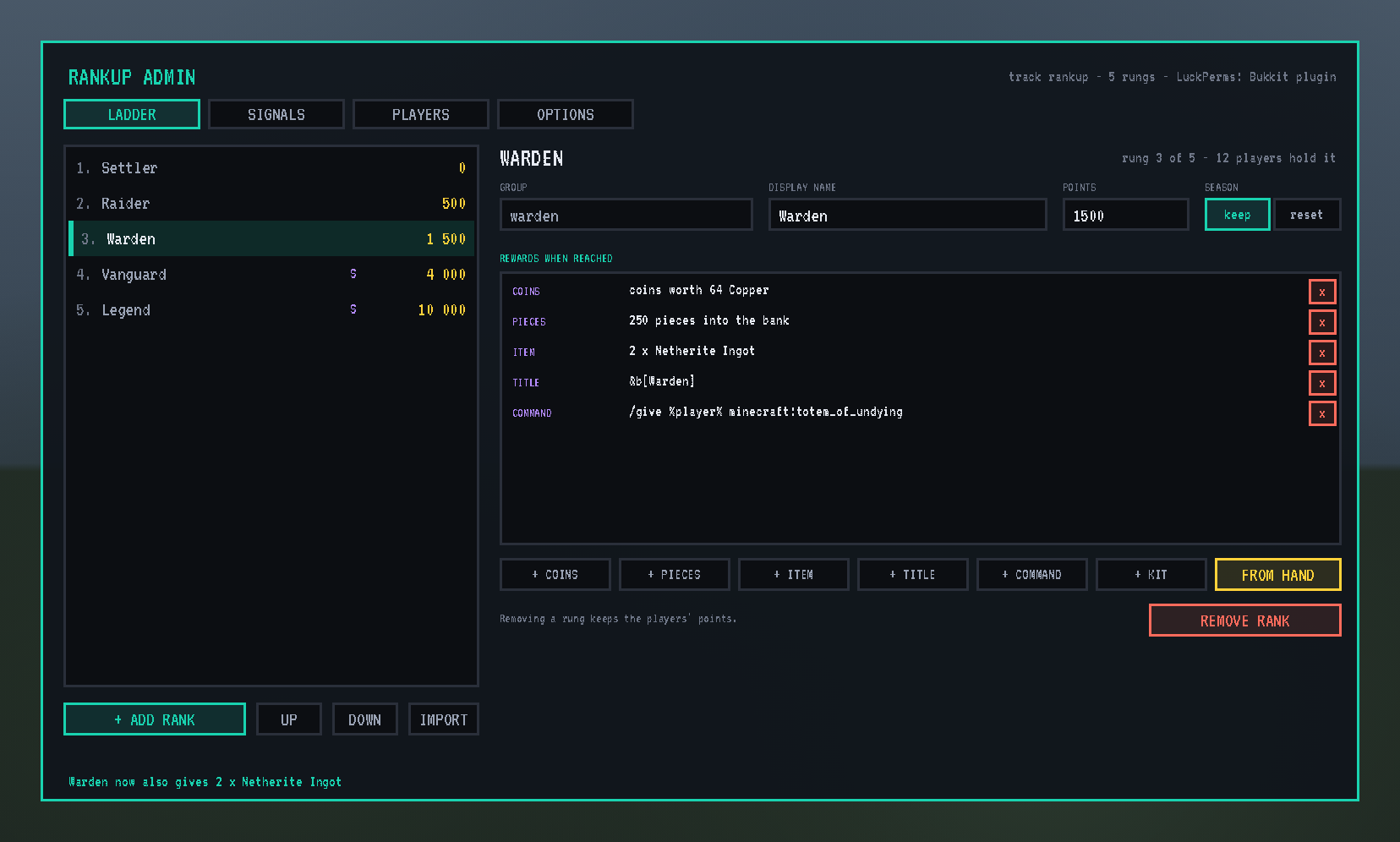
LADDER: the ladder chips at the top choose a ladder (+ LADDER adds one); under them its LuckPerms track, the priority its titles use, and PROGRESS FROM: every signal it counts and what each is worth there. When a ladder counts one signal, a rung’s points are translated (“= 120 minutes”). The rungs sit on the left in track order. Add one with its group, points and name (or IMPORT the groups of the LuckPerms track), reorder with UP and DOWN. The chosen rung’s display name and points edit in place; keep or reset says whether a season’s end takes it away. Its rewards sit below: + COINS (Shatter Coins into the hand), + PIECES (into the bank), + ITEM, + TITLE (a LuckPerms prefix, colour codes welcome; its image shows in a small slot beside it), + COMMAND (run by the console, %player% is the player), + KIT (a BSP-Core kit, delivered when the inventory has room), and FROM HAND for whatever you hold. Any number of rewards per rung.
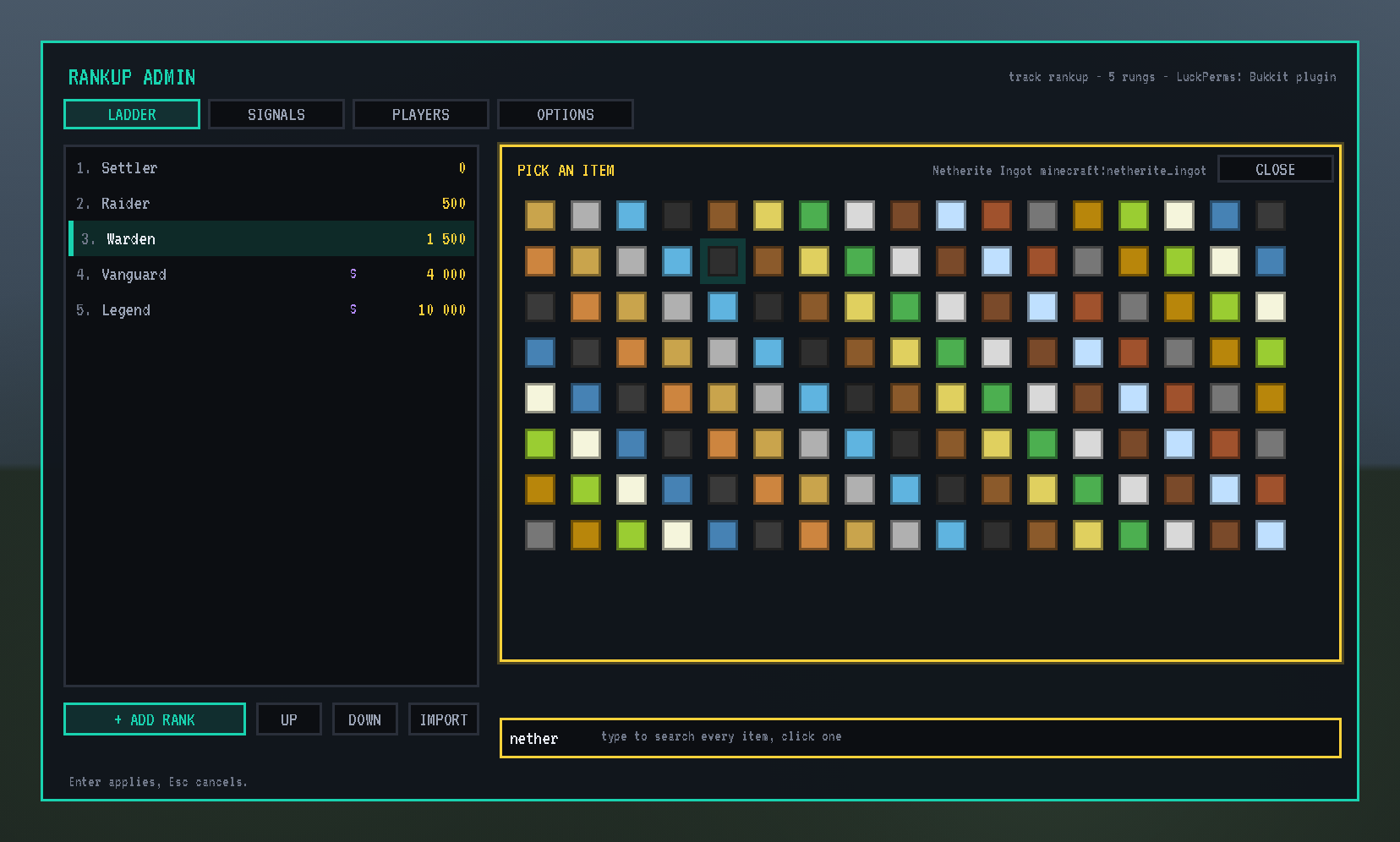
+ ITEM opens a browser over every item in the game, including every other mod’s: type to search by name or id, click one, type the count.
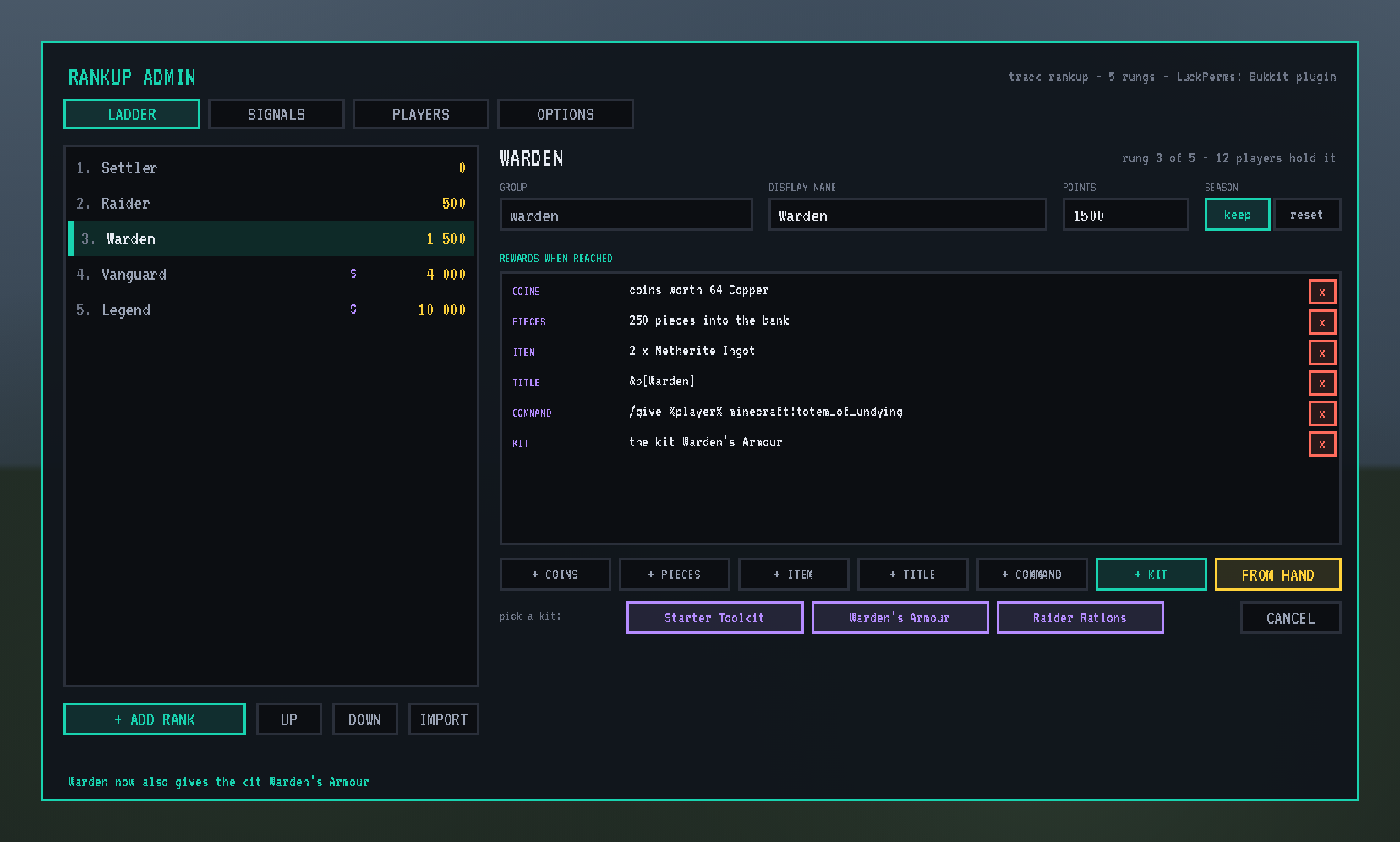
+ KIT shows the kits made in BSP-Core’s admin panel; one click makes the kit the rung’s reward. BSP-Core owes the kit to the player and hands it over when their inventory has room, at once or at their next login, so a full inventory never loses it.
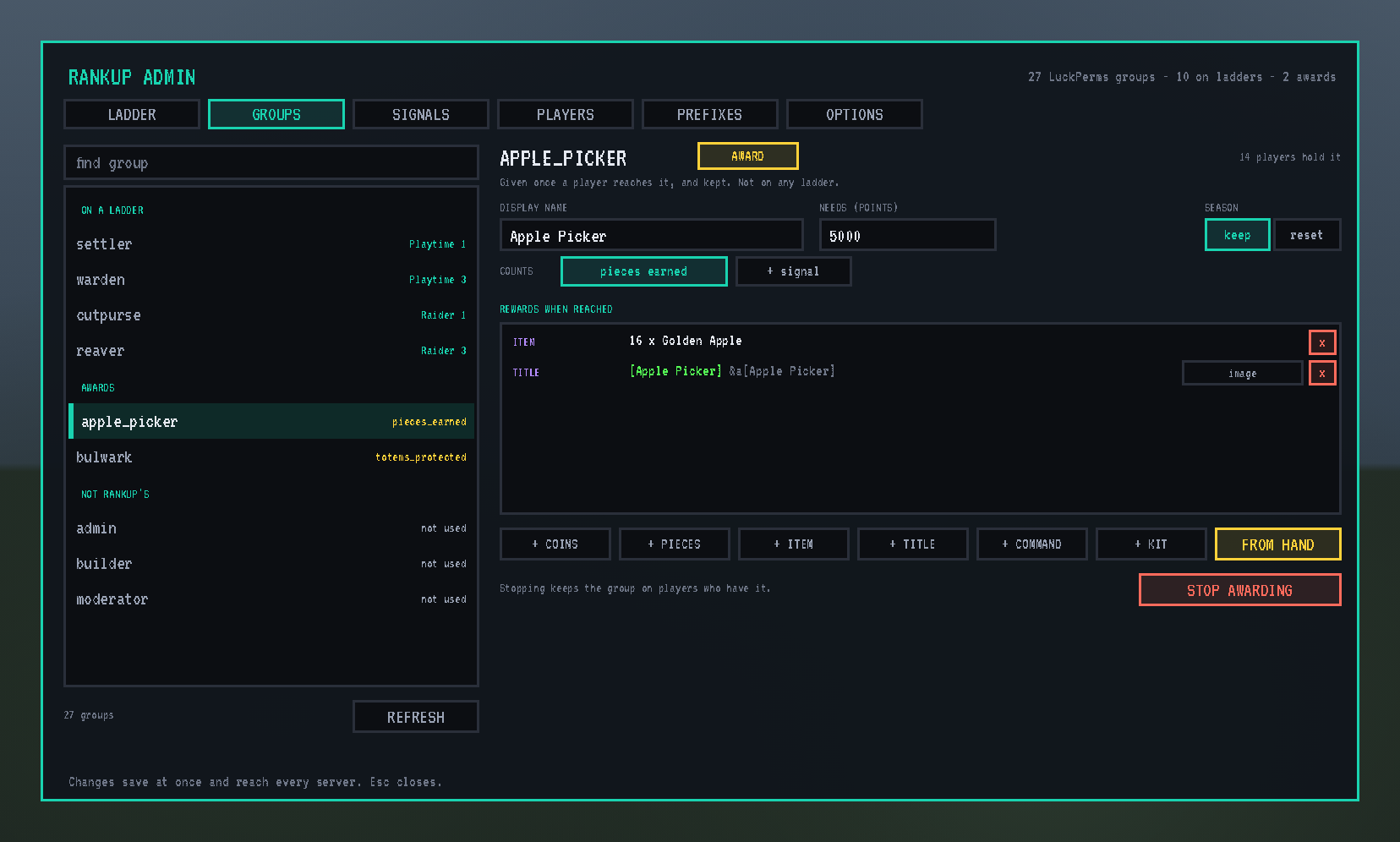
GROUPS: every group in LuckPerms, sorted into rungs (with their ladder), awards, and the rest. Make any group an award: give it the points it needs, the signals that count toward it (shown the same way as PROGRESS FROM), whether it resets each season, and its rewards. STOP AWARDING keeps the group on players who already have it.
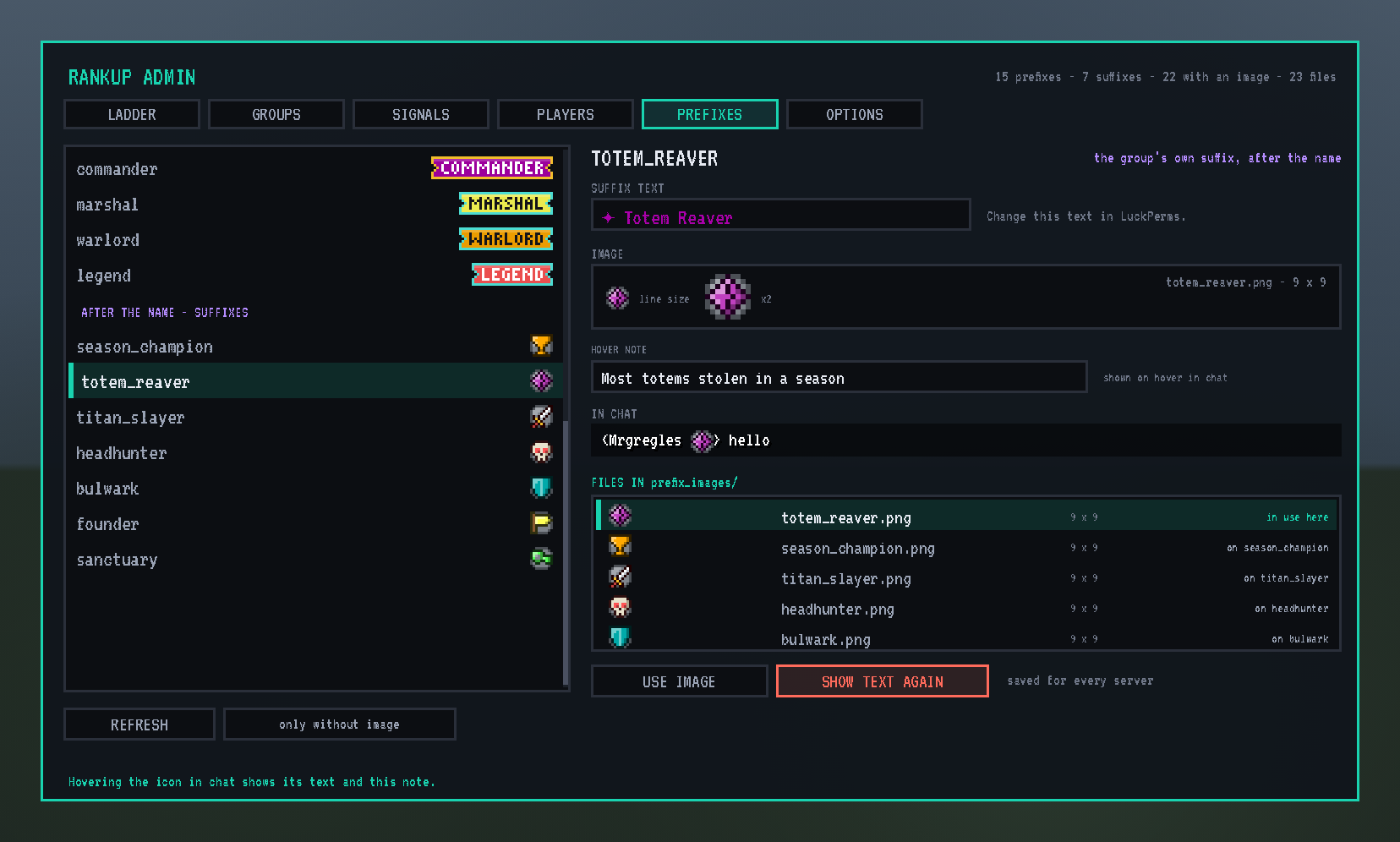
PREFIXES: every tag RankUp can show, by where it comes from: each ladder’s titles, the awards’ titles, the LuckPerms groups’ own prefixes, and after them the groups’ suffixes. Pick one, pick a file from the folder (each shown as it will look, with any problem in red), USE IMAGE; type its HOVER NOTE; see it in a chat line. SHOW TEXT AGAIN brings the text back. REFRESH reads the folder and LuckPerms again. The image stays even if the file is later deleted.
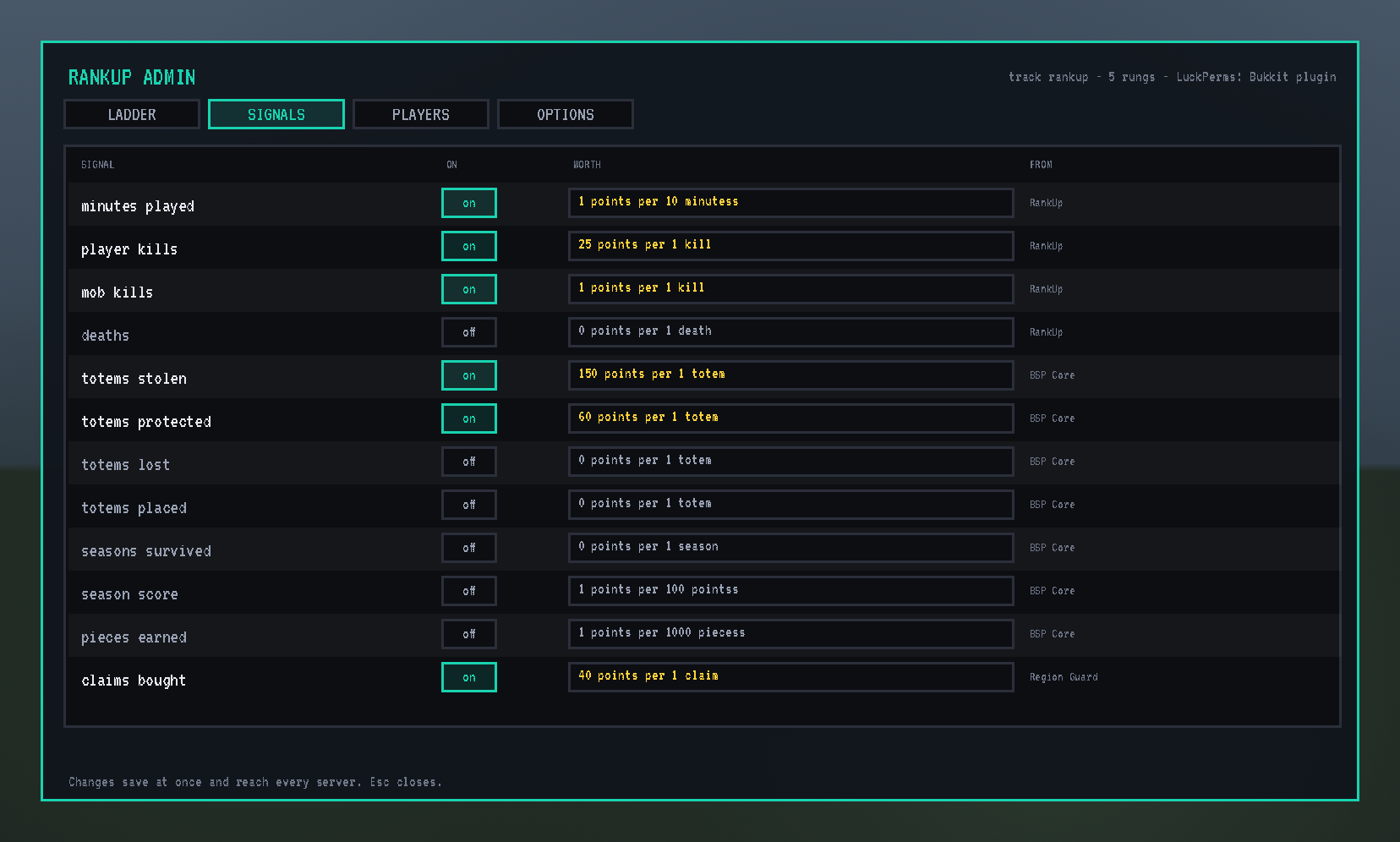
SIGNALS: what counts and how much. Switch each on or off and set its worth (“25 points per 1 kill”, “1 point per 10 minutes”). A column per ladder and award ticks where each signal counts there; one click switches it. Counts are kept even while a signal is off, so switching one on later credits what players already did.
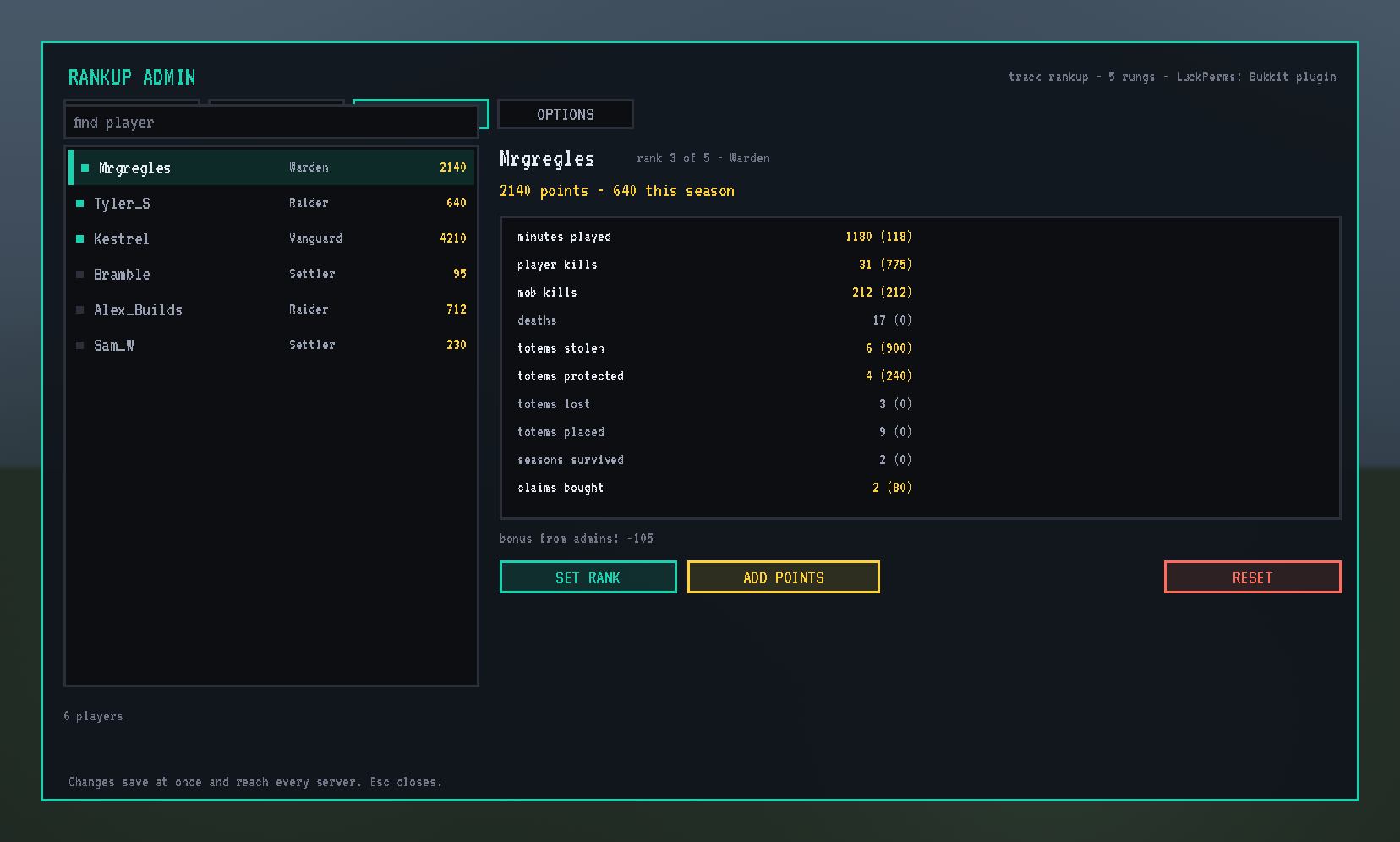
PLAYERS: find anyone, online or not. See their rank on every ladder with its points, this season’s points and the bar to the next rung, with SET on each ladder (no rewards); their awards, where a click gives one (GIVE IT, no rewards) or takes one away (TAKE IT: RankUp won’t give it back until an admin does); and every count, marked with the ladders that count it. ADD POINTS (a negative number takes) and RESET cover every ladder.
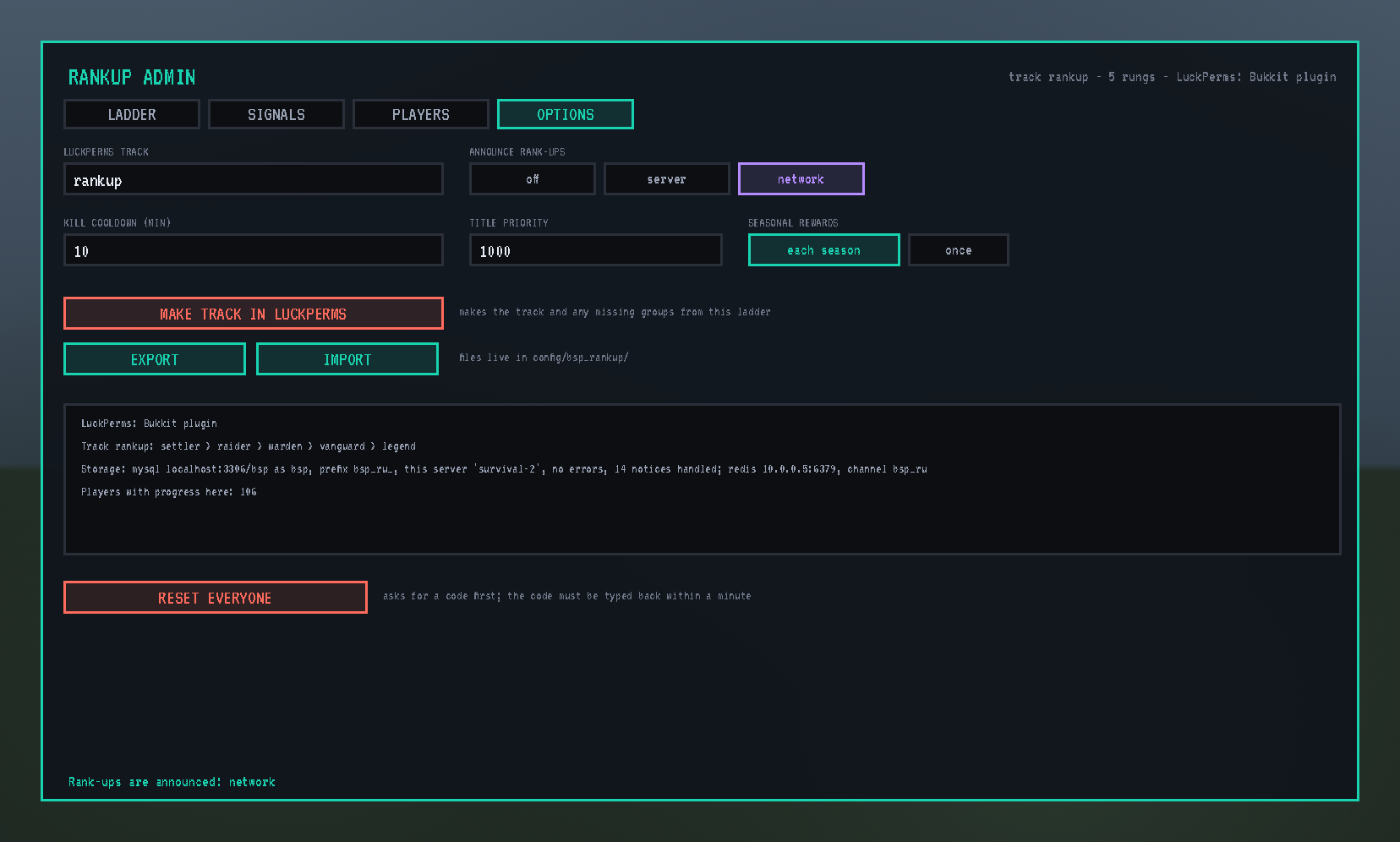
OPTIONS: the LuckPerms track, where rank-ups are announced (off, this server, the whole network), the kill cooldown (a repeat kill of the same player counts again only after it), the prefix priority titles use, whether seasonal rungs reward again each season or once, PREFIXES AND SUFFIXES in chat on or off, MAKE TRACK IN LUCKPERMS (creates the track and any missing groups from the ladder, with rising weights), EXPORT and IMPORT of the whole setup as a file, the state of LuckPerms and the storage, and RESET EVERYONE behind a code typed back within a minute.
Every change saves at once and reaches every server. Buttons that remove things want a second click. Everything the screen does, /rankup can do from chat or the console too (/rankup ladder add warden 1500 Warden, /rankup reward add warden item minecraft:netherite_ingot 2, /rankup signal player_kills points 25 per 1, /rankup ladders add raider raider, /rankup award add apple_picker 5000, /rankup award give Steve apple_picker, /rankup prefix image title warden warden.png, /rankup prefix note suffix headhunter Most player kills in a season …).
Seasons
A rung marked reset is seasonal. When BSP-Core ends a season, players on a seasonal rung fall back to the highest permanent rung below it (and to that rung’s title), keep their lifetime points, and from then on seasonal rungs count only the points earned since, so the climb starts afresh every season while permanent ranks stay forever. Awards marked reset are taken back and can be earned again. Players online are handled at once, everyone else on their next login. Season winners are BSP-Core’s business.
Anti-farming
A kill of the same player within the cooldown counts nothing; killing yourself is a death, not a kill; a steal of an unclaimed totem is still a steal, but a totem is “protected” only when its owner was online on that server when the steal failed. Once a teams mod registers RankUp’s team hook, kills between teammates count for nothing.
A network of servers
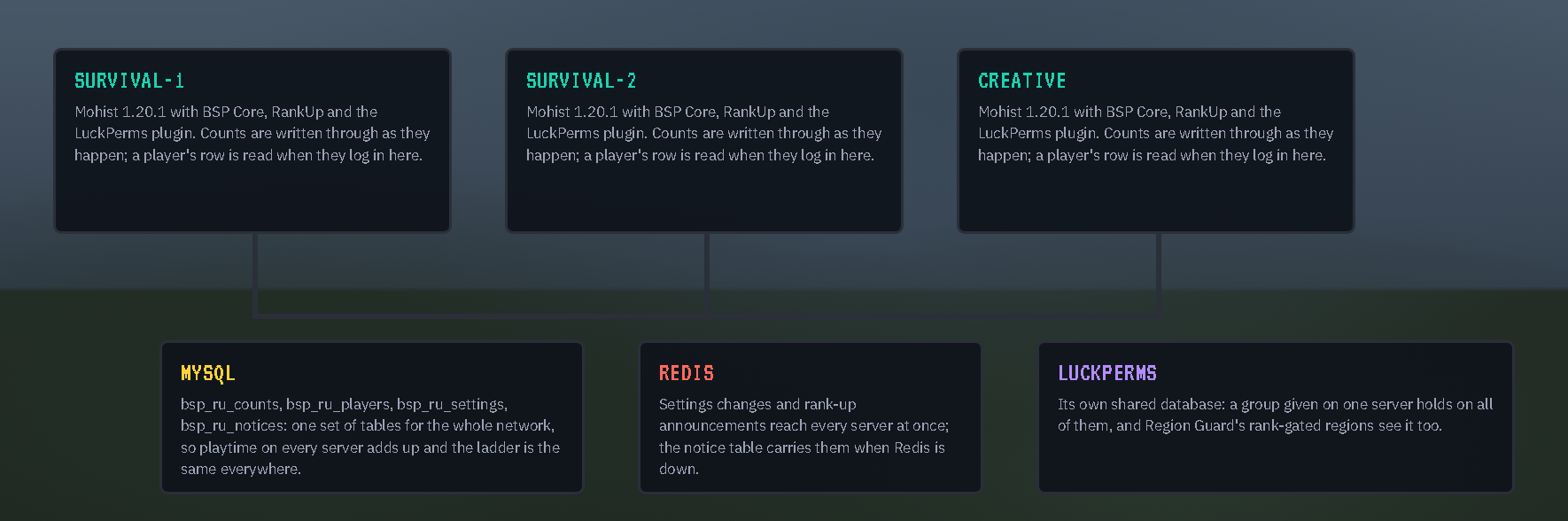
With storage.mode = "mysql" in serverconfig/bsp_rankup-server.toml on each backend, every count is written through to RankUp’s own tables as it happens, so playtime on several servers adds up; a player’s progress is read when they log in anywhere, before anything is decided for them; the ladders, awards, settings and prefix images are shared; a rank-up worked out on one server reaches the player on the server they’re playing on; and with Redis enabled, changes and network-wide announcements reach every server at once (the table carries them when Redis is down). LuckPerms’ own shared database carries the ranks. No database driver is bundled: RankUp uses BSP-Core’s. That config file holds nothing else; the ladder lives in the shared storage and is edited in game.
With the other BSP mods
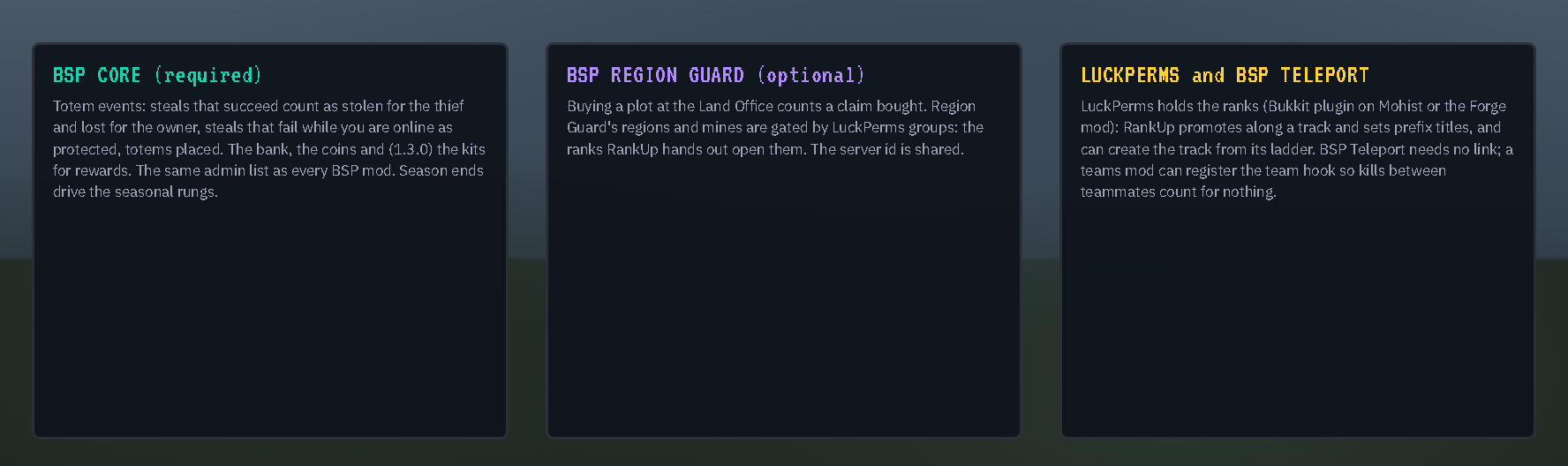
- BSP-Core (required, 1.4.5 or newer): its totem events are the raiding signals (a successful steal is a totem stolen for the thief and lost for the owner; a failed one while the owner is online is a totem protected; totems placed), its season score is a signal, its bank and coins pay the rewards, its kits can be rewards, its teams stop teammates’ kills counting, its admin list is the admin list, and its season ends drive the seasonal rungs.
- BSP-Region Guard (optional): buying a plot at the Land Office counts a claim bought; Region Guard’s rank-gated regions and mines open for the ranks and awards RankUp hands out, since they are the same LuckPerms groups. A rank-up moves a player off the rung below, so a region for “Warden and up” lists every rung from Warden to the top. On a network RankUp takes Region Guard’s server name.
- BSP-Teleport (optional): no link is needed; both run side by side.
- LuckPerms: RankUp moves players along each ladder’s track, adds and takes award groups, sets titles, and shows prefixes and suffixes around names; it can create a track and its groups from a ladder. Give the groups rising weights and LuckPerms reports the highest as the primary group.
For other mods
A small API (docs/API.md in the repository): the ladders and awards, a player’s rank on each and their standing, hasRank and hasAward for gates (“Warden or better”), points from other mods, the team hook, and a RankChangedEvent on the Forge bus after every rank change, naming the ladder.
Links
Source and docs: https://github.com/Build-Secure-Protect/BSP-RankUp. Issues and ideas welcome there. MIT licensed.
常见问题
BSP RANKUP 支持哪些 Minecraft 版本?
BSP RANKUP 支持 Minecraft Java 版 1.20.1,可用的加载器:Forge。下载时注意选择和你游戏版本一致的文件。
BSP RANKUP 怎么安装?
先用 PCL2 或 HMCL 启动器安装对应版本的 Forge,再把下载的 .jar 文件放进游戏目录的 mods 文件夹,重新启动游戏即可。开启了版本隔离的,mods 文件夹在 versions/版本名 下面。
Mrgregles 的其他作品
查看全部 →
Build Secure Protect
Inspired by the old Tekkit modpack Voltz. BSP or Build, Protect, Secure focuses on base building and raiding. Use tech to create your very own fortress then attack others to claim their precious resources.

BSP CORE
BSP (Build Secure Protect) core modpack that adds custom items, blocks, machines, functions and behaviours to the official BSP server.

BSP TELEPORT
A teleport, home, warp mod to be used with the BSP Modpack offical server allowing teleporting between all servers within the network.
BSP REGION GUARD
A claims and regions guard system made for the official BSP server and Forge.
评论
登录后评论和评分