
BetterHead Chat
作者:Sansrus
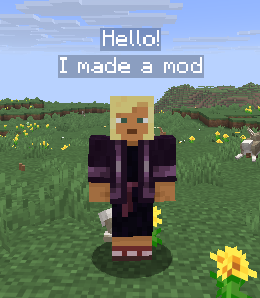
Displays chat messages above players' heads. Supports vanilla chat, whispers, and configurable /tellraw patterns.
截图
介绍
中文介绍正在准备中,下面暂时显示原文。
A Fabric mod that displays chat messages above players’ heads in Minecraft.
Features
- Chat messages appear as floating text above the sender’s head
- Supports vanilla chat,
/msgwhispers, and/tellrawsystem messages - Configurable message patterns for parsing
/tellrawoutput (e.g.<%player%> %message%) - Heuristic player name detection as a fallback
- Adjustable display range, line lifetime, line height, and max lines
- Optional chat hiding — show messages only above heads, not in chat
- YACL-based config screen with ModMenu integration
Installation
- Install Fabric Loader
- Download the appropriate module for your Minecraft version
- Place the
.jarfile in yourmodsfolder - Install Fabric API and YACL if not already installed
Configuration
Open the mod settings via ModMenu or the in-game config screen. Options include:
- Mod Enabled — toggle the mod on/off
- Max Lines — maximum number of lines displayed above a player
- Line Lifetime — how long messages stay visible (seconds)
- Attach to Head — position text at head level or fixed height
- Line Height — vertical offset above the head
- Hide Nametag — hide the vanilla nametag when overhead chat is active
- Hide Chat Messages — suppress messages from the chat window
- Enable Whisper — show
/msgwhispers above heads - Range — maximum render distance for overhead text
- Reverse Order — display newest messages at the top
- Max Line Length — character limit before wrapping
- Chat Patterns — regex patterns for parsing
/tellrawmessages (e.g.<%player%> %message%) - Heuristic Player Detection — attempt to detect player names in unrecognized system messages
License
All Rights Reserved
Links
常见问题
BetterHead Chat 支持哪些 Minecraft 版本?
BetterHead Chat 支持 Minecraft Java 版 1.21–26.3,共 17 个版本,可用的加载器:Fabric。下载时注意选择和你游戏版本一致的文件。
BetterHead Chat 怎么安装?
先用 PCL2 或 HMCL 启动器安装对应版本的 Fabric,再把下载的 .jar 文件放进游戏目录的 mods 文件夹,重新启动游戏即可。开启了版本隔离的,mods 文件夹在 versions/版本名 下面。运行环境:仅客户端。
Sansrus 的其他作品
查看全部 →
Shadow Items Mod
by Sansrus
This mod returns shadow items to the game
362
9 个月前
Modrinth

SansrusMod
by Sansrus
A client mod with all sorts of things for personal convenience
324
1 个月前
Modrinth

Bigger Every Kill
by Sansrus
+0.05 size to all mobs for every mob killed by a player
50
1 个月前
Modrinth

Everything Clings
by Sansrus
Everything within 40 blocks is pulled toward the nearest player
35
1 个月前
Modrinth
评论
登录后评论和评分