
Auto Reauth
Automatically re-authenticates your session when it expires, so you don't need to restart your game.
截图
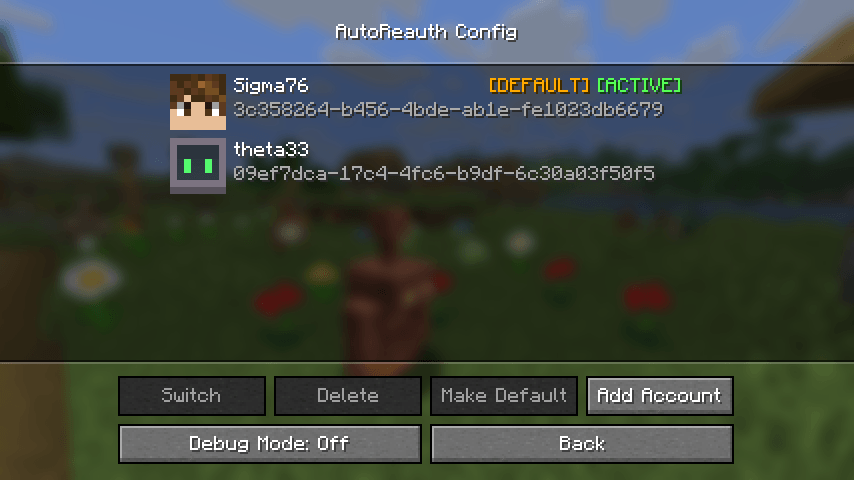
介绍
Auto Reauth 

Requires: Fabric API and Mod Menu.
This is a mod that automatically re-authenticates your session when it expires.
Without this mod, you need to restart your game every time your session expires (about every day).
Usage
After installing, you will need to sign in through auto reauth, so it can store your authentication tokens.
To do this, open the mod config screen either through Mod Menu or by clicking the account status line on the multiplayer or realms screens.
Here you can click “Login” to be redirected to the Microsoft login page, after signing in (if everything goes well) you will be redirected to a page that says “You can close this tab now”, at this point your authentication tokens are stored, and you can close the tab.
Now, anytime you open the multiplayer menu, auto reauth will check your session status, and re-authenticate if necessary.
The tokens may expire after some time (like 90 days) so if you start having issues with the mod, try logging in.
Do note that using this mod will store your authentication tokens in your home folder (~/.auto-reauth/config.nbt).
So just be careful about that.
References
- Microsoft Authentication Scheme — Information on how the Microsoft authentication flow works for Minecraft.
- Auth Me — A mod that lets you re-authenticate your session manually.
常见问题
Auto Reauth 支持哪些 Minecraft 版本?
Auto Reauth 支持 Minecraft Java 版 1.20.1–26.3,共 19 个版本,可用的加载器:Fabric。下载时注意选择和你游戏版本一致的文件。
Auto Reauth 怎么安装?
先用 PCL2 或 HMCL 启动器安装对应版本的 Fabric,再把下载的 .jar 文件放进游戏目录的 mods 文件夹,重新启动游戏即可。开启了版本隔离的,mods 文件夹在 versions/版本名 下面。
connorslade 的其他作品
查看全部 →
Auto Reauth
Automatically re-authenticates your session when it expires, so you don't need to restart your game.

FastDoll
By default, the player model in the inventory is rendered at only 20FPS, this mod renders it at full speed.
FastDoll
By default, the player model in the inventory is rendered at only 20FPS, this mod renders it at full speed.

Screenshot Layers
Splits screenshots into multiple layers so you can retroactively hide the GUI or hot bar in your screenshots.
评论
登录后评论和评分