
截图
介绍
🛡️ ArmorDurability
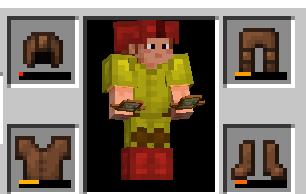
ArmorDurability is a lightweight client-side Fabric mod that visually indicates the durability of your armor in real time.
No more guessing when your gear is about to break — your armor will change color dynamically based on its remaining durability.
🎨 Features
🔹 Dynamic color system
🟢 Green — high durability (70–100%)
🟡 Yellow — medium durability (30–69%)
🔴 Red — low durability (0–29%)
🔹 Works with all armor pieces
Helmet
Chestplate
Leggings
Boots
🔹 Client-side only
Safe to use on any server — no installation required server-side.
🔹 Purely visual
Does not modify item data or gameplay mechanics.
⚙️ Technical Details
Built for Fabric 1.20.1
Uses rendering hooks / overlays to tint armor based on durability
Compatible with most mods that don’t heavily modify armor rendering
💡 Why use ArmorDurability?
Vanilla Minecraft only shows durability as a small bar in your inventory — easy to miss in combat.
ArmorDurability brings that information directly into the world, making it:
easier to react during fights
more immersive
visually intuitive
🚀 Installation
Install Fabric Loader
Install Fabric API
Drop the mod .jar into your mods folder
Launch the game
📌 Notes
This mod is client-side only
If another mod replaces armor rendering, compatibility may vary
常见问题
armordurability 支持哪些 Minecraft 版本?
armordurability 支持 Minecraft Java 版 1.20.1–1.21.11,共 3 个版本,可用的加载器:Fabric。下载时注意选择和你游戏版本一致的文件。
armordurability 怎么安装?
先用 PCL2 或 HMCL 启动器安装对应版本的 Fabric,再把下载的 .jar 文件放进游戏目录的 mods 文件夹,重新启动游戏即可。开启了版本隔离的,mods 文件夹在 versions/版本名 下面。运行环境:仅客户端。
arch-mc 的其他作品
查看全部 →
Reconnect Me
Adds a Reconnect Button

friendmarker
Mod that colors friend's armor into green

super health indicator
Renders player's health on hover

hotbarslots
Renders hotbar slot keybinds
评论
登录后评论和评分