
Whopper Datapack
This datapack adds an entire new food system, to create the perfect WHOPPER! (from the Burger king meme)
截图


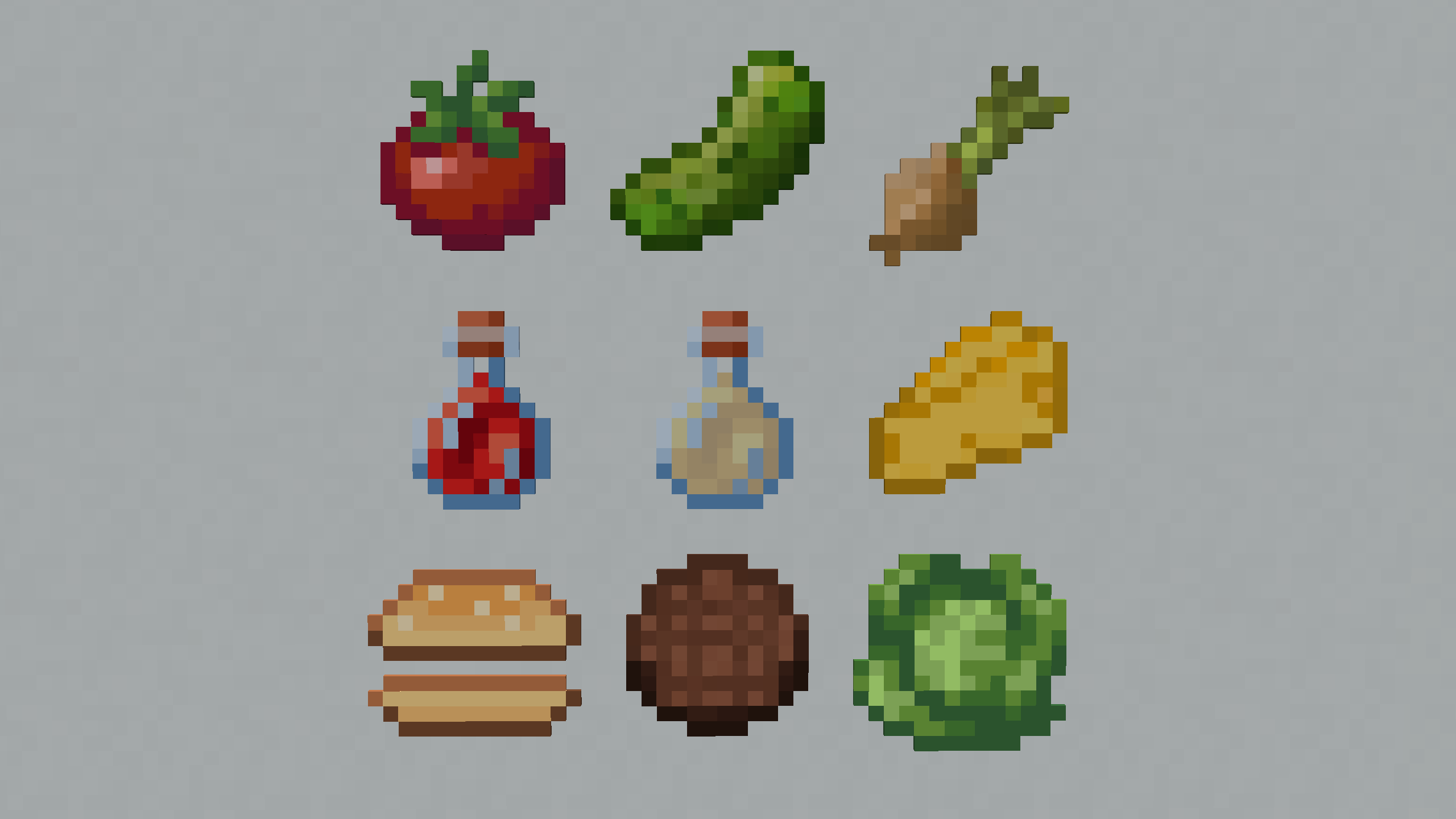
介绍
All features are showcased in this video: https://www.youtube.com/watch?v=r-Xwq9fjSes
NEW ITEMS:
- Cutting Board – [Crafting: 2 wooden slabs in crafting table]
- Bun – [Crafting: Cut bread using flint on the cutting board]
- Patty – [Crafting: Cut steak using flint on the cutting board]
- Lettuce – [Found in village chests in the plains biome]
- Tomato – [Found in village chests in the plains biome]
- Pickle – [Found in village chests in the plains biome]
- Onion – [Found in village chests in the plains biome]
- Cheese – [Crafting: Throw a milk bucket into a composter]
- Ketchup – [Crafting: Cut tomato using flint on the cutting board, and then right click with a bottle]
- Mayonnaise – [Crafting: Cut egg using flint on the cutting board, and then right click with a bottle]
If you have op, you can type /function whopper:give_items to give yourself all the whopper parts
GAME MECHANICS
- Creating Whopper – to create a whopper, place down a bun. Then you can add any topping you like
- Eating Whopper – to eat a whopper, you need to place down another bun which becomes the top. Right click to eat. Amount of hunger filled up:
- 0 patties – 2 hunger bars
- 1-6 patties – +2 hunger bars for every patty
- 7-14 patties – Will inflict nausea, no hunger bars filled up
- 15+ patties – You will explode
- Cutting – Able to cut items on a cutting board using a piece of flint, can bottle up the items using a glass bottle. Break the cutting board by shift + right-clicking it
- Growing Crops – You can grow lettuce, tomatoes, pickles and onions. Find the in village chests in the plains biome.
⚠️ BUGS
There are some unfixable bugs in this datapack. No items can be duped, only can be lost. This only happens when quickly switching hotbar slots when eating or cutting, otherwise there is no problem. If you notice any unfair bugs report them in the [bugs] text channel in my discord server
⚠️ MULTIPLAYER
Haven’t tested if this works. There shouldn’t be big problems, however it might not work perfectly
DOWNLOAD
To download the datapack, you have two options to add it to your world:
Creating a new world:
- Download the Whopper_Datapack.zip
- Click Create new world in minecraft
- Click Data Packs
- Drag the Whopper_Datapack.zip into there, and make sure you put it on the ‘selected’ side (right side)
Add to existing world:
- Download the Whopper_Datapack.zip
- Select your world in the single player menu
- Click Edit at the bottom of the screen
- Click Open World Folder
- Click on the datapacks folder
- Drag the Whopper_Datapack.zip into there
To download the resource pack, follow these steps:
- Download the Whopper_Resourcepack.zip
- In minecraft, click on Options
- Click on Resource Packs
- Drag the Whopper_Resourcepack.zip into there, and make sure you put it on the ‘selected’ side (right side)
常见问题
Whopper Datapack 支持哪些 Minecraft 版本?
Whopper Datapack 支持 Minecraft Java 版 1.19–1.19.4,共 5 个版本。下载时注意选择和你游戏版本一致的文件。
Whopper Datapack 怎么安装?
新建世界时在「数据包」里把下载的 .zip 拖进去;已有的存档,把文件放进存档目录下的 datapacks 文件夹,进游戏输入 /reload 即可生效。服务器同样放在世界目录的 datapacks 里。
GoldenRobotII 的其他作品
查看全部 →
Space Race
Space Race is a Datapack that allows you to build your OWN rocket and explore the solar system!
Christmas Datapack
A Datapack that adds 12 new Christmas features to Minecraft! A Christmas tree and presents, candy canes and roast chicken feasts, and a bunch more cool items!

Block Display Helper
This datapack helps with the block display entity with special items, such as a move stick, a scale stick and a rotate stick.

Printer Datapack
This datapack adds a way to shrink down any build to a single block!
评论
登录后评论和评分