
介绍
Dimensional Ring Guidebook!
In order to get your very own ring, you can craft it:

Once acuring your own ring, right click to get a menu:
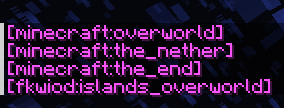
This will show up in chat, and click any dimensions that you wish to go.
For custom dimension you’ve installed, you must first go to that custom one & upon entering it, it will now enlist the dimension in the menu.
RECOURSE PACK REQUIRED!
You can find it alongside the datapack downloads.
Q&A
Why does it show 😕
Due to how minecraft works & stores data, it does that.
Why do I neeed to enter a custom dimension first?
The datapack doesnt reconize the custom dimenisons that you’ve added, only knows of MC’s default ones. IF you’re setting up a server and want immediate acess for everyone: `/execute in <namespace>:<name> run tp ~ ~ ~`
Any other questions:
Do join the discord server.
常见问题
Dimensional Ring 支持哪些 Minecraft 版本?
Dimensional Ring 支持 Minecraft Java 版 1.21。下载时注意选择和你游戏版本一致的文件。
Dimensional Ring 怎么安装?
新建世界时在「数据包」里把下载的 .zip 拖进去;已有的存档,把文件放进存档目录下的 datapacks 文件夹,进游戏输入 /reload 即可生效。服务器同样放在世界目录的 datapacks 里。


评论
登录后评论和评分