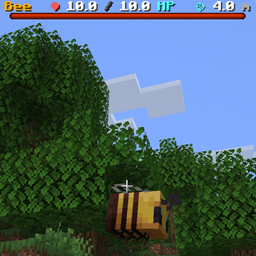
[DAI] Survival Interface (Data)
A true screen-space RPG target interface for DAI showing target name, current/max health, health progress, and approximate range simply by aiming at a living entity.
介绍
DAI Survival Interface
DAI Survival Interface adds a true screen-space RPG-style target HUD to the Decisions and Impulses framework.
Simply aim at a living entity and its information appears on-screen immediately.
You do not need to attack the target first.
The interface uses Minecraft’s native bossbar HUD for dynamic information instead of attaching floating display entities to the player’s camera, keeping the interface stable and genuinely screen-space.
Target Information
The interface displays:
- Target name
- Current health
- Maximum health
- Visual health progress bar
- Approximate distance from the player
Health values are displayed to one decimal place.
Range is calculated from the player’s aim ray and displayed in meters.
Target Recognition
Survival Interface continuously checks what the player is aiming at.
When a living entity is detected, the interface immediately updates with that entity’s information.
A short 2.5-second target-lock grace period keeps the interface visible during brief crosshair misses, reducing flickering when either the player or target is moving.
True HUD Presentation
Survival Interface does not use floating text_display entities.
Instead, it uses Minecraft’s native bossbar system to provide:
- Stable screen-space positioning
- Dynamic target names
- Dynamic health values
- Native health progress
- Dynamic range information
Multiplayer Support
The current version contains eight isolated HUD lanes for local and LAN multiplayer environments, preventing nearby players from sharing the same target interface.
Designed To Stack
Survival Interface contains no floating damage-number logic.
Combat numbers are handled separately by DAI Damage Indicators, allowing either addon to be installed independently or both to be combined.
Commands
/function survival_interface:toggle/function survival_interface:enable/function survival_interface:disable
Requires Minecraft Java 26.2 and Decisions and Impulses / DAI 1.9.5+.
常见问题
[DAI] Survival Interface (Data) 支持哪些 Minecraft 版本?
[DAI] Survival Interface (Data) 支持 Minecraft Java 版 26.2。下载时注意选择和你游戏版本一致的文件。
[DAI] Survival Interface (Data) 怎么安装?
新建世界时在「数据包」里把下载的 .zip 拖进去;已有的存档,把文件放进存档目录下的 datapacks 文件夹,进游戏输入 /reload 即可生效。服务器同样放在世界目录的 datapacks 里。
J12H36H 的其他作品
查看全部 →
DAI Engine ( Decisions and Impulses / D.A.I. )
A JSON-driven Minecraft game framework for creating automation, custom experiences, UI, worldgen, reactions, recognition, server-authoritative gameplay, and complete games through datapacks and resource packs.

[DAI] Damage Indicators (Data)
Floating combat damage numbers for DAI with large readable values, smooth upward movement, and no resource pack required. Designed to stack cleanly with other DAI addons.
[DAI] AutoCraft MineShaft (Data)
AutoCraft MineShaft is a 10-floor Minecraft dungeon RPG where rooms, halls, routes, enemies, loot and bosses generate as you progress. Fight manually, earn keys, choose your path, gear up, defeat each boss, and reach the Heart of the Mine.

[DAI] Musashi Story (Data)
A DAI-powered samurai RPG featuring an authored feudal-Japan world, directional sword combat, custom enemies, loadouts, skills, progression, fast travel, and handcrafted encounters.
评论
登录后评论和评分