
BlockSeek
A highly specialized tool for chunk-by-chunk scanning of a world area, outputting the coordinates of the selected block.
截图

介绍
BlockSeek
A highly specialized, admin-secured datapack for chunk-by-chunk world scanning with automated coordinate logging.
Overview
BlockSeek is an advanced utility datapack designed to automate the detection and coordinate extraction of specific blocks within a defined rectangular area. Version 2.0.0 introduces a complete architectural overhaul, featuring a secure UUID-based admin system, an interactive in-game GUI, and optimized chunk-processing mechanics.
By utilizing a Carrot on a Stick for area selection and the offhand slot for target designation, BlockSeek physically scans chunk columns, registers discovered blocks via temporary markers, replaces them with Structure Blocks, and broadcasts their exact coordinates to the chat and game logs.
⚠️ CRITICAL PRE-INSTALLATION NOTICE
Destructive Scanning Mechanic: BlockSeek is not a passive observer. To register coordinates, the algorithm physically replaces the discovered target blocks with Structure Blocks.
- Backup Mandatory: It is strictly required to create a full backup of your world folder before installation. Intensive processing, tick timeouts, or scanning ubiquitous blocks (like stone or dirt) can lead to severe TPS drops, RAM overflow, or
level.datcorruption. - Build Protection: Do not scan for blocks that are integral to your architectural builds unless you are prepared to restore them from a backup.
Installation & Initialization
- Place the
BlockSeekfolder or.ziparchive into your world’s directory:.minecraft/saves/<World_Name>/datapacks/. - Launch the world and execute
/reload. - Admin Claiming:
- Singleplayer: The first player to join the world is automatically assigned the
admintag and registered as the owner. - Multiplayer: The server owner must manually assign the
admintag or configure the owner UUID via theblockseek:admin ownerstorage to grant access.
Usage Instructions
Phase 1: Preparation & Area Selection
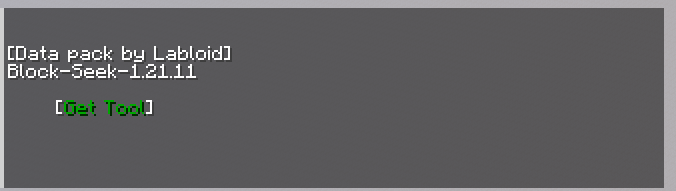
- Open the GUI by interacting with the datapack (or use the provided commands) and click [Get Tool] to receive the custom Carrot on a Stick.
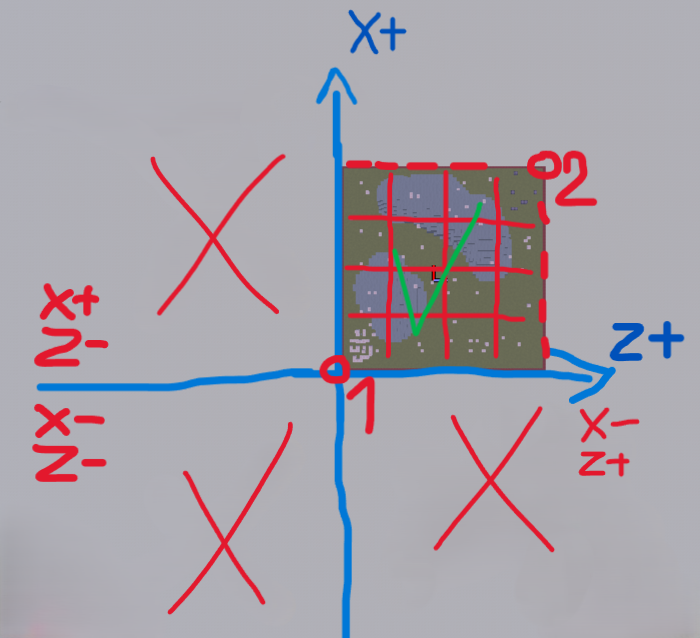
- Stand in the North-Western (top-left) corner of your intended scanning area.
- Right-click with the tool to set Pos1.
- Move to the South-Eastern (bottom-right) corner. Ensure the X and Z coordinates are strictly greater than Pos1.
- Right-click to set Pos2.
(Note: The Y-axis is ignored during selection; the system automatically scans the full build limit from Y=-64 to Y=319).
Phase 2: Target Selection
Place the exact block you wish to locate into your offhand slot.
Warning: Avoid scanning ubiquitous blocks (stone, deepslate, dirt). Spawning thousands of markers simultaneously will crash the server thread.
Phase 3: Configuration & Execution
- Open the GUI to access the control panel.
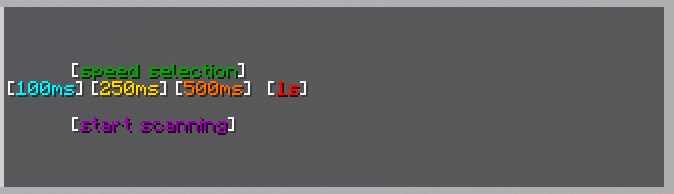
- Select your preferred Speed (Delay per chunk column):
- 2t (0.1s): Maximum speed. Requires high-end hardware.
- 5t (0.25s): Fast scanning.
- 10t (0.5s): Optimal / Default.
- 20t (1.0s): Safe mode for lower-end systems.
- Click [Start scan]. The player will be shifted into Spectator mode and automatically teleported across the selected chunks.
- To abort prematurely, click [Stop] in the GUI or execute
/function blockseek:stop.
Output Format & Data Parsing
Discovered blocks are announced in the chat and duplicated in the latest.log file using a strict, parseable syntax:
blocklocator [BlockSeek] Found: <X> .X <Y> .Y <Z> .Z command
- Manual Extraction: Use a text editor to search for the
blocklocatorkeyword. - Automation: Utilize the companion script available at our repository to parse the log file and export clean coordinates: https://github.com/LabloidMC/ExtractCoords
Commands & GUI Reference
| Action | Command / Trigger |
| :— | :— |
| Open GUI | /trigger bs_ui set 9 |
| Get Tool | /trigger bs_ui set 1 |
| Emergency Stop | /function blockseek:stop |
| Reset Points | /trigger bs_ui set 8 |
| Assign Admin Role (Force) | /tag <username> add admin |
| Remove Admin Role (Force) | /tag <username> remove admin |
| Force Disable Datapack | /datapack disable "file/BlockSeek" |
常见问题
BlockSeek 支持哪些 Minecraft 版本?
BlockSeek 支持 Minecraft Java 版 1.21.11–26.3,共 3 个版本。下载时注意选择和你游戏版本一致的文件。
BlockSeek 怎么安装?
新建世界时在「数据包」里把下载的 .zip 拖进去;已有的存档,把文件放进存档目录下的 datapacks 文件夹,进游戏输入 /reload 即可生效。服务器同样放在世界目录的 datapacks 里。

评论
登录后评论和评分