
Who I Am
Shows the local player's name tag in third-person or free-camera views, appends the player name to the window title, and provides the /i command.
截图
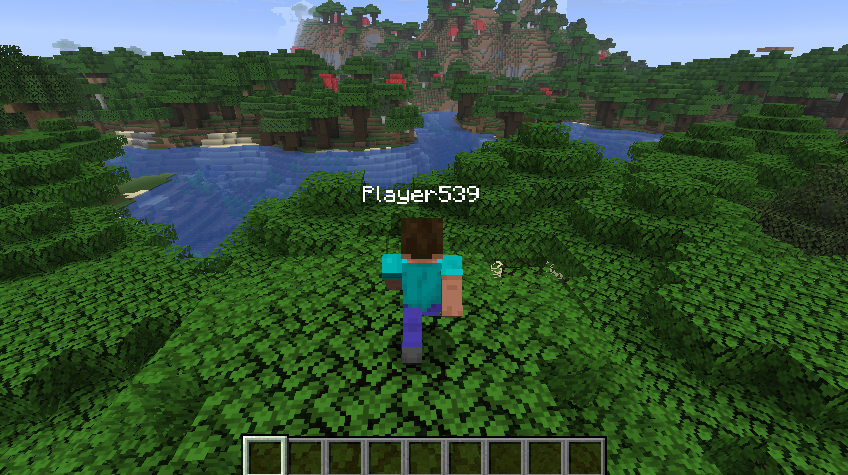
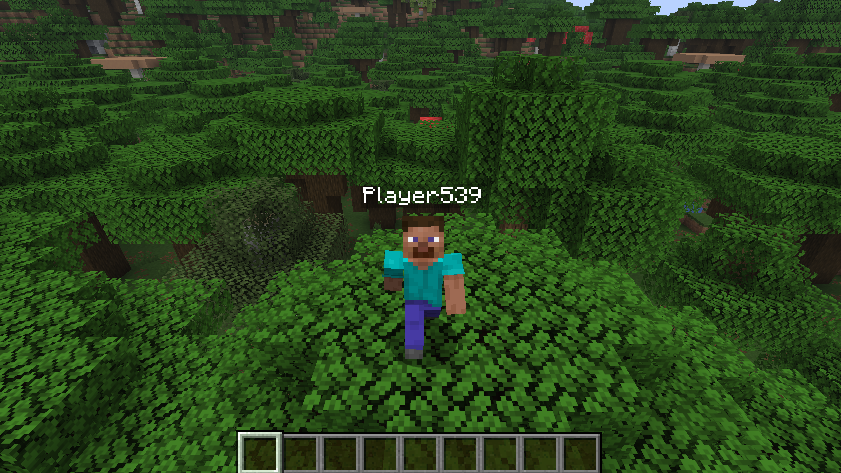

介绍
Languages
Who I Am
A client-side Fabric mod that displays your own Minecraft player name in places where it is normally hidden.
This mod runs entirely on the client and does not modify any server behavior.
Features
- Shows your own name tag in third-person view
- Shows your own name tag when the camera is detached from the local player, including free-camera views
- Appends the current player name to the end of the Minecraft window title
- Provides the client-side
/icommand to display the current player name - No server-side plugin or mod required
Commands
Show current player name
/i- Prints
You are: <player name>in the client chat - The command is handled locally and is not sent to the server
How It Works
- The mod reads the current player name from the active Minecraft client session
- When the local player model is rendered:
- The name tag is forced to display in third-person view
- The name tag is also forced to display when the camera is detached from the local player
- Whenever Minecraft generates the window title, the player name is appended to the end
- Running
/idisplays the same player name in the client chat
The mod does not send additional packets, require server support, or modify server-side player data.
Supported Versions
- Minecraft 26.3
- Fabric Loader 0.19.5+
- Fabric API 0.160.5+
- Java 25
License
MIT
常见问题
Who I Am 支持哪些 Minecraft 版本?
Who I Am 支持 Minecraft Java 版 26.1.2–26.3,共 2 个版本,可用的加载器:Fabric。下载时注意选择和你游戏版本一致的文件。
Who I Am 怎么安装?
先用 PCL2 或 HMCL 启动器安装对应版本的 Fabric,再把下载的 .jar 文件放进游戏目录的 mods 文件夹,重新启动游戏即可。开启了版本隔离的,mods 文件夹在 versions/版本名 下面。运行环境:仅客户端。
lyuwenhan 的其他作品
查看全部 →
Player Highlighter
Highlights players with a glowing outline and a HUD target icon.
PlayerHighlighter
Highlights players with a glowing outline and a HUD target icon.

Infinity Fireworks
Prevents firework rockets from being consumed when used.

Fly Speed Modifier
Temporarily adjusts Freecam or player flight speed using a key and the mouse wheel.
评论
登录后评论和评分