截图
介绍
Languages
Player Highlighter
A client-side Fabric mod that improves player awareness with glowing outlines, on-screen target icons, and a nearby-player information HUD.
Overview
Player Highlighter makes other players easier to locate and track without requiring any server-side installation.
The mod provides three visual features:
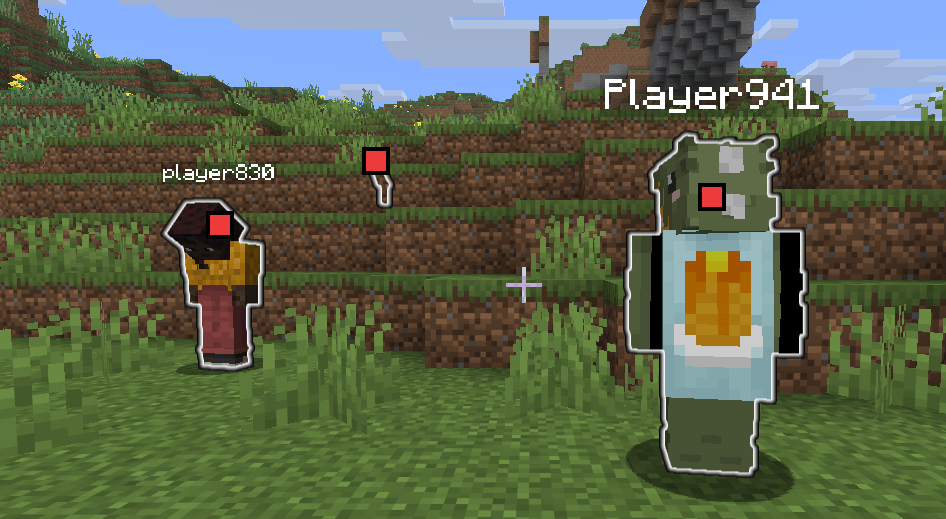
- A glowing outline around other players
- Small target icons displayed over visible players
- A HUD list showing nearby player information
Glowing outlines and target icons appear while the configured hold key is pressed or while keep mode is enabled. The player information HUD remains available independently.
All features are handled entirely on the client.
Key Features
- Highlights other players with a glowing outline
- Displays target icons over players currently visible on screen
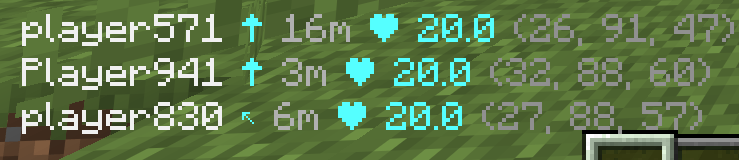
- Shows nearby player information in a HUD
- Shows player name, relative direction, distance, health, and coordinates
- Supports a hold key for temporary highlighting
- Supports toggleable keep mode for persistent highlighting
- Supports a client command for showing or hiding the player information HUD
Highlight Controls
Highlighting is active when either of the following conditions is met:
- The highlight hold key is pressed
Default key: TAB - Keep mode is enabled
Default toggle key: I
When highlighting is active:
- Other players receive a glowing outline
- Visible players receive a small target icon at their projected screen position
When neither condition is active, the glowing outlines and target icons disappear immediately.
Player Information HUD
The HUD displays nearby players in the bottom-left corner of the screen.
Example:
Player867 ↑ 11m ❤ 20.0 (123, 64, -456)Field descriptions:
Player867— Player name↑— Direction relative to the current camera facing11m— Horizontal distance on the XZ plane❤ 20.0— Current health(123, 64, -456)— World coordinates
Multiple players are listed vertically.
The direction indicator can use the following arrows:
↑ ↗ → ↘ ↓ ↙ ← ↖The HUD is hidden when Minecraft’s GUI is hidden.
HUD visibility can also be controlled with the client command:
/playerhighlighter hud on
/playerhighlighter hud off
/playerhighlighter hud toggle
/playerhighlighter hud status
Command behavior:
/playerhighlighter hud onshows the Player Information HUD/playerhighlighter hud offhides the Player Information HUD/playerhighlighter hud toggleswitches the HUD between shown and hidden/playerhighlighter hud statusshows the current HUD state
Target Icons
While highlighting is active, a small target icon is rendered over each visible player.
Icons are displayed only when the player:
- Is in front of the camera
- Can be projected onto the current screen
- Is within the visible screen boundaries
- Is not the current camera entity
Players behind the camera or outside the screen are not assigned an icon.
Glowing Outline
Other players are rendered using an outline similar to Minecraft’s vanilla Glowing effect.
Behavior:
- Only player entities are affected
- The local player is excluded
- Mobs and other entities are not affected
- The outline follows vanilla outline rendering rules
- Team-based outline colors may still apply where supported
- No real status effect is added to the player
Supported Versions
- Minecraft 26.3
- Fabric Loader 0.19.5+
- Fabric API 0.160.5+
- Java 25
License
MIT
常见问题
PlayerHighlighter 支持哪些 Minecraft 版本?
PlayerHighlighter 支持 Minecraft Java 版 1.21.11–26.3,共 4 个版本,可用的加载器:Fabric。下载时注意选择和你游戏版本一致的文件。
PlayerHighlighter 怎么安装?
先用 PCL2 或 HMCL 启动器安装对应版本的 Fabric,再把下载的 .jar 文件放进游戏目录的 mods 文件夹,重新启动游戏即可。开启了版本隔离的,mods 文件夹在 versions/版本名 下面。
lyuwenhan 的其他作品
查看全部 →
Player Highlighter
Highlights players with a glowing outline and a HUD target icon.

Infinity Fireworks
Prevents firework rockets from being consumed when used.

Fly Speed Modifier
Temporarily adjusts Freecam or player flight speed using a key and the mouse wheel.
Fly Speed Modifier
Temporarily adjusts Freecam or player flight speed using a key and the mouse wheel.
评论
登录后评论和评分