
截图
介绍
🌐 ITITAN Hosting

Game Rules Menu
Since the features of this mod were added to the game in Update 26.1, the mod will no longer be updated in future versions
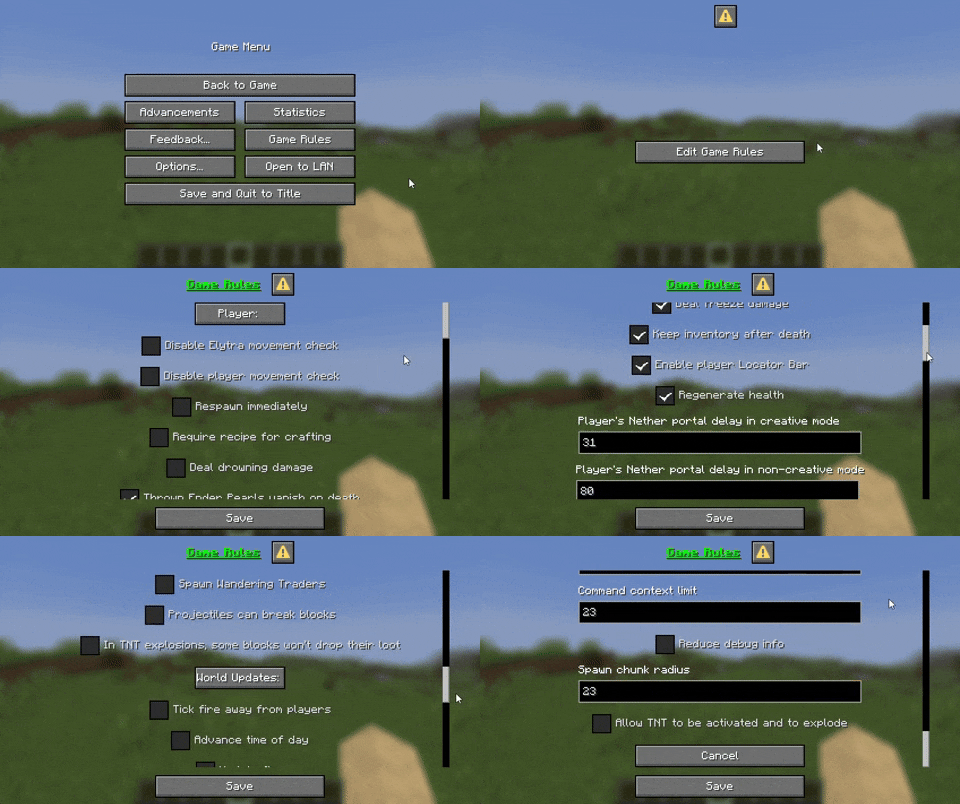
Game Rules Menu lets you tweak every gamerule in Minecraft through a clean, in-game interface. No commands, no hassle – just pure control at your fingertips. Perfect for mapmakers, server owners, or anyone who wants full rule over their world.
Easily accessible, fancy menu
You can access it from the Pause menu! _(You can also type “/trigger openGameRules” in the chat)_

All Languages in Game
The “Game Rules Menu” is available in all languages, it uses your selected language in the game!

All Gamerules
From this menu you can access all gamerules and change them as you wish. You can press the save button to save them or press the cancel button to cancel the changes you have made.
You must be op to use the menu!
This is just a datapack, so there are some restrictions on the menu. You can use this mod to remove the op command warning and you can use this mod to remove the annoying warning at the top right.
Your feedback is important to us. You can write on Discord. Discord name: tpcoffline
常见问题
Game Rules Menu 支持哪些 Minecraft 版本?
Game Rules Menu 支持 Minecraft Java 版 1.21.6–1.21.11,共 6 个版本,可用的加载器:Fabric / Forge / NeoForge / Quilt。下载时注意选择和你游戏版本一致的文件。
Game Rules Menu 怎么安装?
先用 PCL2 或 HMCL 启动器安装对应版本的 Fabric / Forge / NeoForge / Quilt,再把下载的 .jar 文件放进游戏目录的 mods 文件夹,重新启动游戏即可。开启了版本隔离的,mods 文件夹在 versions/版本名 下面。运行环境:客户端 / 服务端。
CrafTea 的其他作品
查看全部 →
Thirst Bar
Adds a thirst bar to the game.

Glass Hotbar Connected
This resource pack changes the hotbar background to glass.

Dennis Painting On Java Mod
Adds the Dennis(Good Boy) painting from Bedrock Edition to Java Edition.

Coordinate Bar
Displays your current coordinates in the action bar.
评论
登录后评论和评分