
AR1 Animated Typing
A simple mod adding customizable animations when typing in text fields
截图




介绍
AR1 Animated Typing is a lightweight client-side Fabric mod that adds smooth, customizable animations to text input fields. Every time you type or delete a character, it appears and disappears with a pleasing animation instead of instantly popping in.
Key Features
- 10 animation styles – scaling, grow, scroll, stretch, fade, glitch, blink, shrink, pop, and drop.
- Accent color – characters start with the selected accent color and smoothly transition to the default text color as they appear.
- Adjustable animation speed – 8 presets: 100, 200, 300, 400, 550, 700, 850, 1000 ms.
- Works everywhere – chat, command blocks, search fields, rename screens, etc.
- Localization – fully translated into 14 languages (see below).
- Smart compatibility – automatically disables animation for password commands from AR1 Hide Password, so secrets stay hidden.
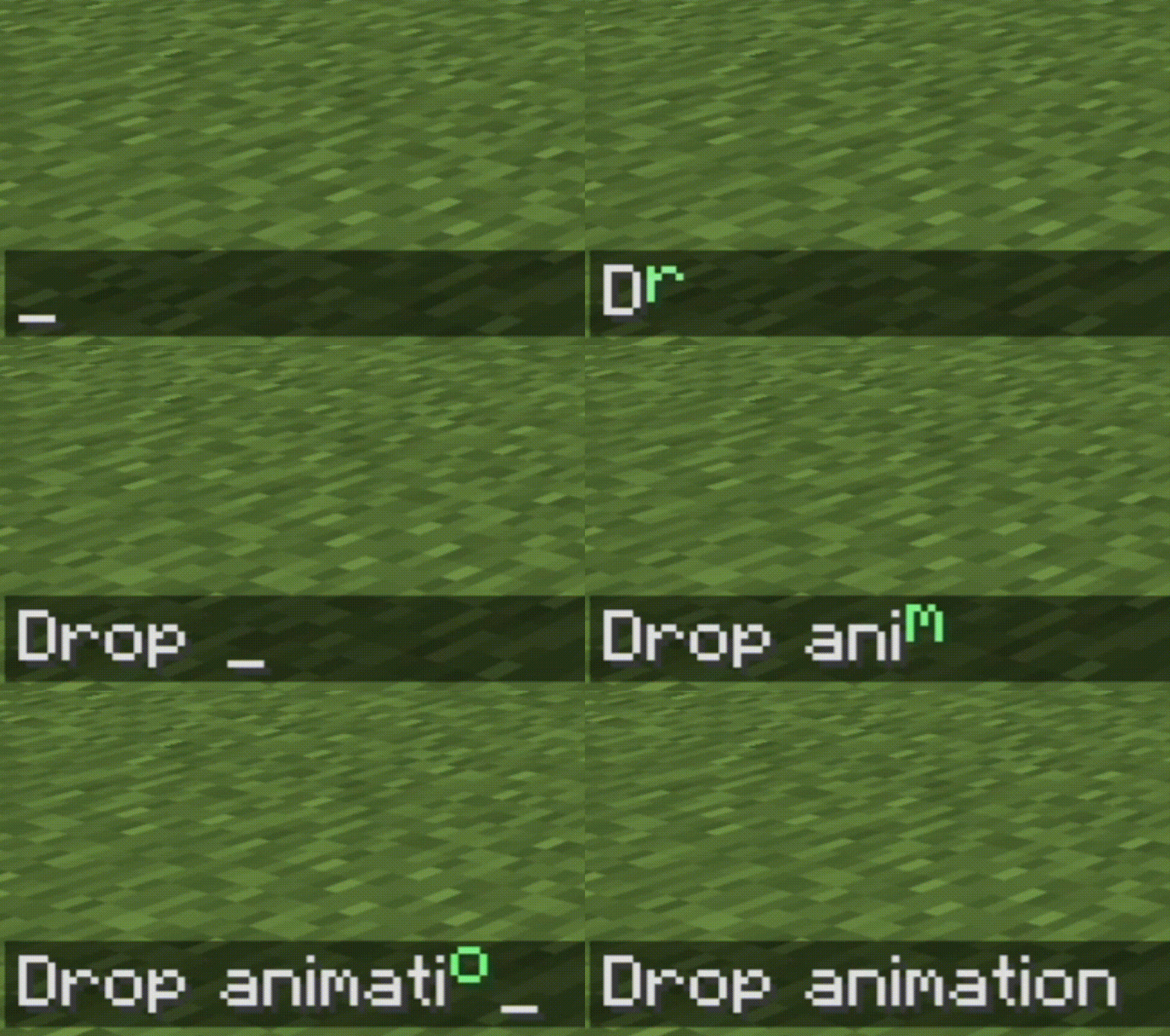
Animation Styles Demonstrations [not all]
Drop [Default] with green color

Pop with green color

Fade with green color

Scaling with green color

Animation Styles
| Style | Description |
|——-|————-|
| Scaling | Character grows from center |
| Grow | Character grows from the bottom |
| Scroll | Vertical scroll |
| Stretch | Horizontal stretch |
| Fade | Smooth opacity transition |
| Glitch | Random offsets and flickering |
| Blink | Rapid flashing before appearing |
| Shrink | Starts large and shrinks to normal |
| Pop | Overshoots and settles |
| Drop | Falls from above into place |
Compatibility
⚠️ Important for users:
This mod may conflict with other mods that intercept and/or modify values in text fields, especially those that hide confidential information (e.g., passwords when typing /l testpass123) for certain commands. One such mod is AR1 Hide Password.
If data protection is important to you or you often share your game screen with others, it is recommended to install AR1 Hide Password and make sure that all commands whose values should be hidden are listed in its settings.
When such commands are detected, AR1 Animated Typing automatically disables animation for them, preventing accidental leakage of confidential data and preserving password masking.
Localization
The mod is fully translated into 14 languages:
| Country | Language | Name | Code |
|———|———-|——|——|
| 🇷🇺 | Russian | Русский | ru_ru |
| 🇺🇸 | English | English | en_us |
| 🇩🇪 | German | Deutsch | de_de |
| 🇪🇸 | Spanish | Español | es_es |
| 🇵🇱 | Polish | Polski | pl_pl |
| 🇺🇦 | Ukrainian | Українська | uk_ua |
| 🇧🇾 | Belarusian | Беларуская | be_by |
| 🇫🇷 | French | Français | fr_fr |
| 🇧🇬 | Bulgarian | Български | bg_bg |
| 🇨🇿 | Czech | Čeština | cs_cz |
| 🇯🇵 | Japanese | 日本語 | ja_jp |
| 🇰🇿 | Kazakh | Қазақша | kk_kz |
| 🇮🇳 | Hindi | हिन्दी | hi_in |
| 🇨🇳 | Chinese (Simplified) | 简体中文 | zh_cn |
Configuration
All settings are available via ModMenu or manually in config/ar1-animated-typing.toml.
| Option | Description | Default |
|——–|————-|———|
| enabled | Enable/disable the mod | true |
| animationTime | Animation duration in milliseconds | 200 |
| animationType | Animation style (SCALING, GROW, SCROLL, STRETCH, FADE, GLITCH, BLINK, SHRINK, POP, DROP) | DROP |
| accentColor | Starting color of characters | #4dff5b |
| compatibilityCommands | Additional commands without animation (optional) | [] |
Installation
- Install Fabric Loader.
- Place Fabric API, Cloth Config API, and optionally ModMenu into the
modsfolder. - Copy
ar1-animated-typing-<version>.jarinto themodsfolder.
Developed by ar1emq – a member of THEMIDNIGHTCORE
常见问题
AR1 Animated Typing 支持哪些 Minecraft 版本?
AR1 Animated Typing 支持 Minecraft Java 版 26.1–26.3,共 5 个版本,可用的加载器:Fabric。下载时注意选择和你游戏版本一致的文件。
AR1 Animated Typing 怎么安装?
先用 PCL2 或 HMCL 启动器安装对应版本的 Fabric,再把下载的 .jar 文件放进游戏目录的 mods 文件夹,重新启动游戏即可。开启了版本隔离的,mods 文件夹在 versions/版本名 下面。运行环境:仅客户端。
THEM!DNIGHTCORE 的其他作品
查看全部 →
AR1 Backup
A powerful mod that lets you create backups of your worlds—manually or automatically!

AR1 Text Formatting
Mod that allows using standard Minecraft formatting codes "§" in absolutely every text field: chat, books, signs, item names, GUIs, action bars, titles, and more.

AR1 Coins Mod
A simple mod that adds coin transfers to the game, featuring 18 types of coins and coin piles!

AR1 No Experience
Mod that removes the "Too Expensive!" limit from the anvil and allows combining any enchantments, even those that are normally incompatible.
评论
登录后评论和评分