
AR1 Text Formatting
Mod that allows using standard Minecraft formatting codes "§" in absolutely every text field: chat, books, signs, item names, GUIs, action bars, titles, and more.
截图
介绍
AR1 Text Formatting is a lightweight Fabric mod that allows using standard Minecraft formatting codes (§) in absolutely every text field: chat, books, signs, item names, GUIs, action bars, titles, and more. No more restrictions – customize your text freely.
Key Features
- Full
§Support – the formatting symbol is allowed in all text inputs. - All Standard Colors & Styles – 16 colors (
§0–§f), bold (§l), italic (§o), obfuscated (§k), and reset (§r). - Works Everywhere – chat, books (writable and written), signs, anvil‑renamed items, GUI elements, action bar, titles, and even some modded screens that use vanilla rendering.
- No Configuration Needed – install and it works instantly.
- Lightweight & Fast – does not affect game performance.
How to Use
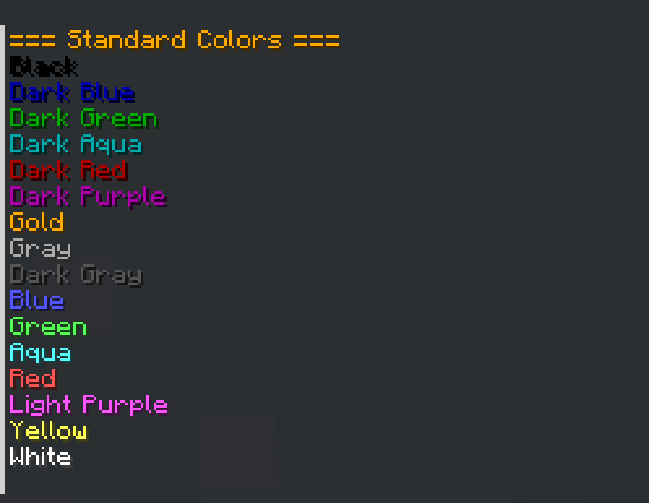
In any text field, type the § symbol followed by a formatting code. Below are all available codes and examples:
Colors
| Code | Name |
|——|—————|
| §0 | Black |
| §1 | Dark Blue |
| §2 | Dark Green |
| §3 | Dark Aqua |
| §4 | Dark Red |
| §5 | Dark Purple |
| §6 | Gold |
| §7 | Gray |
| §8 | Dark Gray |
| §9 | Blue |
| §a | Green |
| §b | Aqua |
| §c | Red |
| §d | Light Purple |
| §e | Yellow |
| §f | White |
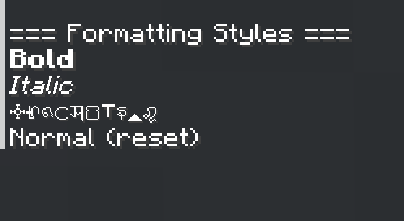
Formatting Styles
| Code | Style | Example | Result |
|——|————–|—————–|———————–|
| §l | Bold | §lBold text | Bold text |
| §o | Italic | §oItalic text | Italic text |
| §k | Obfuscated | §kRandom | s4@jun#”sf$&f0@/ |
| §r | Reset | §rNormal | Resets all styles |
Combining Colors and Styles
You can combine multiple codes:
| Example | Result |
|———————————-|—————————————–|
| §c§lRed Bold | Red bold text |
| §9§oBlue Italic | Blue italic text |
| §6§l§oGold Bold Italic | Gold bold italic text |
| §a§kGreen Obfuscated | Green s4@jun#”sf$&f0@/ text |
| §rReset §6after | Normal text then gold |
Notes
- The
§symbol may require a special key combination (e.g., Alt+6 or Ctrl+Shift+6) depending on your keyboard layout. This mod removes the built‑in restriction, so once typed, it will work. - However, I recommend simply copying this symbol to the clipboard and pinning it there, that way, it will be easier to use. To open the clipboard in Windows, press [WIN+V].
Developed by ar1emq – a member of THEMIDNIGHTCORE
常见问题
AR1 Text Formatting 支持哪些 Minecraft 版本?
AR1 Text Formatting 支持 Minecraft Java 版 26.1.2–26.3,共 3 个版本,可用的加载器:Fabric。下载时注意选择和你游戏版本一致的文件。
AR1 Text Formatting 怎么安装?
先用 PCL2 或 HMCL 启动器安装对应版本的 Fabric,再把下载的 .jar 文件放进游戏目录的 mods 文件夹,重新启动游戏即可。开启了版本隔离的,mods 文件夹在 versions/版本名 下面。运行环境:客户端 / 服务端。
THEM!DNIGHTCORE 的其他作品
查看全部 →
AR1 Animated Typing
A simple mod adding customizable animations when typing in text fields

AR1 Backup
A powerful mod that lets you create backups of your worlds—manually or automatically!

AR1 Coins Mod
A simple mod that adds coin transfers to the game, featuring 18 types of coins and coin piles!

AR1 No Experience
Mod that removes the "Too Expensive!" limit from the anvil and allows combining any enchantments, even those that are normally incompatible.
评论
登录后评论和评分